
HidVPN earns a commission if you buy through some of the links on this page. It doesn’t change what we write. Our affiliate disclosure.
Table of Contents
Key Takeaways
- Normal Telegram chats, including all groups, are not end-to-end encrypted. They’re encrypted between your device and Telegram’s servers, and stored in Telegram’s cloud.
- Only Secret Chats are end-to-end encrypted. They work one to one, on the device you started them on, and you have to open one deliberately.
- Telegram says voice and video calls, including group calls, are end-to-end encrypted.
- Telegram’s privacy policy says it may share your IP address and phone number with authorities if it receives a valid order from judicial authorities confirming you’re a suspect in a criminal case, and it may keep connection records (metadata) such as your IP address for up to 12 months.
- For most people the bigger day-to-day risk is scams and unwanted contact, and a few privacy settings fix most of it.
Telegram has a reputation as the private messenger. Part of that is earned and part of it isn’t. The honest answer to “is Telegram safe?” depends on which chat you’re using and what you’re trying to protect against, because Telegram treats ordinary chats and Secret Chats very differently.
This guide goes by Telegram’s own FAQ and privacy policy, not by its reputation. It covers what’s encrypted end to end and what isn’t, what Telegram stores and when it shares it, the scams that cause most real-world harm, and the settings worth changing today.
Watch: which Telegram chats are end-to-end encrypted (HidVPN Short)
Safe for what, exactly?
“Safe” means different things for different people. Three separate questions sit inside it:
- Can strangers on the internet read my messages? No. Everything on Telegram is encrypted in transit, so someone on the same café Wi-Fi or your internet provider can’t read your chats.
- Can Telegram itself read my messages? For normal chats and groups, Telegram holds them on its servers in a form it can decrypt to sync them across your devices. For Secret Chats, no.
- Can someone use Telegram to get to me? This is where most real problems happen: scam messages, fake investment groups, and people finding you through your phone number or username.
Telegram is reasonably safe against the first, depends on your chat type for the second, and needs a few settings changed for the third.
What Telegram encrypts end to end, and what it doesn’t
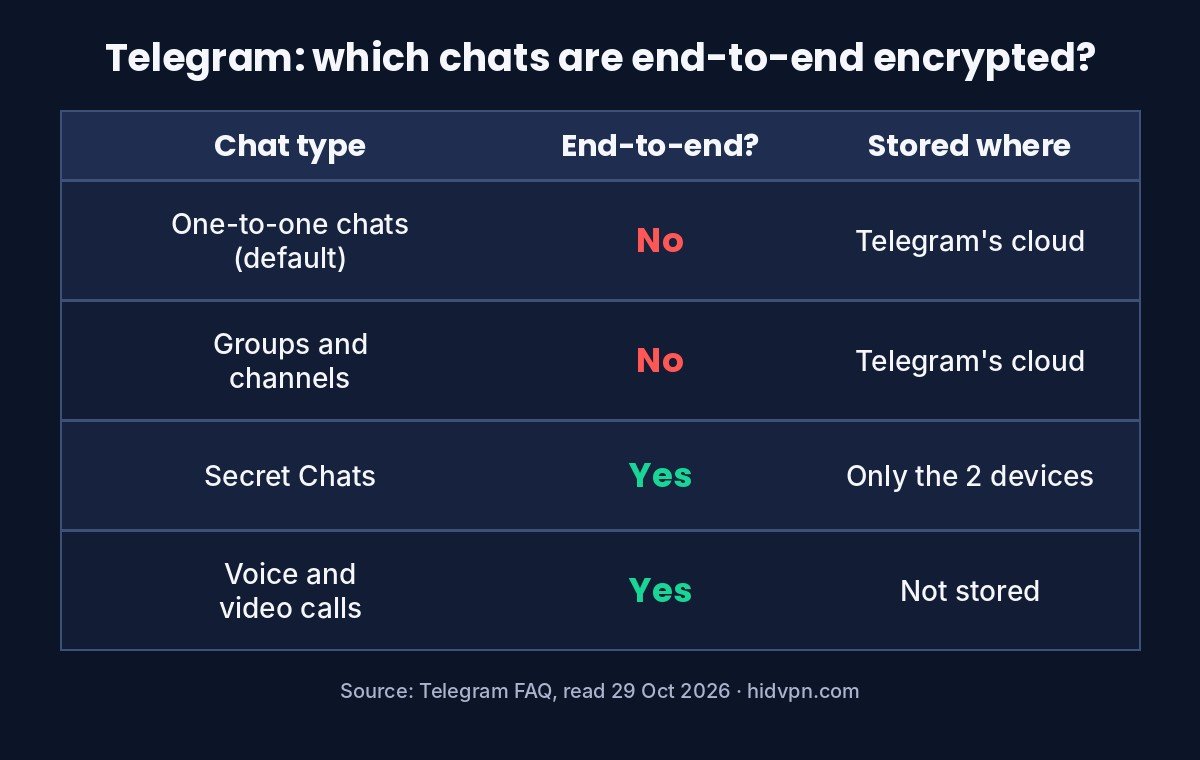
End-to-end encryption means only the people in the conversation hold the keys. The company running the service can’t read the messages even if it wanted to. Here’s how Telegram’s own FAQ describes each type of conversation:
| Type of conversation | Encryption | Where it’s stored | Notes from Telegram’s FAQ |
|---|---|---|---|
| One-to-one chats (default) | Server-client: encrypted between your device and Telegram | Telegram’s cloud, synced to all your devices | Stored encrypted, with decryption keys split and kept apart from the data |
| Groups and channels | Server-client | Telegram’s cloud | Groups are cloud chats; there is no end-to-end option for groups |
| Secret Chats | End-to-end | Only on the two devices that created them | Can’t be forwarded, aren’t in the cloud, and are lost if you log out |
| Voice and video calls | End-to-end | Not stored | Telegram says group calls are also end-to-end encrypted and can be verified |
The practical point: unless you start a Secret Chat on purpose, your messages are not end-to-end encrypted. Many people assume the opposite because of Telegram’s reputation. Other popular messengers, such as WhatsApp and Signal, encrypt both one-to-one and group chats end to end by default, so this is a real difference rather than a technicality.
Telegram’s explanation is that cloud chats let you use the same conversations instantly on your phone, laptop and tablet. That’s a genuine convenience. It’s also a trade: the convenience depends on Telegram holding your messages.
How to start a Secret Chat
Use Telegram’s phone app (or the macOS app; Telegram Desktop for Windows and the web version don’t offer Secret Chats). Open the person’s profile, tap the three-dot menu or More, and choose Start Secret Chat. It opens as a separate conversation, marked with a lock icon, alongside your normal chat with them. Remember it only exists on that device: if you switch phones or log out, it’s gone.
What Telegram keeps on its servers
From Telegram’s privacy policy:
- Your account basics: your phone number, name, profile picture and bio.
- Cloud chat content: messages, photos, videos and documents from cloud chats, which Telegram says are stored heavily encrypted.
- Secret chats: not stored on its servers, and Telegram says it keeps no logs of their messages.
- Contacts: if you sync them, only the phone number and name.
- Metadata: Telegram may collect metadata such as your IP address and the devices and apps you’ve used, and says it keeps it for 12 months at most.
- Inactive accounts: deleted after a period of inactivity you can set in Settings.
That metadata line is the one a privacy-minded user should notice. Even when message content is protected, who you are, when you connect and from which IP address can be recorded. It’s the same distinction we make for VPN providers in our guide to what “no-logs” really means: content and connection records are different things.
When Telegram hands data over
Telegram’s privacy policy was updated in September 2024 on this point. It now says Telegram may disclose your IP address and phone number to the relevant authorities if it receives a valid order from judicial authorities confirming you’re a suspect in a case involving criminal activities that violate the Telegram Terms of Service, after a legal analysis of the request. Telegram says it lists such disclosures in a quarterly transparency report.
Two things follow. Telegram doesn’t describe handing over message content in that section; the data named is your IP address and phone number. And for someone who isn’t a criminal suspect, this isn’t a day-to-day risk. But anyone relying on Telegram to stay anonymous from a government should understand that the phone number and IP address are the data in play.
The bigger everyday risk: scams and strangers
For most people the threat on Telegram isn’t encryption. It’s other users. Telegram makes it easy to message people you don’t know and to run large public groups, and scammers use both. Patterns to watch for:
- Investment and crypto “opportunities” in groups or from strangers, especially with screenshots of big returns. Treat any unsolicited investment pitch as a scam.
- Fake support accounts claiming to be from Telegram, a bank or an exchange and asking for a login code. Telegram’s login codes are for you only; nobody legitimate asks for one.
- Impersonated friends whose account was taken over, asking for money or codes. Check by phone or another app first.
- Job offers that pay for “simple tasks” and then ask you to deposit money to unlock earnings.
- Malicious files and links sent in groups. Don’t open files from strangers.
Our guide on what a VPN does and doesn’t protect explains why none of these are solved by encryption or a VPN: they rely on persuading you to do something.
Seven settings to change in five minutes
Most of these are in Settings, Privacy and Security in the Telegram app:
- Two-Step Verification: turn it on and set a password. Then someone with your SMS code still can’t get into your account. This is the most important one.
- Phone Number: set “Who can see my phone number” to Nobody or My Contacts. Telegram says that by default your number is visible only to people you’ve added to your contacts, but check it under Privacy and Security, Phone Number. If you set “Who can see my phone number” to Nobody, a second option, “Who can find me by my number”, appears: set it to My Contacts.
- Calls: limit who can call you, and set Peer-to-peer to Nobody or My Contacts. Peer-to-peer calls connect you directly, which can reveal your IP address to the other person; relayed calls go through Telegram’s servers instead.
- Groups and Channels: limit who can add you to groups to My Contacts, which cuts out most spam groups.
- Last Seen and Online: choose who sees when you were last online.
- Active Sessions (under Devices): check the list of logged-in devices and end any you don’t recognise.
- Account self-destruct: set how long your account survives if you stop using it.
If you use a username, remember anyone who finds it can message you without your number. That’s useful for public profiles and unnecessary for most people.
Where a VPN fits, and where it doesn’t
A VPN changes one thing for Telegram users: the IP address Telegram and peer-to-peer call partners see. With a VPN connected, they see the VPN server’s address instead of your home connection. That matters given the privacy policy’s metadata and disclosure sections, both of which name the IP address.
Telegram also has a built-in proxy setting (Settings, Data and Storage, Proxy). A proxy covers only the Telegram app, while a VPN covers the whole device; our VPN vs proxy guide explains the difference.
A VPN doesn’t make ordinary chats end-to-end encrypted, doesn’t hide your phone number from Telegram, and does nothing against scams. It’s one layer for one specific piece of data. Our guides on what your internet provider can see and whether a VPN hides your location explain exactly what moves and what doesn’t. If you’re using Telegram on public Wi-Fi, our guide to what can go wrong on public networks is worth a read too.
If you do use a VPN on your phone, run our IP leak test once to confirm it shows the VPN’s address, and see our four quick checks for the rest.
Telegram safety questions
Is Telegram end-to-end encrypted?
Only Secret Chats and calls. Ordinary one-to-one chats and all groups use encryption between your device and Telegram’s servers and are stored in Telegram’s cloud.
Is Telegram safer than WhatsApp?
For message content, WhatsApp encrypts ordinary chats end to end by default and Telegram doesn’t, so WhatsApp is stronger there. Telegram lets you sign up without showing your number to other users and use a username instead. Which matters more depends on what you’re protecting.
Can Telegram read my messages?
Cloud chats are stored on Telegram’s servers in a form Telegram can decrypt to sync your devices, with keys kept separately from the data. Secret Chats can’t be read by Telegram.
Does Telegram share data with police?
Its privacy policy says it may disclose your IP address and phone number if it receives a valid order from judicial authorities confirming you’re a suspect in a criminal case, after its own legal review, and that it reports such disclosures quarterly.
Can someone find my phone number on Telegram?
By default your number is visible only to people you’ve added to your contacts. Set both phone number options in Privacy and Security to restrict it further.
Are Telegram groups private?
Private groups aren’t publicly listed, but they’re still cloud chats, not end-to-end encrypted. Anyone in the group can screenshot or forward messages.
Sources
- Telegram FAQ (cloud chats use server-client encryption; Secret Chats end-to-end and device-specific; calls end-to-end; phone number visibility; usernames; read 29 October 2026).
- Telegram Privacy Policy (sections 3, 5.2 and 8.3: stored data, metadata kept up to 12 months, disclosure of IP address and phone number on court order, transparency reports; changelog for September 2024; read 29 October 2026).
See NordVPN’s current plans. Prices change often, so check the current plan before you buy.