
HidVPN earns a commission if you buy through some of the links on this page. It doesn’t change what we write. Our affiliate disclosure.
Table of Contents
- The short answer
- What a proxy does
- What a VPN does
- VPN vs proxy, side by side
- The proxy types you’ll run into
- Wait, isn’t a “VPN extension” a proxy?
- When a proxy is enough
- When you want a VPN instead
- The problem with free proxies: two real cases
- Test which one you’re using in 2 minutes
- FAQ
- The bottom line
Key Takeaways
- A proxy swaps your IP address for one app, usually your browser. A VPN encrypts all the traffic leaving your device and routes it through the VPN server.
- Most proxies don’t add encryption. Your internet provider, or whoever runs the Wi-Fi you’re on, can still see where proxy traffic goes.
- Everything outside the proxied app (other apps, system updates, background services) keeps using your real connection.
- Free open proxies are risky: a large 2018 study found some injecting crypto-mining code, tampering with secure connections and adding malware to downloads.
- You can check which one you’re using in about two minutes on your own device, starting with a terminal, not a website.
The short answer
A proxy and a VPN both put a middleman between you and the website you’re visiting, so the site sees the middleman’s IP address (the number that identifies a connection online) instead of yours. That’s where the similarity ends.
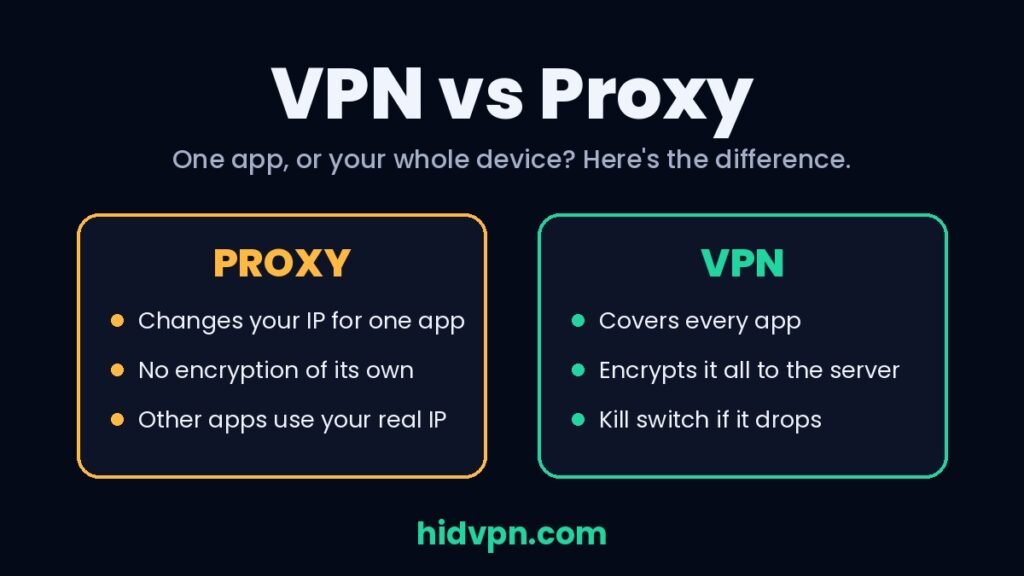
A proxy usually works for one app at a time and doesn’t encrypt anything by itself. A VPN works at the level of the whole device and encrypts everything between you and the VPN server. If you only need a different IP address in your browser for a minute, a proxy can do that. If you want your traffic protected on hotel Wi-Fi, or hidden from your internet provider, a proxy isn’t the right tool.
What a proxy does
A proxy server is a computer that makes requests on your behalf. Your browser sends its request to the proxy, the proxy passes it on to the website, and the answer comes back the same way. Cloudflare’s engineers describe the key point plainly: the destination server only sees the connection from the proxy, and it doesn’t know about you or your connection to the proxy.
That’s useful, but notice what’s missing from that description:
- No encryption by default. A proxy forwards traffic; it doesn’t scramble it. If the website uses HTTPS (the padlock), that site’s own encryption still protects the content. If it doesn’t, the content travels in plain view, and the proxy operator can read it too.
- One app at a time. A proxy is something an app chooses to use. You set it in your browser, or in a single program’s settings. Your email app, your phone’s background services and every other program keep using your normal connection.
- Your internet provider still sees a lot. With a plain proxy, your provider can see that you’re talking to a proxy and, for unencrypted traffic, what you’re asking it for. Our guide to what your internet provider can see explains what’s visible with and without protection.
Common mix-up: a proxy hides your IP address from the website. It doesn’t hide your activity from your network. Those are two different problems, and only one of them is solved here.
What a VPN does
A VPN (virtual private network) is an app that creates an encrypted tunnel between your whole device and a VPN server. Every app’s traffic goes into that tunnel, gets encrypted, comes out at the server and continues to the website from there.
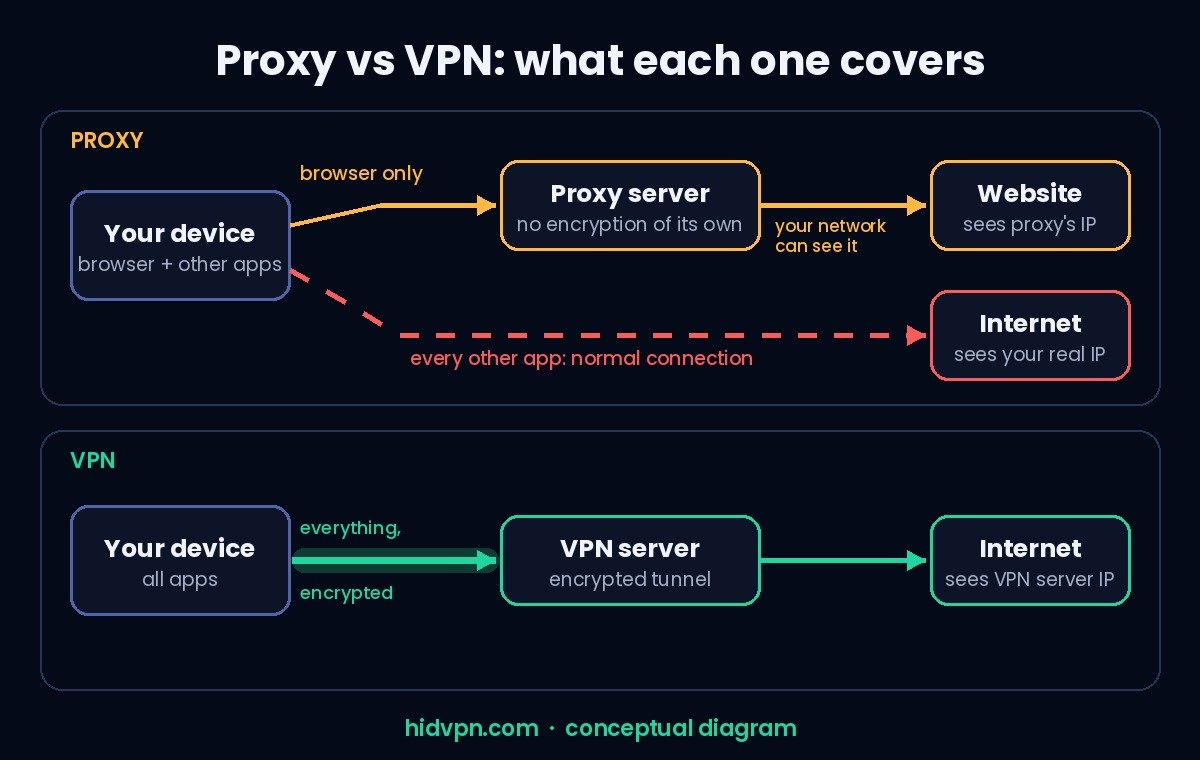
Watch: VPN vs proxy, the difference in 25 seconds (HidVPN Short)
Three things change compared with a proxy:
- Everything is covered, not only the browser: apps, games, updates and background services all use the tunnel. (You can choose to leave some apps out with split tunneling, but that’s an opt-out, not the default.)
- Your network sees only encrypted traffic going to one VPN server. On café or airport Wi-Fi, that’s the part that matters. Our guide to public Wi-Fi risks covers why.
- Safety features exist for when things go wrong. A kill switch blocks your internet if the VPN drops, so nothing leaks out during the gap. Proxies have no equivalent: if the proxy fails, an app may quietly fall back to your normal connection.
A VPN isn’t magic either. Websites can still recognise you through logins, cookies and browser fingerprinting. We cover those limits in what a VPN does and doesn’t protect.
VPN vs proxy, side by side
| Proxy | VPN | |
|---|---|---|
| What it covers | One app (usually the browser) | The whole device |
| Encryption | None of its own (HTTPS sites stay encrypted by the site) | Everything, from your device to the VPN server |
| What websites see | The proxy’s IP address | The VPN server’s IP address |
| What your internet provider or Wi-Fi sees | That you’re using a proxy, plus any unencrypted content | Encrypted traffic to one VPN server |
| If it disconnects | Apps may fall back to your real connection without warning | A kill switch can block traffic until it reconnects |
| Setup | A setting in the browser or the system | An app you install and switch on |
| Cost | Often free (which is its own problem, see below) | Usually a paid subscription |
| Good for | Quick IP changes, company networks, testing | Privacy on networks you don’t control, everyday protection |
The proxy types you’ll run into
“Proxy” covers several different things, which is part of the confusion.
- HTTP proxies handle web traffic. For secure (HTTPS) sites, the browser asks the proxy to open a tunnel with a request called CONNECT. Cloudflare’s write-up notes that the CONNECT request itself is sent in cleartext, while the site’s own encryption then protects the content inside. So the proxy can’t read your HTTPS pages, but it does see which sites you connect to.
- SOCKS5 proxies work below the web level and can carry other kinds of traffic, not only web pages. The SOCKS5 standard (RFC 1928, from 1996) defines how to relay connections. It doesn’t encrypt them.
- Transparent proxies are set up by a network, not by you. Schools, offices and some public Wi-Fi networks use them to filter or cache traffic. You may be going through one without knowing it.
- Web proxies are websites where you paste in an address and the site loads the page for you. They’re the most limited kind, and many pay for themselves with ads injected into the pages they show you.
- Reverse proxies sit in front of websites rather than in front of users. Services like Cloudflare run them to speed sites up and absorb attacks. They have nothing to do with your privacy, but you’ll see the term when you search.
Wait, isn’t a “VPN extension” a proxy?
Often, yes, and that’s not a trick if the provider says so. NordVPN, for example, describes its browser extension as a “VPN proxy extension”: a lightweight option that secures traffic in the browser only. According to NordVPN’s feature page, the extension adds TLS encryption between your browser and its server, while the full app encrypts all internet traffic at the system level.
So an encrypted proxy extension sits between the two. It protects the browser tab you’re in, including on Wi-Fi, but everything outside the browser still goes out unprotected. If you only install the extension on a laptop, your email client, chat apps and system updates aren’t covered. For full coverage, you need the app.
That’s also a quick way to judge any “free VPN” browser extension: check whether the provider says what’s encrypted and what isn’t. If the listing doesn’t say, assume it’s a plain proxy. Our free VPN guide covers what free plans give up.
When a proxy is enough
- Your workplace requires one. Many company networks route web traffic through a proxy for security filtering. That’s normal, and it’s set by IT, not chosen for privacy.
- Checking how a site looks from another country. Web developers and marketers use proxies to see regional versions of their own sites, check local search results or test ads.
- A quick, low-stakes IP change in one browser, where the content is already protected by HTTPS and you don’t care whether your network sees which sites you visit.
In all three cases, you either don’t need encryption or someone else is handling security for you.
When you want a VPN instead
- On public Wi-Fi. Hotels, airports, cafés: anyone who runs or watches the network can see unencrypted traffic and which sites you visit. A VPN covers every app at once.
- When you don’t want your internet provider logging your browsing. A plain proxy doesn’t stop that. A VPN shifts that visibility to the VPN provider, which is why its no-logs policy and audits matter.
- When you can’t remember every app. Phones run dozens of apps in the background. A proxy only protects what you’ve pointed at it.
- When you need it to fail safely. A kill switch keeps traffic blocked during a dropout. A proxy has no such safety net.
If you’re choosing a VPN, the things worth comparing are encryption, a kill switch on every device you use, an audited no-logs policy and apps for your platforms. Our VPN filter tool lets you narrow the list by device and features, and our privacy picks focus on audits and jurisdiction.
The problem with free proxies: two real cases
Open proxy lists, 2018: crypto-mining code, broken encryption and malware. Researchers from Georgetown University and Northeastern University tested more than 107,000 publicly listed open proxies over 50 days, sending 13 million requests through them (presented at ACSAC 2018). More than 92% didn’t respond at all. Among the ones that worked, they found proxies injecting cryptocurrency-mining code into pages, interfering with secure (TLS) connections in a way that could expose them, and modifying downloaded programs to add remote-access trojans and other malware. When you use a stranger’s free proxy, you’re trusting someone you know nothing about with your traffic.
Hola, 2015: free users’ connections sold to other people. Hola was one of the most popular free “VPN” browser extensions of its time, with tens of millions of users. It worked by routing traffic through its users’ own devices, and in May 2015 it came out that its sister service, Luminati, was selling access to free users’ bandwidth to paying customers. That network was then used in an attack that flooded the website 8chan with traffic. Hola’s founder said the arrangement had always been part of the agreement with free users and pointed to a paid plan that avoided it. Many users only learned about it from the news coverage. The lesson: a free service has to make money somewhere, and with proxy-style tools, your connection itself can be the product.
Neither case means every proxy is malicious. They show why the source matters more than the price.
Test which one you’re using in 2 minutes
This works for any proxy, extension or VPN. Start on your own device, because it tells you more than any website can.
1. Compare your browser with your terminal. With the proxy or extension on, open an IP check page in your browser (such as our IP leak test). Note the address, for example 203.0.113.25. Then open a terminal and run curl https://ifconfig.me (Windows 10 and 11 include curl). If the terminal shows a different address, for example your home connection’s 198.51.100.40, only your browser is covered. That’s a proxy or proxy extension. With a full VPN app, both should show the VPN server’s address.
2. Check the system proxy setting. On Windows, open Settings, then Network & internet, then Proxy. On a Mac, open System Settings, then Network, choose your connection, then Details, then Proxies. A proxy turned on there was set for the whole system. If nothing is set but your browser still shows a different IP, the browser or an extension is handling it.
3. Look for a VPN adapter. A VPN creates its own network adapter and routes. On Windows, run route print in Command Prompt; on macOS, netstat -rn; on Linux, ip route. Compare the output with the VPN off and on. A proxy doesn’t change your routing table. A VPN does.
Firefox users: if you use a SOCKS5 proxy in Firefox, the connection settings include an option to send DNS lookups (the step that turns a site name into an address) through the proxy. Leave it off and your internet provider still sees every site name you look up.
FAQ
Is a proxy the same as a VPN?
No. Both hide your IP address from websites, but a proxy usually covers one app and doesn’t encrypt anything by itself. A VPN covers your whole device and encrypts all traffic between you and the VPN server.
Is a proxy safer than a VPN?
Generally not. A plain proxy adds no encryption, and free open proxies have been caught tampering with traffic. A reputable VPN with an audited no-logs policy protects more, on more apps.
Does a proxy hide my browsing from my internet provider?
Not on its own. Your provider can see that you’re using a proxy and, for unencrypted traffic, what you’re requesting. A VPN encrypts that traffic so your provider sees only a connection to the VPN server.
Can I use a proxy and a VPN together?
You can, but it rarely helps an everyday user. It adds another party you have to trust and usually slows things down. If privacy is the goal, a single trustworthy VPN is simpler.
Is a VPN browser extension a proxy?
Many are. NordVPN, for example, calls its extension a “VPN proxy extension” that encrypts browser traffic only. To protect every app, use the provider’s full app.
Why are proxies free and VPNs paid?
Running encrypted servers for a whole device costs money. Free proxies are often run by unknown operators, and some make money from your traffic, through injected ads or, in Hola’s case, by selling access to users’ connections.
The bottom line
Use a proxy when you need a different IP address in one app and security isn’t the point, like a work requirement or checking how a site looks elsewhere. Use a VPN when you want your traffic protected: on Wi-Fi you don’t control, from your internet provider, and across every app on your device. Whatever you use, run the two-minute browser-vs-terminal check so you know what’s covered.
For VPNs, we’ve tested NordVPN and FastestVPN hands-on (see how we test), and our PureVPN vs NordVPN comparison covers how two of the bigger names differ. Full reviews: NordVPN, FastestVPN, PureVPN.
See NordVPN’s current plans · See PureVPN’s current plans · See FastestVPN’s current plans. Prices change often, so check the current plan before you buy.