
HidVPN earns a commission if you buy through some of the links on this page. It doesn’t change what we write. Our affiliate disclosure.
Table of Contents
Key Takeaways
- Incognito mode stops your browser from keeping a record on your device: history, cookies and site data are wiped when you close the private windows.
- It doesn’t hide what you do from the websites you visit, your internet provider, or the network owner at work, school or home. Google’s own help page says so.
- It doesn’t change your IP address. None of the four big browser makers claims it does.
- Downloads and bookmarks you save in a private window stay on your device afterwards.
- A 2024 settlement in a US class action made Google reword Chrome’s Incognito screen and keep blocking third-party cookies in Incognito by default for five years.
Incognito mode is one of the most misunderstood buttons on a computer. The little spy icon suggests you’ve gone invisible. What it actually does is narrower and still useful: it keeps your browsing out of your browser’s history and cookie storage on your device. Everything outside your device carries on as normal.
This guide uses the browser makers’ own help pages to set out exactly what each private mode clears, who can still see your activity, and when a private window is the right tool versus when you need something else.
What incognito mode actually does
Every browser has a private mode under a different name: Incognito in Chrome, Private Browsing in Safari and Firefox, InPrivate in Microsoft Edge. They work on the same idea. While a private window is open, the browser stores what it needs to make sites work, such as cookies that keep you logged in. When you close the last private window, it throws that away.
Google’s help page for Chrome puts it plainly: once you close Incognito, Chrome “doesn’t retain site data or a record of the sites you visited.” In practice that means:
- No browsing history saved for the sites you opened.
- Cookies and site data deleted at the end of the session, so sites forget you were logged in.
- No automatic sign-in. Chrome doesn’t sign you into your Google Account or other sites in a private window.
- Form and search entries aren’t kept, according to Mozilla’s and Apple’s pages for their browsers.
Two things do survive. Files you download stay in your Downloads folder, and bookmarks you save stay in your bookmarks. Chrome, Firefox and Edge all say this on their help pages. If you download something in a private window, delete it yourself if you don’t want it on the device.
Who can still see what you do
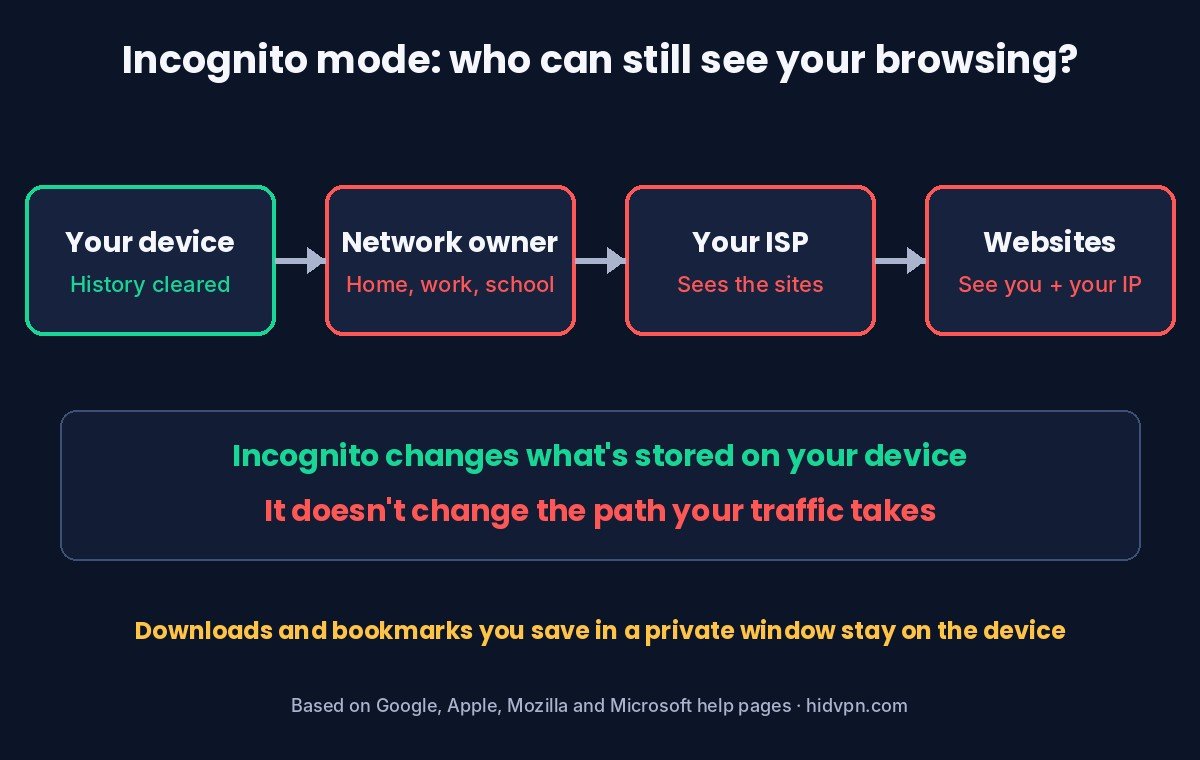
This is the part the spy icon leaves out. A private window changes what’s stored on your device. It doesn’t change the path your traffic takes across the internet.
| Who | In a normal window | In a private window |
|---|---|---|
| Anyone else who uses your device later | Can see your history | Can’t see it in the browser once the window is closed (the computer’s DNS cache can still list site names for a while) |
| The websites you visit | See your visit and your IP address | Still see your visit and your IP address |
| Your internet provider | Sees which sites you connect to | Still sees which sites you connect to |
| Your employer or school network | Can monitor activity on its network | Can still monitor it |
| Spyware or monitoring software on the device | Can record what you do | Can still record it |
Watch: who still sees you in incognito, in 30 seconds (HidVPN Short)
The browser makers agree on this. Google says websites, including Google’s, and networks run by a school, employer or internet provider “may be able to observe your activity in Incognito.” Microsoft warns that your school, workplace and internet provider “might still be able to access this data.” Mozilla says private browsing “does not make you anonymous” and doesn’t protect against keyloggers or spyware.
Your IP address is the reason websites still recognise where you’re coming from. A private window uses the same connection as a normal one, so the address doesn’t change. If you want to see what your provider can see on your connection, our guide on what your internet provider can see goes through it, and our guide on what employers and schools can see on their networks covers work and school Wi-Fi.
Chrome, Safari, Firefox and Edge compared
The core is the same everywhere, but each browser now adds its own extra protections in private windows. What each one’s help page says:
| Browser | Name | Clears when closed | Keeps | Extra protection in private windows |
|---|---|---|---|---|
| Google Chrome | Incognito | History, cookies, site data | Downloads, bookmarks | Third-party cookies blocked by default; on iPhone and Android, Incognito tabs can be locked with your face, fingerprint or screen lock |
| Apple Safari | Private Browsing | Pages visited, search history, AutoFill | Not stated on Apple’s page | Blocks known trackers, strips tracking parameters from links, fingerprinting protection; private tabs lock with Face ID, Touch ID or your passcode (iOS 17 or later) |
| Mozilla Firefox | Private Browsing | History, form and search entries, download list, cache, cookies | Downloaded files, bookmarks, new passwords you save | Blocks third-party cookies and content trackers by default |
| Microsoft Edge | InPrivate | History, cookies, cache, passwords, autofill data, site permissions | Favourites, downloaded files | Microsoft suggests setting tracking prevention to Strict; extensions you allow can still save history |
Safari’s lock is the most practical extra for shared phones and laptops. With it on, anyone who picks up your unlocked device still can’t see your open private tabs without your face, fingerprint or passcode. On a Mac it’s on by default; on iPhone you turn it on in Settings, then Apps, then Safari. Chrome on iPhone has a similar option in its own settings under Privacy and security.
The Edge note about extensions is worth acting on. An extension you’ve allowed in InPrivate can keep its own record of what you do, whatever the browser itself clears. If privacy is the reason you’re opening a private window, leave extensions off in it.
The Google lawsuit that changed the wording
For years, plenty of people assumed Incognito stopped Google itself from collecting data. In 2020, Chrome users filed a class action in California, Brown v. Google, arguing that Google collected browsing data from people in private mode. Google settled. The settlement agreement filed in April 2024 committed Google to:
- Rewording the Incognito screen to say that Incognito won’t change how data is collected by the websites you visit.
- Keeping third-party cookies blocked in Incognito by default for five years (Chrome had blocked them there by default since 2020).
- Deleting or anonymising older private-browsing records: detailed web addresses cut back to domain level, IP addresses partly redacted.
The settlement didn’t pay class members. It left individuals free to sue for damages separately. For an ordinary user the useful lesson is the one the new wording spells out: a private window is about your device, not about what websites collect.
What it’s genuinely good for
- Using someone else’s computer. Log in to your email at a friend’s house or a hotel business centre, and closing the window logs you out and leaves no history. Still check you’ve closed every private window.
- Keeping a gift or a surprise off a shared device. Searches won’t show up in the family laptop’s history or autocomplete.
- Logging in to a second account. A private window has no cookies, so you can sign in to a second account alongside the one in your normal window.
- Seeing a page as a stranger would. Without your cookies and logins, you see roughly what a new visitor sees. Handy for checking your own website or a public profile.
- Getting past a sticky cookie problem. If a site behaves oddly, opening it in a private window rules out stale cookies as the cause.
What it can’t do
- Hide your IP address or location. Websites see your real address either way. Run our IP leak test in a private window and it shows the same IP address as a normal one.
- Hide your browsing from your internet provider or network owner. They see the connections, not your browser’s history list.
- Stop you being recognised when you log in. Sign in to Google, Amazon or Facebook in a private window and they know it’s you.
- Stop browser fingerprinting. Sites can recognise a browser from its settings, screen size and fonts. Safari and Firefox add some protection in private windows; it isn’t the same as being anonymous.
- Protect you from malware or phishing. A private window opens the same dangerous links as a normal one.
Our guide on what a VPN does and doesn’t protect covers these limits from the VPN side, because many of them apply to VPNs too.
How to open (and close) a private window
| Browser | Windows | Mac | Phone |
|---|---|---|---|
| Chrome | Ctrl + Shift + N | Command + Shift + N | Android: More (three dots) > New Incognito tab. iPhone: three-dot menu > New Incognito Tab |
| Firefox | Ctrl + Shift + P | Command + Shift + P | Tabs button > private mask icon |
| Edge | Ctrl + Shift + N | Command + Shift + N | Tabs button > InPrivate |
| Safari | n/a | Command + Shift + N (or File > New Private Window) | iPhone: tabs button > Private (or long-press the tabs button > New Private Tab) |
To get out of private mode, close every private window or tab. On Chrome for Android, a notification lets you close all Incognito tabs at once. On iPhone Safari, open the tab view, switch from Private back to your normal tab group, and close the private tabs if you don’t want to leave them open (they stay locked if Locked Private Browsing is on).
Private window option missing or greyed out? On a work or school device, or a child’s phone with parental controls, private browsing may be switched off by the administrator. That’s deliberate, and it’s set on the device, not in the browser.
Incognito mode vs a VPN
They solve different problems, which is why people sometimes use both.
| Incognito mode | VPN | |
|---|---|---|
| Clears history on your device | Yes | No |
| Hides your IP address from websites | No | Yes, sites see the VPN server’s address |
| Hides the sites you visit from your internet provider | No | Yes, the provider sees one encrypted connection |
| Hides activity from the network owner (home, work, school) | No | Hides the sites, but they can see a VPN is in use |
| Stops logged-in sites recognising you | No | No |
| Costs anything | Free, built in | Usually a subscription |
A VPN moves who can see your traffic: your provider no longer sees which sites you open, but the VPN company could. Our guide on how a VPN works explains that trade, and our VPN and location test shows what changes when you connect. Neither tool makes you anonymous once you log in to an account.
If you use both, check the result: open our IP leak test in the private window with the VPN on and confirm it shows the VPN’s address, not yours.
If you want one to try, NordVPN passed our leak and drop tests in Sydney: see NordVPN’s current plans. Prices change often, so check the current plan before you buy.
Incognito questions
Can incognito history be seen?
Not in the browser’s history once you close the window. But the websites you visited, your internet provider and the network owner can still have records of the visit, and monitoring software on the device can record it too.
Does incognito mode hide my IP address?
No. A private window uses your normal connection, so websites see your usual IP address and rough location. To change the address websites see, you need a VPN or a similar service.
Can my Wi-Fi owner see what I search in incognito?
They can’t see your browser’s history, but whoever runs the network can see which sites devices connect to. On HTTPS sites, which is almost all of them, they see the site’s name, not the individual pages or what you type.
Is incognito mode safe for online banking?
It’s fine, and handy on a shared computer because it logs you out when you close it. It doesn’t add security against phishing or malware, so the usual checks still apply.
Why do sites still know it’s me in incognito?
Usually because you logged in, or because the site recognises your IP address or browser fingerprint. A private window starts without cookies, but logging in tells the site who you are straight away.
Is Safari Private Browsing better than Chrome Incognito?
Both clear your history and cookies. According to Apple and Google, Safari adds tracker blocking, link-tracking removal and fingerprinting protection, while Chrome blocks third-party cookies in Incognito. Both can lock private tabs behind Face ID on iPhone.
Sources
- Google Chrome Help: Browse in Incognito mode (what’s cleared, what’s kept, who can still see activity, shortcuts; read 29 October 2026).
- Mozilla Support: Private Browsing in Firefox (read 29 October 2026).
- Apple Support: Turn Private Browsing on or off on your iPhone and Locked Private Browsing (read 29 October 2026).
- Microsoft Support: Browse InPrivate in Microsoft Edge (read 29 October 2026).
- Brown v. Google LLC, N.D. Cal. 4:20-cv-03664: settlement filing (agreement attached as Exhibit 1), April 2024 (read 29 October 2026).