
hide.me VPN Review 2026: Privacy Focused with a Great Free Option?
hide.me is a Malaysia-based VPN that leans hard into privacy, security, and the kind of technical features that appeal to people who read the settings menu. It’s got an independently audited no-logs policy, a free tier that’s usable, and extras like MultiHop and port forwarding that more advanced users tend to appreciate. But is any of that useful if you’re not a power user in 2026?
The pitch here is transparency plus a solid feature set — secure and flexible whether you’re paying or riding the free plan.
hide.me VPN Highlights at a Glance:
- Strong Privacy & Security: Based in Malaysia (outside 14 Eyes), audited no-logs policy, strong encryption, secure protocols (including WireGuard).
- Generous Free Plan: Offers servers in several locations with a 10GB/month data cap (unlike Proton’s unlimited data but fewer locations/lower speeds).
- Advanced Features: Includes MultiHop (double VPN), Split Tunneling, Port Forwarding, and Stealth Guard (advanced Kill Switch).
- Good Speeds: Utilizes WireGuard and other protocols for generally fast performance.
- P2P Friendly: Allows torrenting on most servers.
- Decent Access: Can access popular streaming sites like Netflix.
Privacy First Approach
Privacy isn’t an afterthought here — it’s the whole foundation:
- Malaysian Jurisdiction: Operates outside the major surveillance alliances.
- Audited No-Logs Policy: Has undergone independent security audits confirming its no-logging claims.
- Transparency: Regularly publishes transparency reports detailing data requests received.
- Strong Encryption & Protocols: Uses AES-256 encryption and supports WireGuard, OpenVPN, IKEv2, SoftEther, and SSTP.
- Kill Switch & Stealth Guard: Provides a standard kill switch and “Stealth Guard” which can restrict specific apps or the entire connection to only work when the VPN is active.
Our Hands-On Test
✓ Hands-on tested in Sydney · 16 October 2026 (Premium trial)
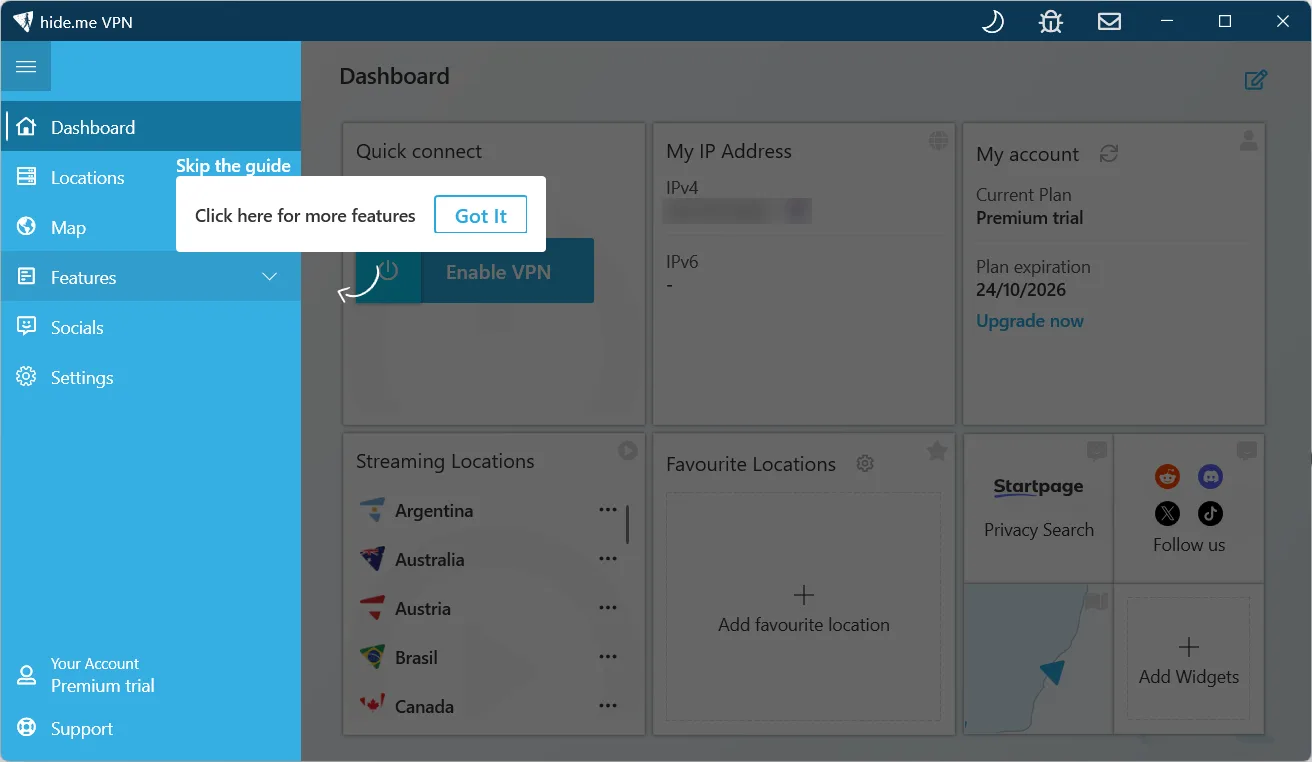
We tested hide.me ourselves on 16 October 2026 with its Windows app. We didn’t have to sign up or enter a card: the app opened straight to the dashboard on a Premium trial running until 24 October. We ran every test below on a Windows 11 laptop on a home connection in Sydney, with screenshots and a screen recording.
How we tested hide.me
- Date: 16 October 2026
- Location: Sydney, Australia (home connection)
- Device: Windows 11 laptop, hide.me app 4.3.2, protocol set to Automatic (the default)
- Plan: Premium trial (no sign-up, no card)
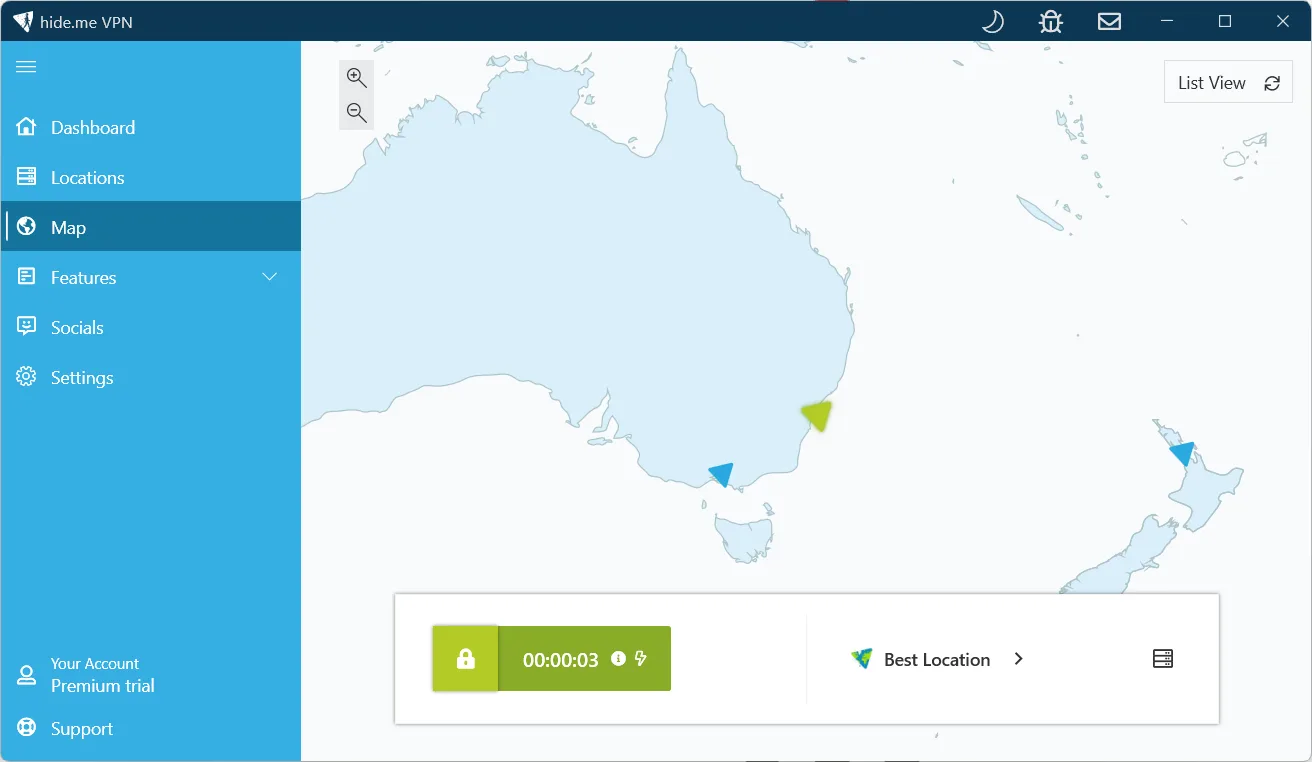
- Server: Best Location, which picked Sydney, Australia
- Tools: fast.com for speed; ipleak.net and dnsleaktest.com for IP, DNS and WebRTC leaks
| Test | Result (16 October 2026) |
|---|---|
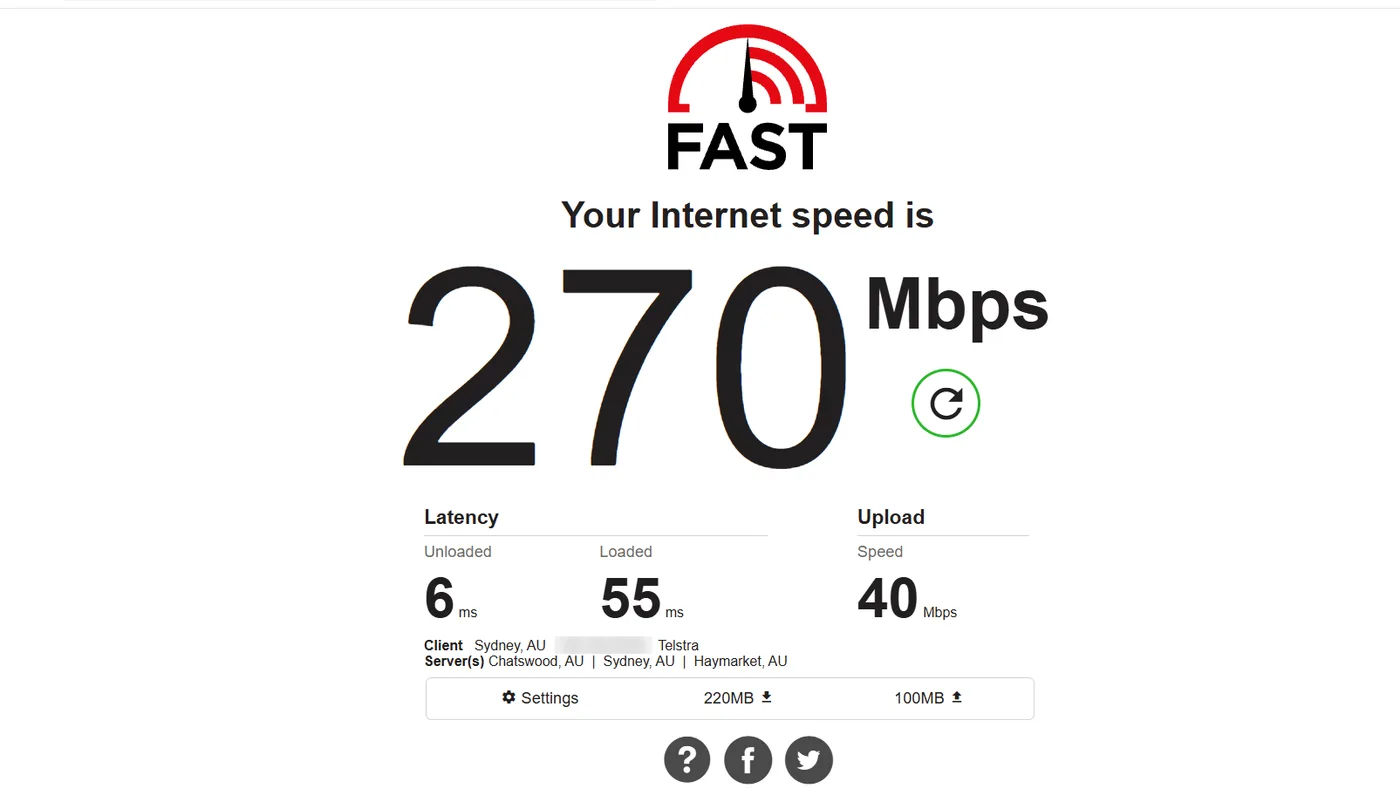
| Download speed, VPN off | 270 and 240 Mbps (start and end of the test) |
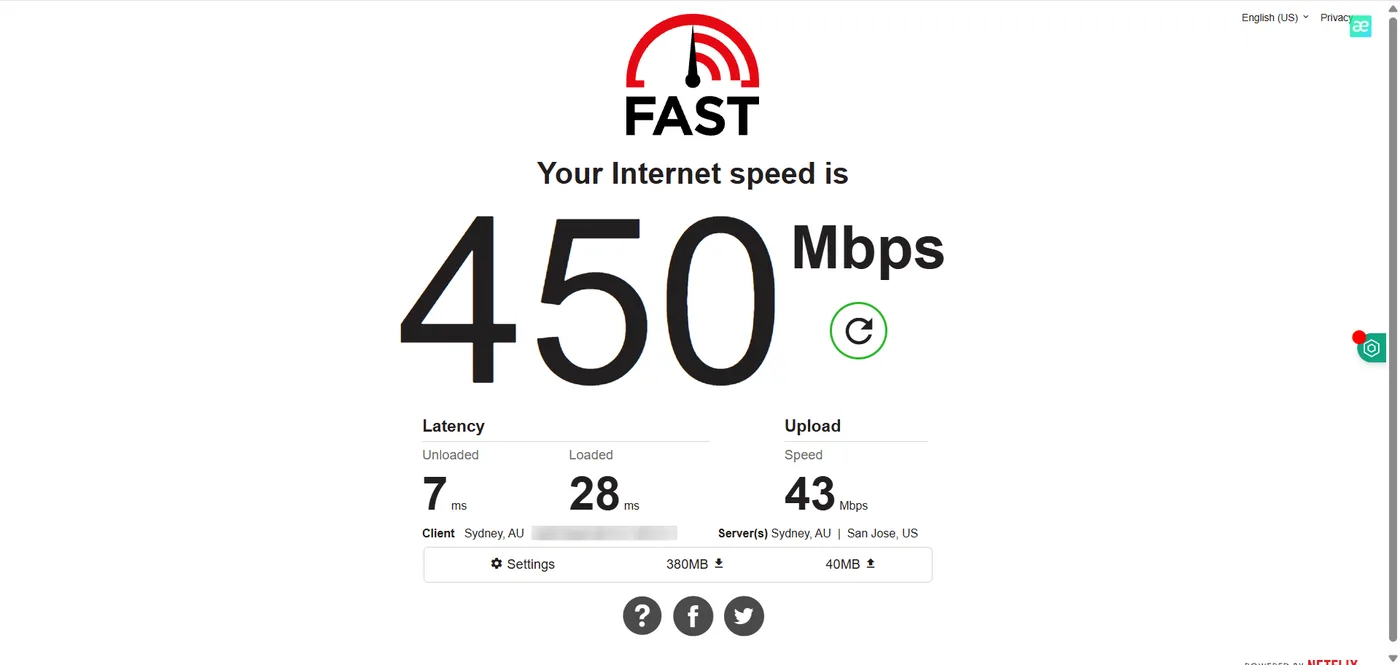
| Download speed, Sydney | 430 and 450 Mbps (two runs, no measurable loss) |
| Upload, off / Sydney | 40 to 45 / 41 to 43 Mbps |
| Latency (unloaded), off / Sydney | 6 / 6 to 7 ms |
| IP, DNS and WebRTC leaks | None. DNS showed only hide.me’s server in Sydney |
| IPv6 | Went through the VPN too (hide.me IPv6 address shown) |
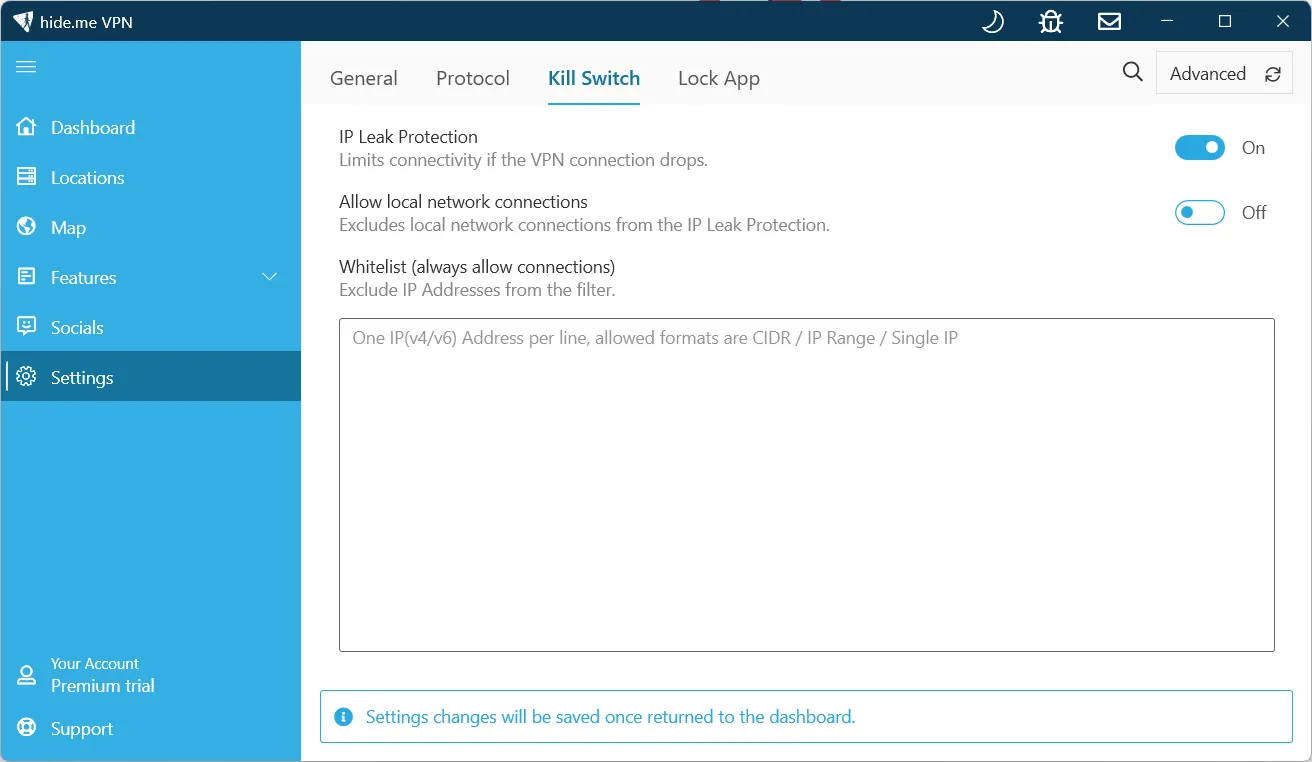
| Kill switch | Called IP Leak Protection, on by default |
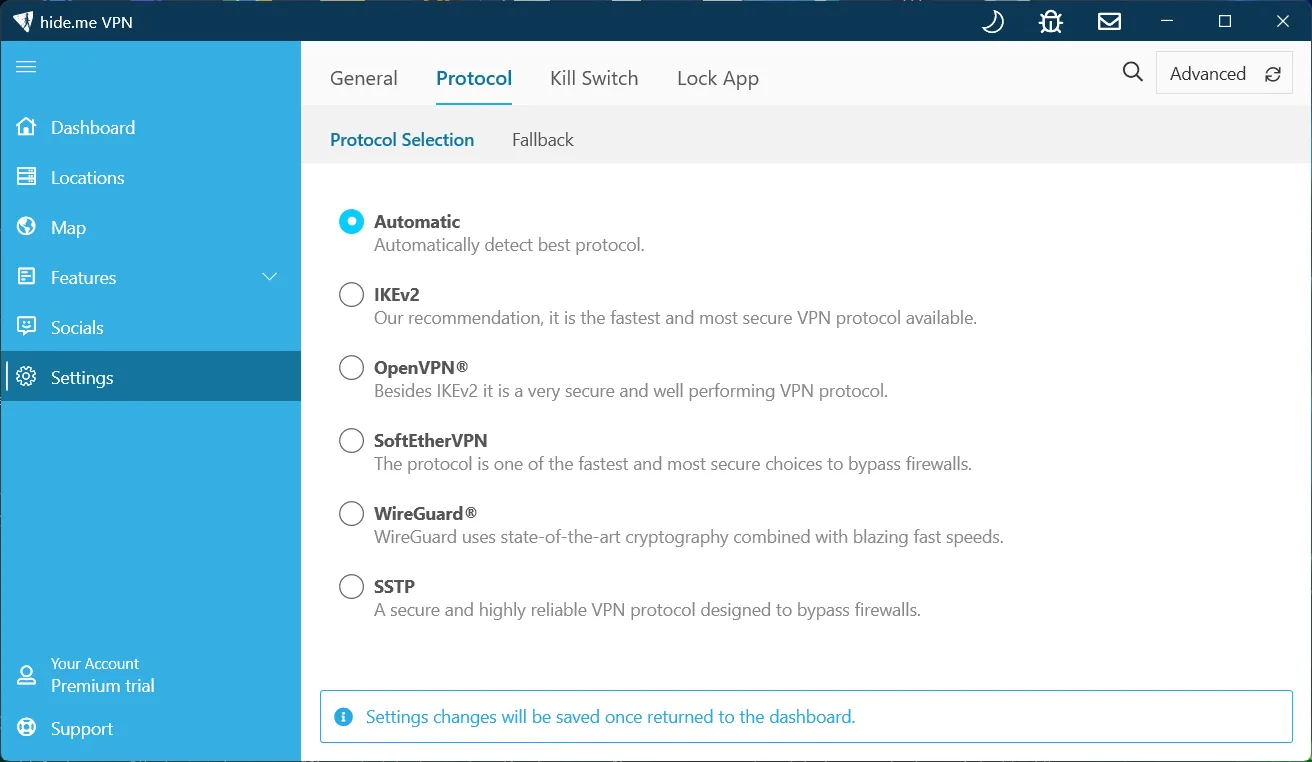
| Protocols in the Windows app | Automatic, IKEv2, OpenVPN, SoftEther, WireGuard, SSTP |
| Not tested | The free plan, distant servers, a dropped connection, phones |
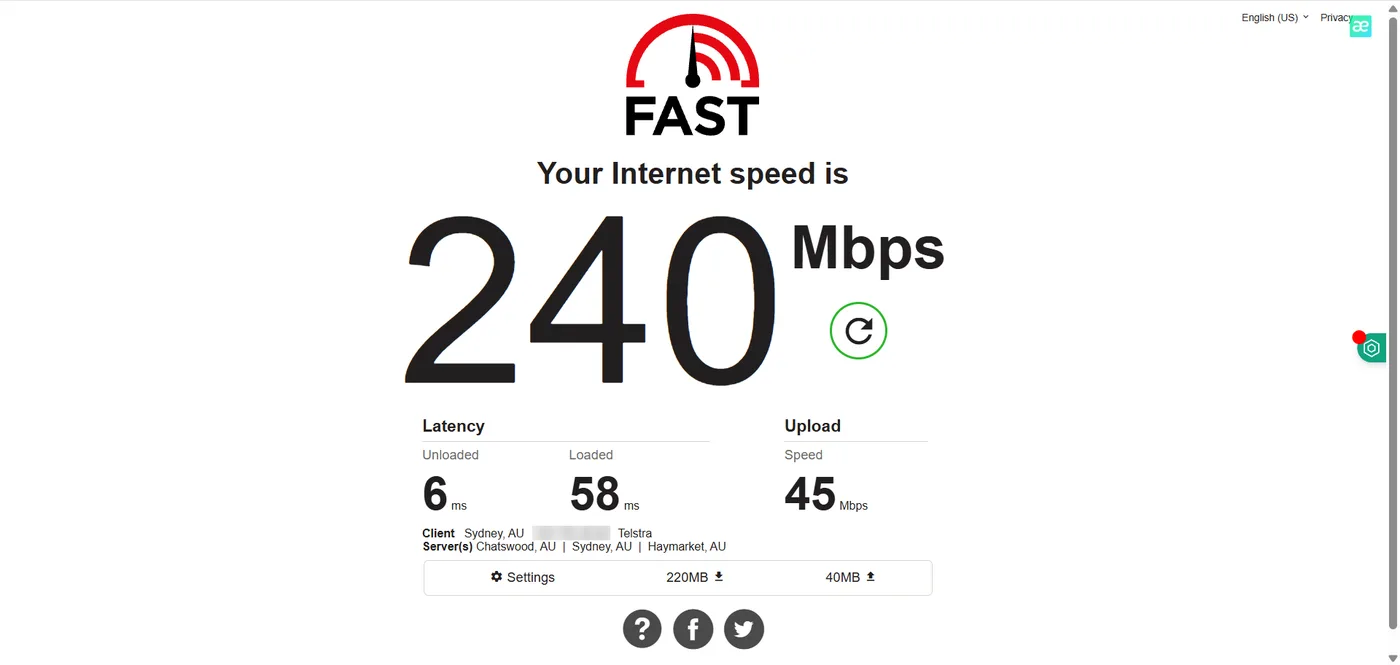
Speed: With the VPN off, fast.com gave us 270 Mbps at the start and 240 Mbps when we checked again at the end. Connected to hide.me’s Sydney server, we got 430 Mbps and then 450 Mbps. A result above the baseline is normal test-to-test variation on a home line, so the fair reading is no measurable speed loss on a local server. Upload stayed in the low 40s either way, and loaded latency was a little lower on the VPN (28 to 34 ms against 55 to 58 ms). We only tested a local server, so these numbers don’t tell you how hide.me does over long distances.
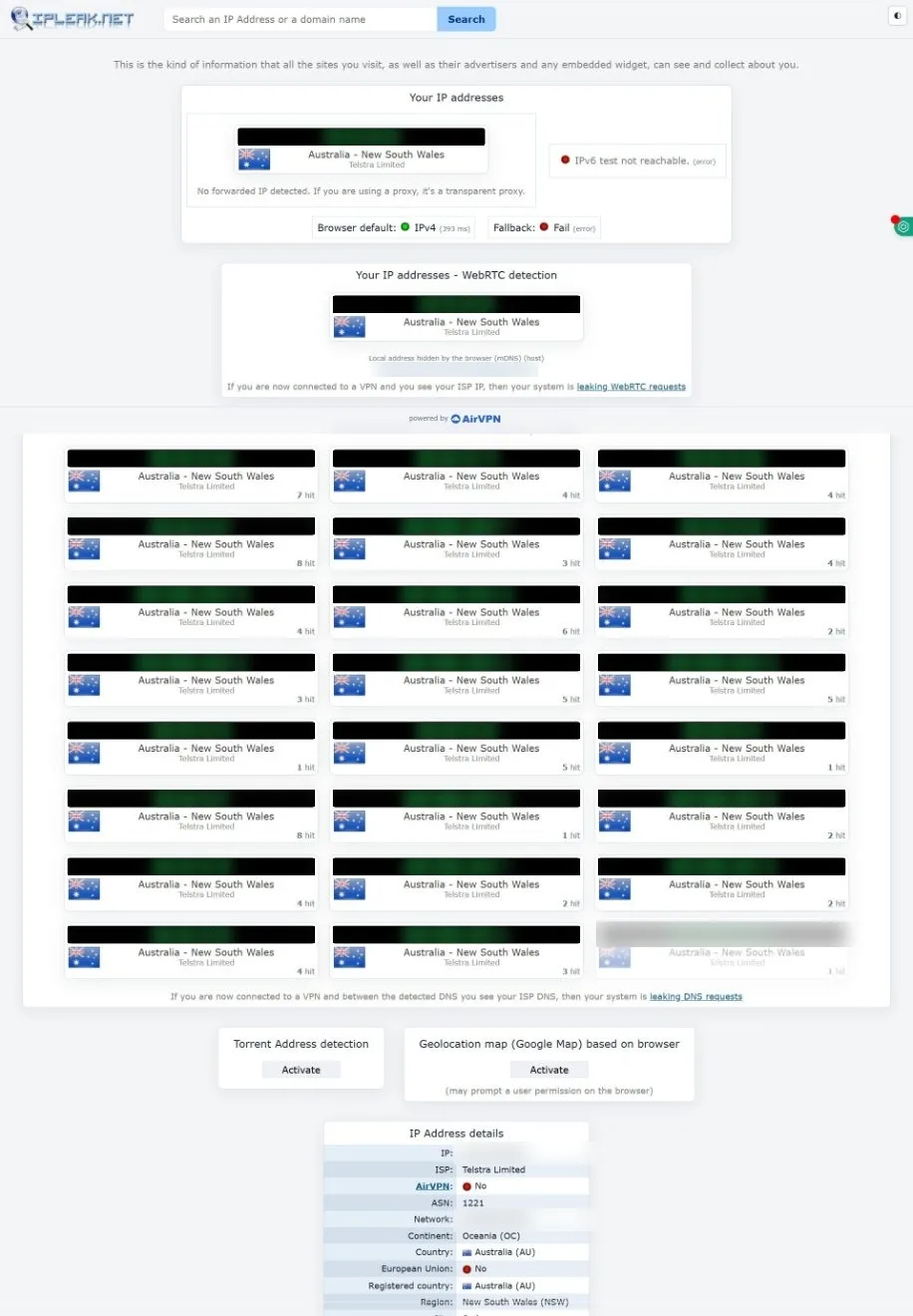
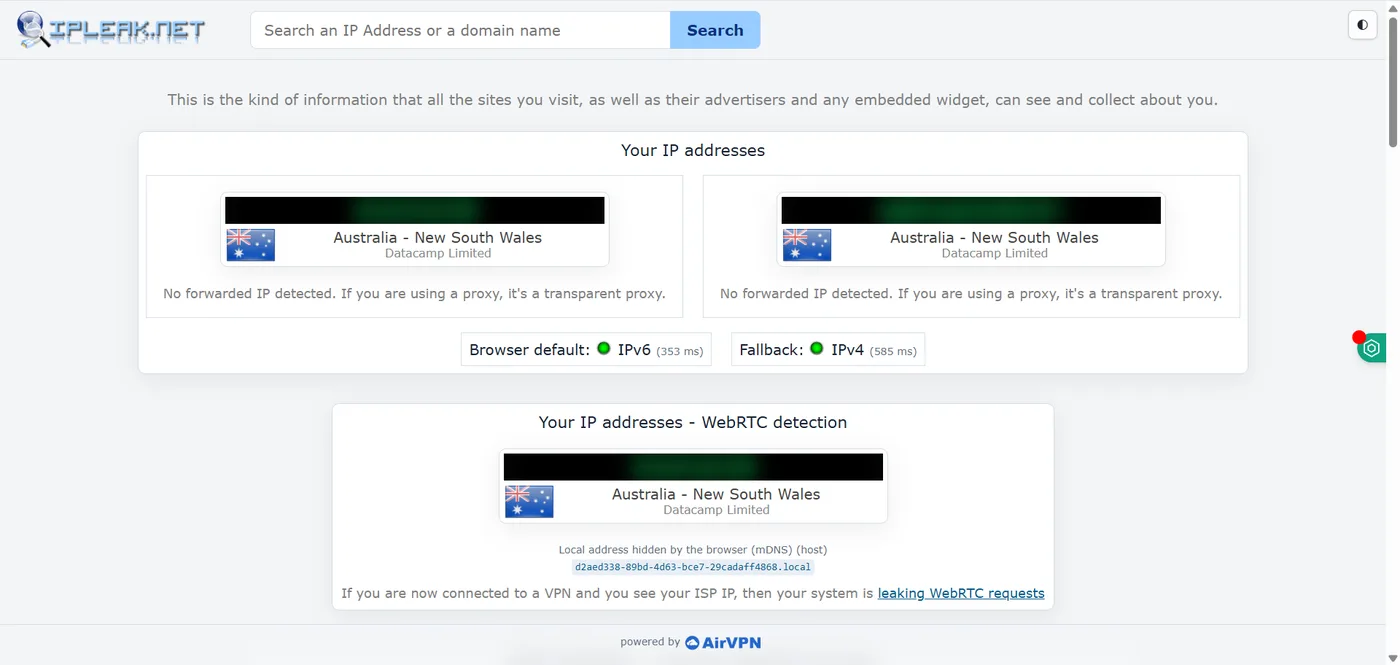
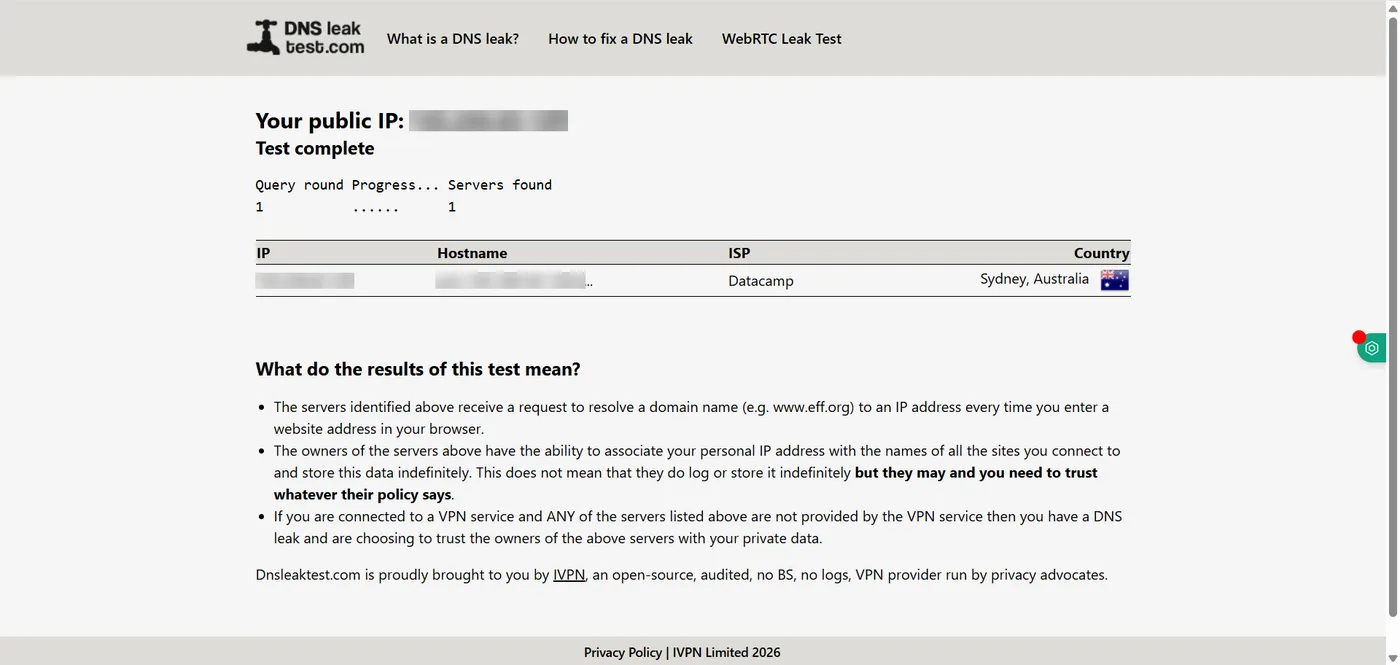
Leak test: Before connecting, ipleak.net showed our internet provider’s IP address, our real address in the WebRTC check and 24 of the provider’s DNS servers (all blurred below). IPv6 wasn’t reachable on our connection at that point. Connected to Sydney, ipleak showed only hide.me addresses: an IPv4 address, an IPv6 address and the same VPN address in the WebRTC check. dnsleaktest.com’s standard test found one DNS server, run by hide.me’s network in Sydney. No leaks.
The app and its settings: After installing, the app showed a Premium trial with no account, so we didn’t see the free plan’s limits for ourselves. The trial had the full location list, with Standard and Multihop tabs, and Best Location chose Sydney for us. The kill switch is a tab in Settings called IP Leak Protection, described as limiting connectivity if the VPN connection drops, and it was on by default. We didn’t cut the connection to test it. The protocol was set to Automatic, and the app never showed which protocol it picked, so we can’t tell you which one these results came from.
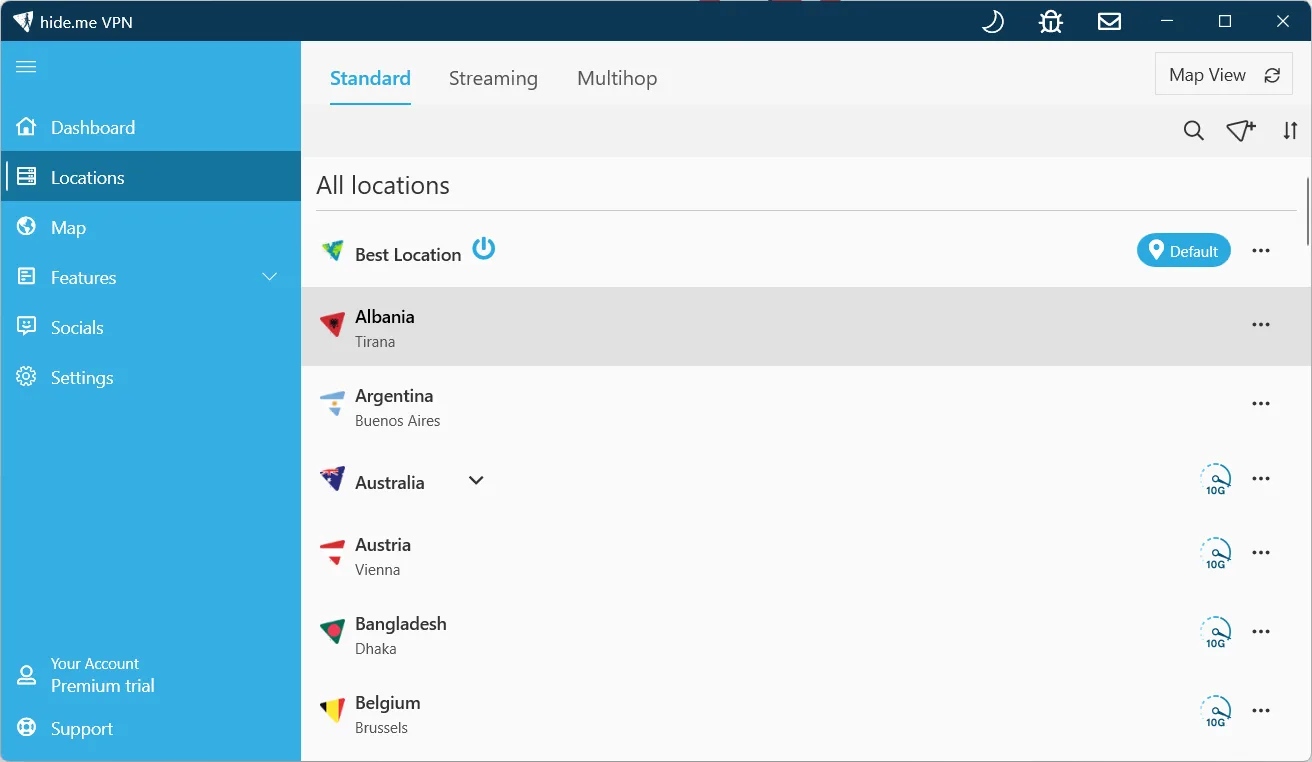
Bottom line: On a Sydney server, hide.me kept our full download speed, leaked nothing over IPv4, IPv6, WebRTC or DNS, and had its kill switch on from the start. Two things to know: the protocol is left on Automatic unless you pick one, and the app put us on a Premium trial rather than the free plan, so check which plan you’re on after the trial ends.
Watch the leak test (23 seconds): our screen recording from the same Sydney test, with our IP addresses blurred.
Features for Different Needs
There’s a real spread of features here depending on what you need:
- MultiHop: Route your connection through two VPN servers for added privacy.
- Split Tunneling: Choose which apps use the VPN tunnel and which connect directly.
- Port Forwarding: Useful for certain applications like optimizing P2P speeds or accessing specific services (less common feature among VPNs).
- Streaming Optimized Servers: While not as extensively labeled as CyberGhost, they do offer servers capable of accessing major platforms like Netflix, BBC iPlayer, etc., though consistency might vary slightly.
- P2P Support: Torrenting is permitted on most paid servers.
Free vs Paid Plans
The free plan is a real selling point. About 5 server locations, 1 connection, and a 10GB monthly data cap — more generous than most free VPNs bother with, and enough to test the service or do some light, secure browsing.
Go paid and the data cap disappears, you get the full server network, 10 simultaneous connections, and access to port forwarding and the full streaming server lineup. Pricing is competitive, especially on longer terms, and comes with a 30-day money-back guarantee.
Any Potential Downsides?
- App Interface: While functional, some users find the apps slightly less polished or intuitive compared to top competitors like ExpressVPN or NordVPN.
- Streaming Consistency: While capable, accessing might require trying a few servers occasionally for less common platforms.
- Free Plan Limitations: The 10GB data cap and limited server locations are expected restrictions for a free service.
Setting Up hide.me: What to Expect
hide.me’s apps are available for Windows, macOS, Linux, iOS, and Android, along with router support and browser extensions. The interface is functional and covers all the essentials — server selection, protocol choice, kill switch, and split tunneling — though some users find it slightly less polished than the top-tier apps from ExpressVPN or NordVPN. Advanced users get plenty to work with, including port forwarding and a stealth guard feature aimed at bypassing VPN blocking on restrictive networks.
The Free Plan: How It Works
hide.me’s free plan includes 10GB of monthly data and access to a limited set of server locations — enough for testing the service’s speed and reliability before subscribing, even if it’s not meant for daily heavy use. Unlike some “free” VPNs that quietly log or sell user data to cover costs, hide.me’s free tier operates under the same no-logs policy as its paid plans, which is a meaningful distinction worth knowing. When we installed the Windows app in October 2026, it started us on a Premium trial with no sign-up instead of the free plan, so the free-plan limits above come from hide.me and other reviews, not our own test.
Streaming and Torrenting Performance
In our own test on a Sydney server, hide.me showed no measurable speed loss. We haven’t tested distant servers, streaming or torrenting ourselves. Streaming access is capable but not flawless — independent reviews suggest less common platforms occasionally require trying a couple of different servers before finding one that works, rather than connecting to the nearest server and succeeding immediately every time. Torrenting is well supported, with P2P traffic allowed on dedicated servers.
Who hide.me Is Best For
At $2.69/month with Good speeds and an audited no-logs policy, hide.me suits privacy-conscious users who want advanced configuration options without paying premium prices. Its usable free plan also makes it a reasonable way to test real-world performance before committing, similar in spirit to what Proton VPN offers.
Where it’s less of a fit: users who want the most polished, beginner-friendly app experience — hide.me’s interface is functional but not as refined as the top-rated apps on this list. If streaming a wide range of platforms without any server-switching is your top priority, it’s also worth comparing against providers with more consistent accessing results.
How hide.me Compares
hide.me’s 8.6/10 rating places it in the middle of the pack, similar to IPVanish on overall score but with a more useful free plan, closer in spirit to Proton VPN‘s approach. Its 2,600-server network is smaller than giants like PIA, but its speed numbers hold up well against pricier options. Compare the full picture on our VPN comparison table.
hide.me FAQ
Is hide.me’s free plan free?
Yes — it includes 10GB of monthly data on a limited set of server locations, operating under the same no-logs policy as paid plans, without the data-selling model some “free” VPNs rely on.
Does hide.me keep logs?
No. Its no-logs policy has been independently audited, covering both free and paid tiers.
Can I use hide.me in China?
It works in China for many users thanks to its stealth guard feature, built specifically to bypass VPN blocking, and it’s increasingly cited by reviewers as a solid option for restrictive networks — though as with any obfuscation-based approach, results can vary and it’s not fully guaranteed.
What protocol does hide.me use?
The Windows app offers WireGuard, IKEv2, OpenVPN, SoftEther and SSTP. In our test it was set to Automatic by default, which picks one for you; you can choose a protocol in Settings.
Does hide.me have a kill switch?
Yes. In the Windows app it’s called IP Leak Protection, and it was on by default in our test. It limits connectivity if the VPN connection drops. We didn’t test it by cutting the connection.
How many devices can I connect at once?
hide.me supports multiple simultaneous connections on paid plans, making it reasonable for covering several devices under one subscription.
Does hide.me support split tunneling?
Yes, across most of its major apps, letting you choose which traffic goes through the VPN and which uses your regular connection — useful for keeping local network devices reachable while everything else stays encrypted.
What are hide.me’s advanced features?
Beyond the basics, hide.me offers port forwarding, a stealth guard for restrictive networks, and granular protocol controls — features that appeal more to technically inclined users than to people who just want a simple connect button.
Is hide.me based in a privacy-friendly country?
Yes — hide.me is based in Malaysia, outside the Five/Nine/Fourteen Eyes intelligence-sharing alliances, which some privacy-focused users specifically look for when comparing providers.
Does hide.me offer a money-back guarantee on paid plans?
Yes, in addition to the free plan, paid subscriptions come with a refund window, giving you two separate ways to test the service risk-free before settling on a long-term plan.
The Verdict: Who Should Use hide.me?
hide.me is a very strong contender, especially for privacy-focused users and those looking for one of the best free VPN plans available. Its audited no-logs policy, strong jurisdiction, and advanced features like port forwarding appeal to a knowledgeable user base.
We recommend hide.me VPN for:
- Users prioritizing verifiable privacy and security.
- Anyone wanting a capable free VPN with a generous data allowance.
- Users who need features like port forwarding or MultiHop.
- Torrenters looking for a secure, P2P-friendly service.
While the app design might not be everyone’s favorite, and streaming isn’t quite as foolproof as some dedicated streaming VPNs, hide.me showed no leaks and no measurable speed loss in our Sydney test, and it’s a feature-rich service (both free and paid) that holds its own against the competition.