
CyberGhost VPN Review 2026: Beginner-Friendly Apps and a Huge Server Network
CyberGhost VPN stands out for three things: a massive server network, apps that don’t require a manual, and servers labelled for specific jobs. Add cheap long-term plans and a 45-day refund window on longer plans, and it’s an easy VPN to try. The question is whether the extras hold up once you look past the marketing.
Pricing runs $2.19/month on the 26-month plan, $6.99/month on the 6-month plan, or $12.99/month billed monthly — with 7 simultaneous connections included on every plan. Longer plans come with a 45-day money-back guarantee (14 days on the monthly plan).
If you’re new to VPNs and want an app that picks a server for you, CyberGhost was built with you in mind. Here’s where it’s strong and where it isn’t.
How this review was put together: we tested CyberGhost ourselves on 10 October 2026, using its 24-hour free Windows trial (results and screenshots below). The rest of this review relies on CyberGhost’s documentation, its published audit and the sources we link to. How we test VPNs.
What CyberGhost does well
- Massive Server Network: One of the largest networks around, spanning 100 countries, which keeps server load down and gives you plenty of location options.
- Servers labelled by use: the app groups servers for downloading, gaming and other tasks, so you don’t have to pick from a bare country list.
- Very User-Friendly: Intuitive apps, easy for beginners to pick up.
- Affordable Pricing: $2.19/month on the 26-month plan, rising to $6.99/month on the 6-month plan or $12.99/month billed monthly.
- Generous Money-Back Guarantee: 45 days on longer plans (14 days on monthly).
- Strong Security Fundamentals: AES-256 encryption, standard protocols including WireGuard, and a kill switch.
- Audited No-Logs Policy: CyberGhost published an independent audit of its no-logs claims by Deloitte.
The app picks the server for you
This is CyberGhost’s main selling point. Instead of a bare country list, the app labels servers by task, such as downloading or gaming, and suggests one. If you don’t want to research which server to use, that saves time. We haven’t checked how well the labelled servers perform ourselves.
Apps are available across the board — Windows, macOS, iOS, Android, Linux, Fire TV, and browser extensions — and they’re clean and easy to follow.
Our Hands-On Test
✓ Hands-on tested in Sydney · 10 October 2026 (24-hour free trial)
We tested CyberGhost ourselves on 10 October 2026, using its 24-hour free trial for Windows. Sign-up needed an email address and no card. We ran every test below on a Windows 11 laptop on a home connection in Sydney, with screenshots.
How we tested CyberGhost
- Date: 10 October 2026
- Location: Sydney, Australia (home connection)
- Device: Windows 11 laptop, CyberGhost app, WireGuard protocol
- Plan: 24-hour free trial (no card)
- Servers: Sydney, Australia and Los Angeles, United States
- Tools: fast.com for speed; ipleak.net and dnsleaktest.com for IP, DNS and WebRTC leaks
| Test | Result (10 October 2026) |
|---|---|
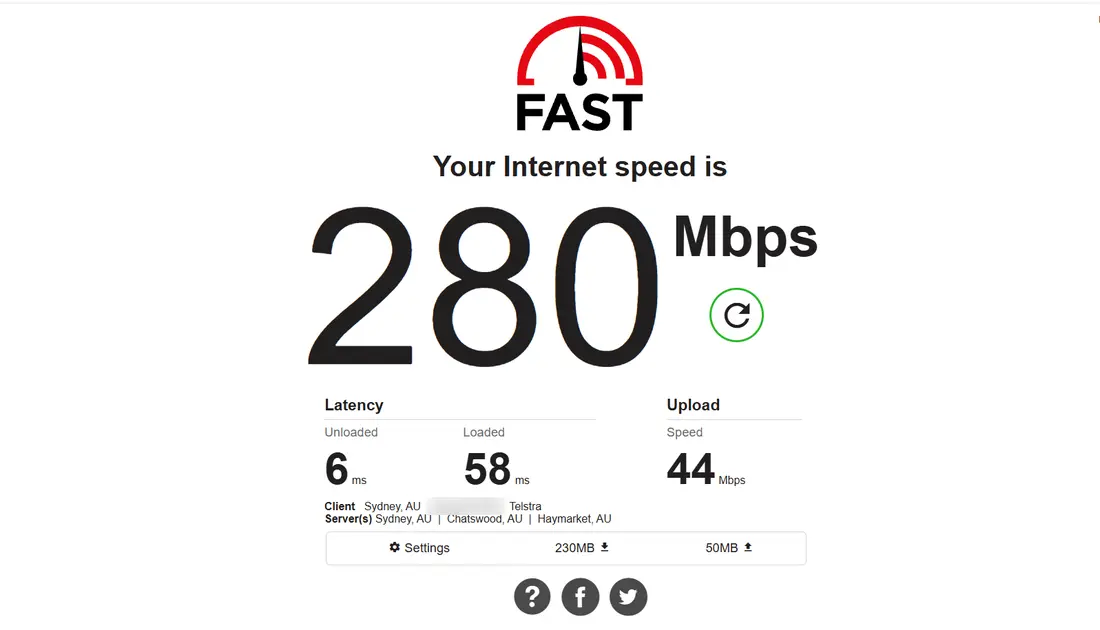
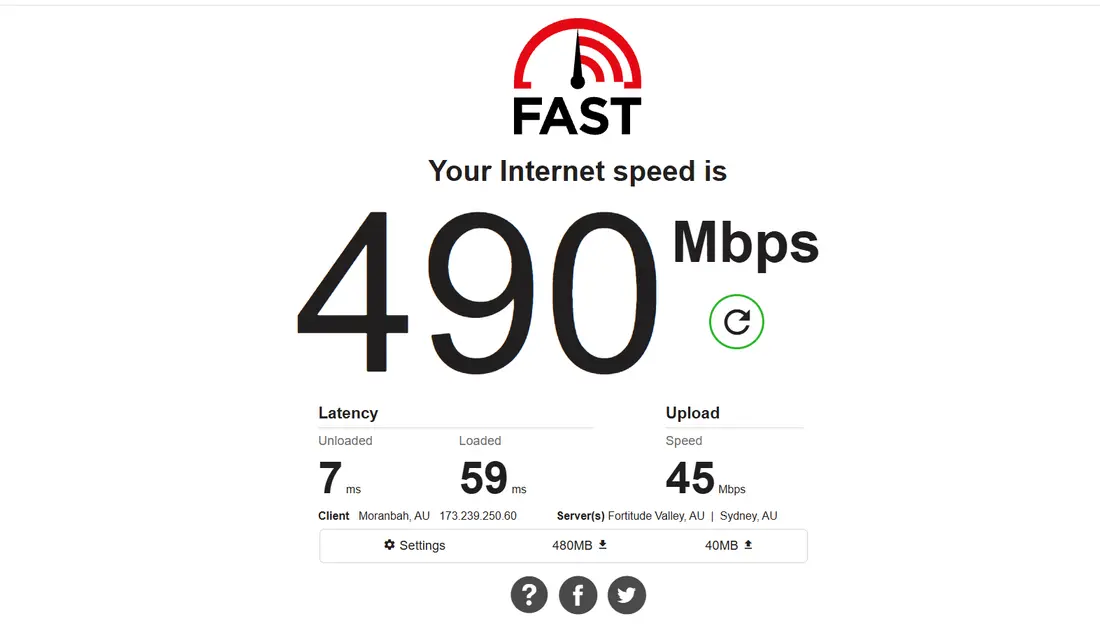
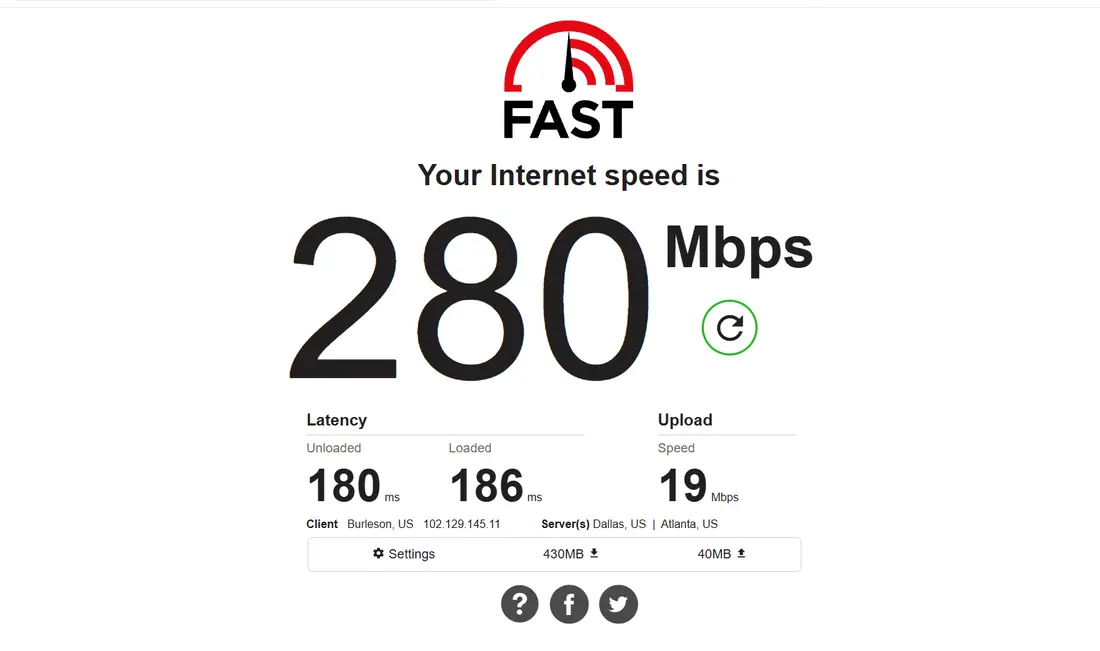
| Download speed, VPN off | 280 and 290 Mbps (two runs) |
| Download speed, Sydney | 490 Mbps (no measurable loss) |
| Download speed, Los Angeles | 280 Mbps (no measurable loss) |
| Upload, off / Sydney / Los Angeles | 44 / 45 / 19 Mbps |
| Latency, off / Sydney / Los Angeles | 6 / 7 / 180 ms |
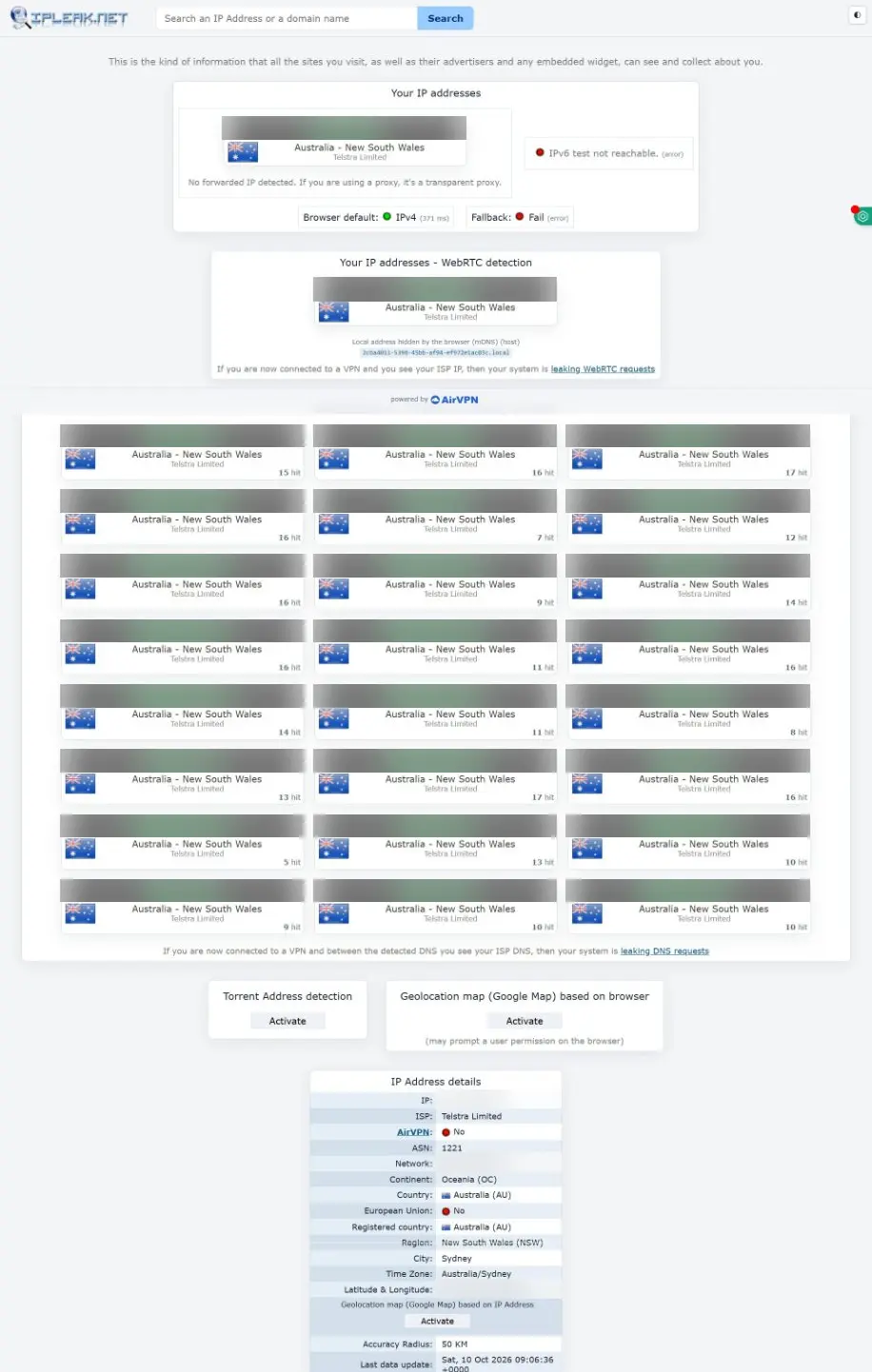
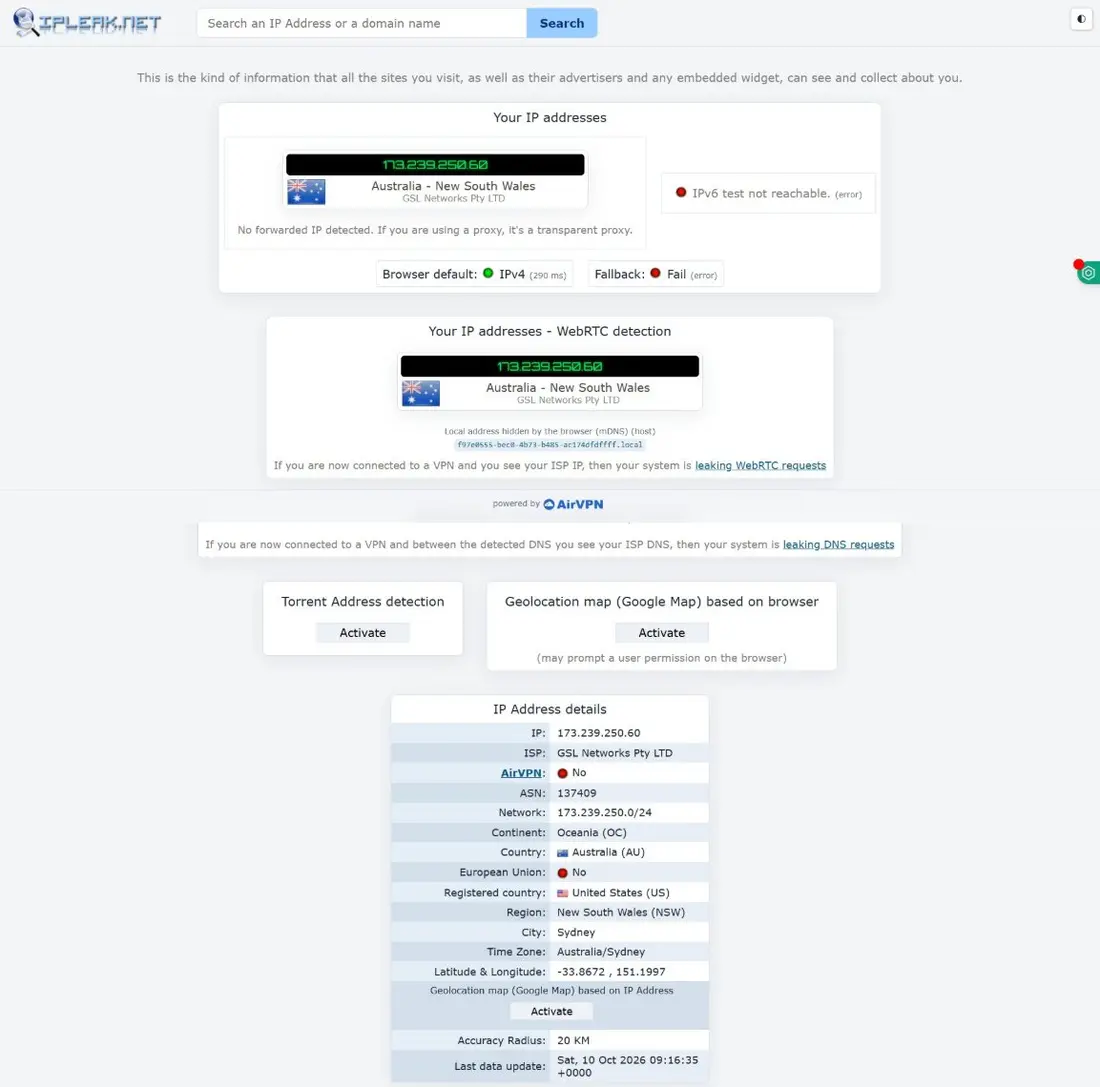
| IP, DNS and WebRTC leaks (Sydney) | None. DNS showed only CyberGhost’s server in Sydney |
| Kill switch | On by default |
| Ad and tracker blocker | Included, but off by default |
| Split tunneling (Windows) | By website only, and only on OpenVPN |
| Not tested | IPv6 handling, streaming, torrenting, phones |
Speed: With the VPN off, fast.com gave us 280 Mbps, and 290 Mbps when we checked again at the end. Connected to Sydney, we got 490 Mbps. A result above the baseline is normal test-to-test variation, so the fair reading is no measurable speed loss on a local server. On Los Angeles, about 12,000 km away, download held at 280 Mbps. Upload dropped from 44 to 19 Mbps and latency rose to 180 ms, which is the distance across the Pacific. For comparison, FastestVPN managed 20 Mbps download on a US server in our test.
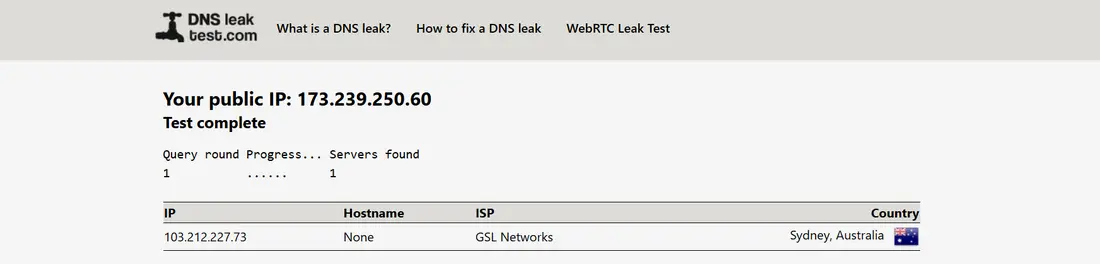
Leak test: Before connecting, ipleak.net showed our internet provider’s IP address and 24 of its DNS servers (blurred below). Connected to Sydney, it showed only a CyberGhost IP, and the WebRTC check showed that same VPN address instead of ours. ipleak’s DNS check came back empty, so we confirmed with dnsleaktest.com: the only DNS server was CyberGhost’s, in Sydney. No leaks. ipleak couldn’t reach IPv6 during this session, with or without the VPN, so this test doesn’t tell you how CyberGhost handles IPv6.
The app and its settings: The free trial is the full app, with a timer at the top and every server location available. Under Privacy settings, the automatic kill switch and DNS leak protection were on by default. The content blocker, which blocks ad, tracker and malware domains, is included but was off, so turn it on if you want it. Split tunneling on Windows lives under Smart rules, as “Exceptions”: you list websites that skip the VPN, and it only works on the OpenVPN protocol. Choosing apps to exclude is an Android feature, which we didn’t test.
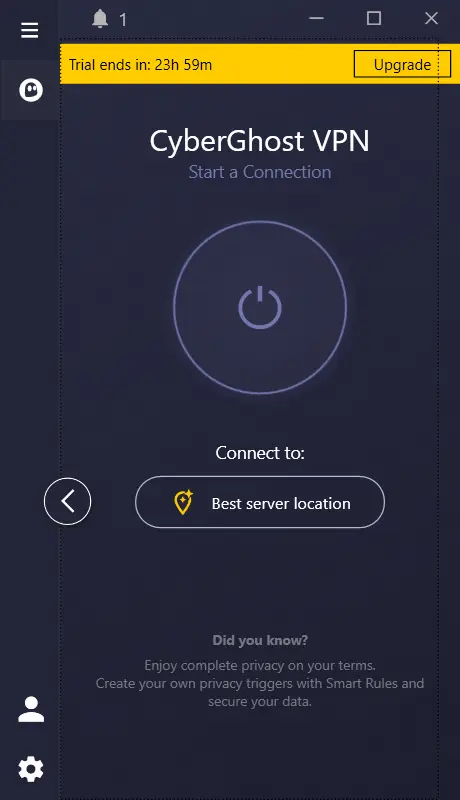
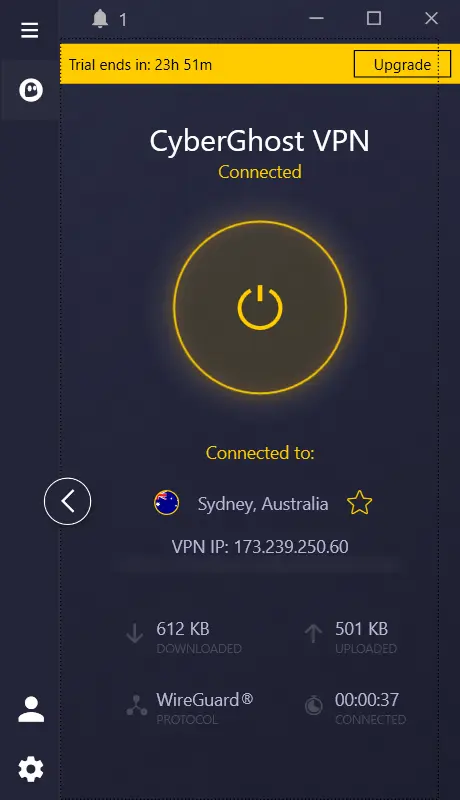
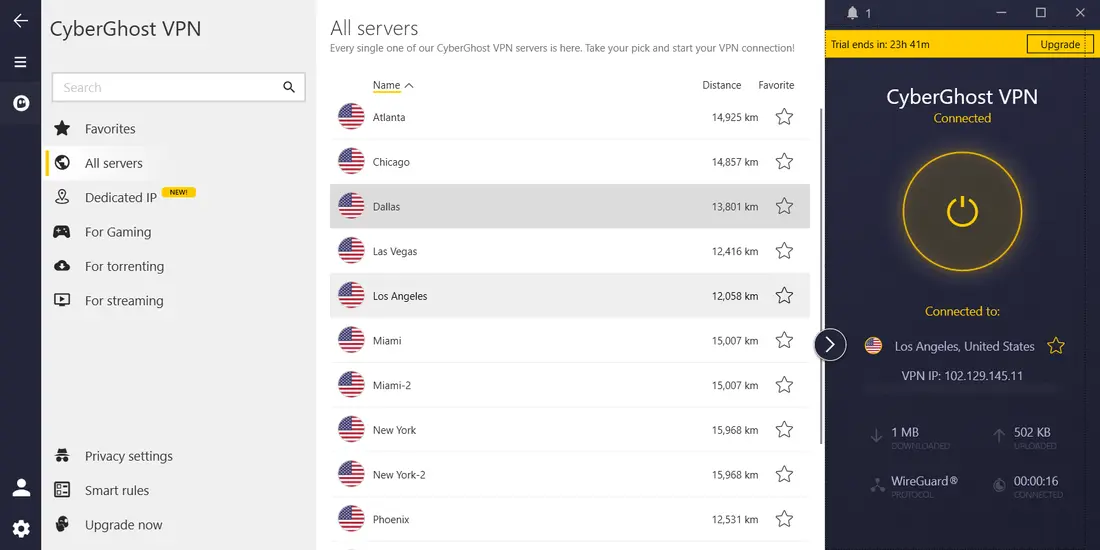
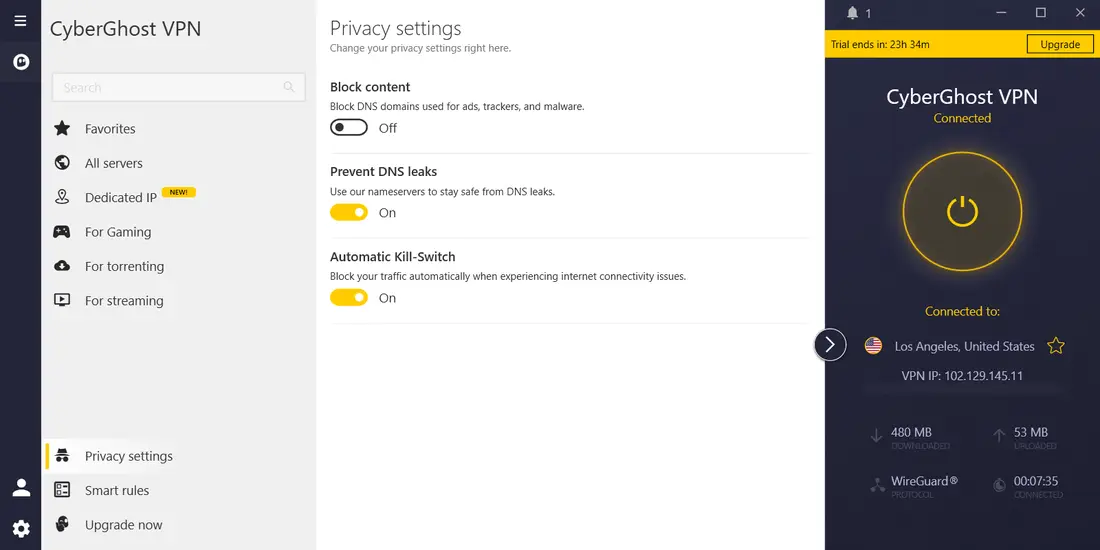
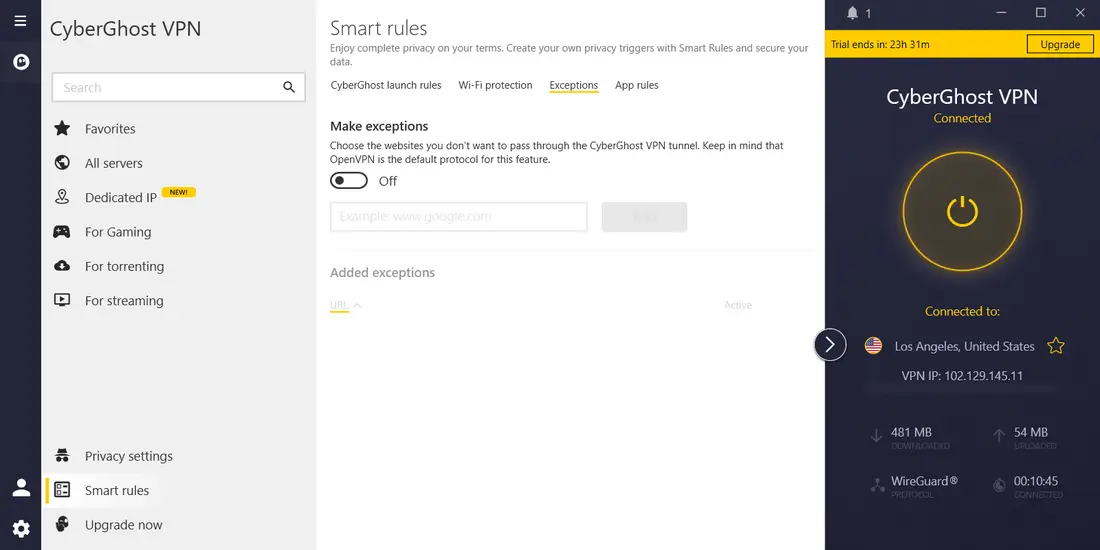
Bottom line: CyberGhost kept our full download speed on a Sydney server and on a Los Angeles server, leaked nothing, and turns the kill switch on for you. Two things to know: the ad blocker starts off, and split tunneling on Windows works by website, not by app.
Security & Privacy Features
CyberGhost covers the essential security bases:
- Encryption: Standard AES-256.
- Protocols: WireGuard, OpenVPN, IKEv2.
- Kill Switch: On automatically, preventing data leaks if the connection drops.
- No-Logs Policy: CyberGhost says it doesn’t keep activity logs, and Deloitte has audited that claim. CyberGhost also publishes regular transparency reports.
- Content Blocker: Blocks ad, tracker and malware domains. It’s called “Block content” in the Windows app and was off by default in our test.
- Based in Romania: A privacy-friendly jurisdiction outside the major surveillance alliances.
Solid core security overall, though it’s missing some of the more niche features you’d find in NordVPN, like Double VPN or Onion over VPN.
Large downloads and P2P
CyberGhost marks a set of servers for P2P in the app, so you know which ones allow it. Its kill switch blocks traffic if the VPN drops, so a download doesn’t carry on over your normal connection. We haven’t tested torrenting, but in our general test a Los Angeles server kept our full 280 Mbps download speed.
Price and the 45-day refund window
CyberGhost is often one of the cheapest premium VPNs around once you sign up for the long-term plans (usually 2 years plus extra months). Given the large server network and the specialized servers, that’s a lot of value for the money.
The 45-day money-back guarantee on longer plans is also one of the most generous around, giving you plenty of time to test the service. (The monthly plan is a shorter 14-day window.)
Where CyberGhost falls short
- China Unreliability: Not generally recommended if you need consistent access within China.
- Windows split tunneling is website-only: in our test you could exclude websites, not apps, and only on OpenVPN.
- Limited Split Tunneling: Usually only available on Windows and Android.
Setting up CyberGhost
Install the app, sign in and connect. Rather than scrolling a country list, you can pick a task and let the app suggest a server. On Windows, split tunneling sits under Smart rules > Exceptions and works by website, on OpenVPN only. App-based split tunneling is on Android, which we didn’t test.
Who should pick CyberGhost
At $2.19/month, CyberGhost is one of the more affordable options we’ve reviewed, and combined with its very user-friendly apps, it’s a solid pick for anyone new to VPNs who doesn’t want to spend time configuring settings. Its network of 9,600+ servers across 100 countries (CyberGhost’s figure) means there’s usually a server near you.
Where it’s less of a fit: users who specifically need reliable access in China. CyberGhost is technically listed as usable there, but the provider itself doesn’t recommend it for consistent access in heavily restricted regions — if that’s your main use case, check our Best VPN That Works in China picks instead. Power users who want fine-grained settings may prefer a more configurable app such as PIA.
How CyberGhost Compares
CyberGhost’s 9.0/10 rating puts it solidly in the upper tier of the VPNs we’ve reviewed, and at $2.19/month it undercuts most of them on price. ExpressVPN and NordVPN cost more and offer more advanced features. CyberGhost’s server count is among the largest on our list, and its no-logs policy has been audited like theirs. See how it stacks up directly on our VPN comparison table.
CyberGhost FAQ
Is CyberGhost good value for money?
For most people, yes. At $2.19/month on the longest plan it’s one of the cheapest VPNs we’ve reviewed, with an audited no-logs policy and 9,600+ servers. Prices change often, so check the current plan before you buy.
Does CyberGhost keep logs?
No. Its no-logs policy has been independently audited — the same standard the pricier providers on this list meet, and one worth insisting on regardless of which VPN you end up choosing.
Can I use CyberGhost in China?
It’s listed as usable, but CyberGhost doesn’t recommend it for anyone who needs consistent, reliable access in China. If that’s a priority, we’d point you toward our dedicated China-focused picks instead.
Does CyberGhost support split tunneling?
Partly. On Windows, our test found website-based exceptions only (Smart rules > Exceptions), and they need the OpenVPN protocol. App-based split tunneling is on Android, which we didn’t test. It isn’t on macOS, iOS or Linux, so if excluding apps matters to you, weigh that before subscribing.
What protocol does CyberGhost use?
WireGuard is the usual default. OpenVPN and IKEv2 are also available if a network blocks WireGuard.
Plans and Money-Back Guarantee
CyberGhost’s pricing rewards longer commitments — the $2.19/month rate applies to its longest-term plan, with shorter subscriptions costing more per month. Like most providers on this list, it backs its long-term plans with a money-back guarantee window, giving you time to test speeds on your own network before deciding to stick with it. Cancel within that window and the refund is handled through the same account dashboard you use to manage your subscription.
Does CyberGhost have a kill switch?
Yes — if the VPN connection drops unexpectedly, CyberGhost’s kill switch blocks internet traffic until it’s restored. It was on by default in our test.
How many devices can I connect at once?
CyberGhost supports up to 7 simultaneous connections on a single subscription, which combined with its low starting price makes it a reasonable option for households covering several phones, laptops, tablets, and streaming devices without paying for multiple separate subscriptions.
Device support is broad — native apps cover Windows, macOS, Android, iOS, and Linux, plus router-level setup for covering every device on a home network at once without eating into your simultaneous-connection limit, which is handy for smart TVs and game consoles that can’t run a VPN app natively. Browser extensions for Chrome and Firefox are also available for quick proxy-style browsing when you don’t need the full VPN client running.
Is CyberGhost the right VPN for you?
CyberGhost makes sense if ease of use and a low price matter most, especially on the longer plans. The big server network and the task labels make choosing a server simple. In our test it kept full download speed on Sydney and Los Angeles servers, with no leaks.
CyberGhost makes most sense for:
- VPN beginners who want a simple, intuitive experience.
- People who want the app to suggest a server for each task.
- Anyone who wants clearly marked P2P servers.
- Budget-conscious users seeking a feature-rich VPN with a long money-back guarantee.
Power users might miss some of the more advanced configuration options, and anyone needing access in China should look elsewhere, but for many everyday users CyberGhost balances features, ease of use and price well.