
HidVPN earns a commission if you buy through some of the links on this page. It doesn’t change what we write. Our affiliate disclosure.
Table of Contents
- Two address systems running at the same time
- Why an IPv6 address says more about you
- The IPv6 leak: covering one address and missing the other
- What five VPNs did with IPv6 on our own devices
- Block it or carry it: the two honest answers
- Speed and gaming: does IPv6 change anything?
- Read your own IPv6 result in two minutes
- If your VPN leaks IPv6: three fixes
- IPv4 vs IPv6 questions
- Sources
Key Takeaways
- IPv4 and IPv6 are two numbering systems for the same internet. Most home connections now carry both at once, so a website can see two addresses for you, not one.
- An IPv6 address is usually more identifying than an IPv4 one: it isn’t shared with other households the way IPv4 often is, and part of it can stay fixed for a long time.
- An IPv6 leak happens when a VPN carries your IPv4 traffic through the tunnel but your device’s IPv6 traffic goes straight to the site. The site then sees your real address while the VPN app says “connected”.
- On our own devices, two VPNs blocked IPv6 entirely (Proton VPN, NordVPN on iPhone) and two carried it through the tunnel with a VPN IPv6 address (hide.me, Hotspot Shield). Both are fine. A real address showing is not.
- Leak test pages say “IPv6 test not reachable” for three different reasons. We explain how to read it, because it fooled us on two evenings.
Every guide to IPv4 vs IPv6 opens with the same fact: IPv4 ran out of addresses, so IPv6 was built with more of them than there are grains of sand. True, and not the reason you’re here. If you use a VPN, or you’re thinking about one, the part that matters is narrower: your connection probably speaks both, your VPN might only cover one, and the one it misses is the more revealing of the two.
This guide stays on that narrow part. The technical differences take one short section. The rest is what those differences do to your privacy, and what we saw when we checked five VPNs and an iPhone on our own connection in Sydney.
Two address systems running at the same time
An IP address is the return address on everything your device sends. IPv4, the original system from 1981, writes it as four numbers, such as 203.0.113.42. It can express about 4.3 billion addresses, which sounded like plenty before phones, TVs and doorbells each wanted one.
IPv6, standardised in the late 1990s and published in its current form as RFC 8200, writes the address as eight groups of hexadecimal, such as 2001:db8:4f2a:…. It has room for 340 undecillion addresses, which in practice means every device can have its own public address, and your internet provider can hand your home a whole block of them.
| IPv4 | IPv6 | |
|---|---|---|
| Looks like | 203.0.113.42 (four numbers, 32 bits) | 2001:db8:4f2a:1c0e:… (eight hex groups, 128 bits) |
| How many | About 4.3 billion | About 3.4 × 10³⁸ |
| Who shares your address | Often several devices or even households behind one address (NAT, carrier-grade NAT) | Normally nobody. Each device gets its own public address |
| How long it stays the same | Depends on your provider; home IPv4 addresses often change | The network part (prefix) is set by your provider and can stay fixed for months; the device part can change daily |
| Share of Google’s users reaching it this way | Just under half | Just over half, after crossing 50% for the first time in March 2026 |
The important word is “both”. Most providers run the two side by side, which engineers call dual-stack. Our own Telstra connection in Sydney gives every device an IPv4 address and an IPv6 address at the same time, and a website can use either one. That’s the fact the rest of this guide turns on.
Why an IPv6 address says more about you
Privacy-wise, the two systems aren’t equal, and IPv6 is the one to watch for three reasons.
- Less sharing. With IPv4, your provider often puts many customers behind one public address, because there aren’t enough to go round. From a website’s side, that address is a crowd. With IPv6, there’s no shortage, so your device usually has a public address of its own. One address, one device.
- A prefix that sticks. An IPv6 address has two halves. The first half is the prefix your provider assigns to your home; the second half identifies the device. Providers can and do keep the prefix stable for long periods. Even if the device half changes, the household half can stay recognisable.
- Device fingerprints in the address. Early IPv6 built the device half from the network card’s hardware address, which never changes. Modern systems use “privacy extensions” (RFC 4941) that generate a random device half and rotate it, usually daily. Windows, macOS, iOS and Android all do this by default now, which fixes the worst of it, but not the prefix.
None of that makes IPv6 bad. It makes it precise, and precision is the opposite of what you want a website to have when you’ve turned a VPN on to hide where you are. Our guide on what your internet provider can see covers the other side of the same picture.
The IPv6 leak: covering one address and missing the other
A VPN works by routing your device’s traffic into an encrypted tunnel to the VPN server. The site at the other end sees the server’s address. If the tunnel only carries IPv4 traffic, and your device still has a working IPv6 address, your browser can simply use IPv6 to reach a site, outside the tunnel. The VPN app says connected. The site sees your real IPv6 address. That’s an IPv6 leak.
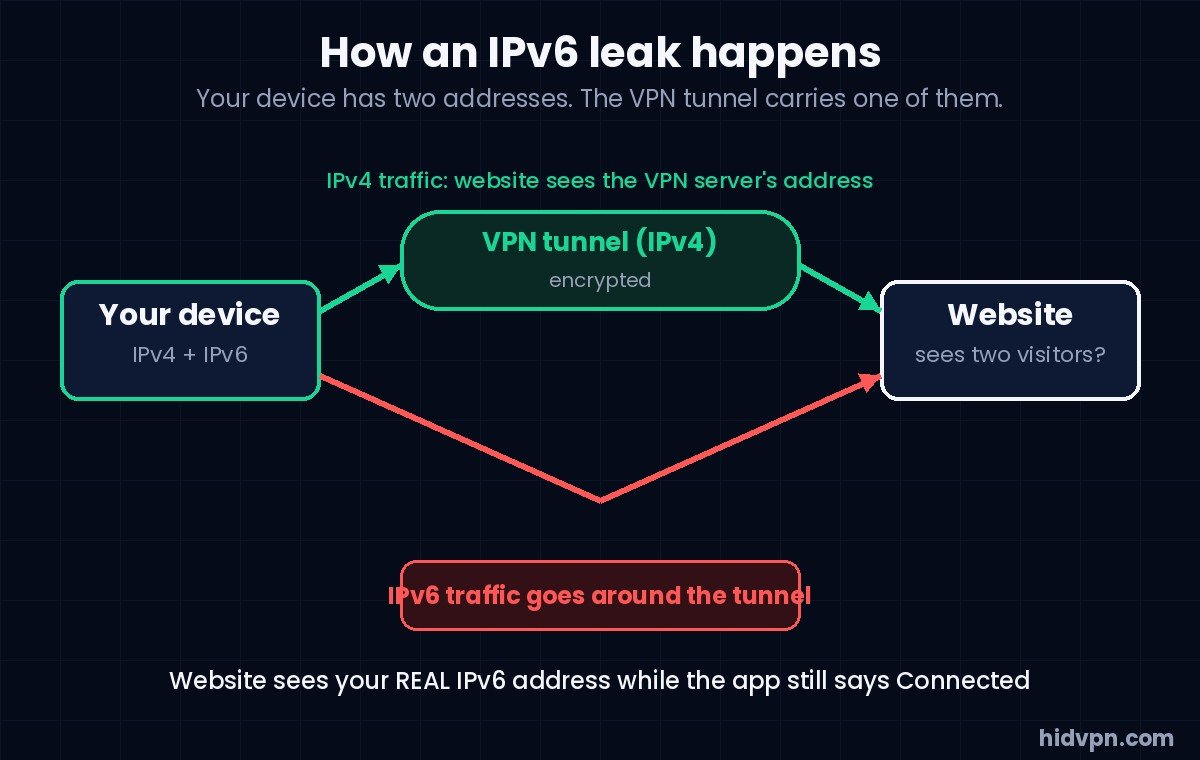
It happens quietly because most websites and apps prefer IPv6 when both are available, using a method called Happy Eyeballs that tries IPv6 first. So a leak isn’t an edge case that only triggers on odd sites. If the path is open, it’s the default path.
DNS has the same shape. If your device still asks your provider’s IPv6 DNS server for addresses, your provider sees which sites you look up even while the VPN carries the visits. Our DNS leak guide covers that half.
A VPN provider has two honest ways to deal with this. It can block IPv6 on the device while connected, so there’s nothing to leak. Or it can carry IPv6 inside the tunnel and give you a VPN-side IPv6 address. Both close the gap. What doesn’t close it is ignoring IPv6, which some older or cheaper apps still do.
What five VPNs did with IPv6 on our own devices
✓ From our hands-on tests, Sydney, October 2026
How we tested
- Windows 11 laptop on home Wi-Fi (Telstra, dual-stack), plus an iPhone on the same network for the last two rows
- Tool: ipleak.net, which shows the IPv4, IPv6 and WebRTC addresses a site can see, with the VPN off and then on; dnsleaktest.com for DNS
- Dates: Proton VPN 9 Oct, CyberGhost 10 Oct, hide.me 16 Oct, Hotspot Shield 17 Oct, NordVPN (iPhone) and iCloud Private Relay 22 Oct 2026
- Our real addresses are blurred in every screenshot on the review pages linked below
| Service | Server | IPv6 with the VPN on | Reading |
|---|---|---|---|
| Proton VPN (free plan) | Tokyo | “Not reachable”. Only the Proton IPv4 address showed | IPv6 blocked while connected. No leak |
| CyberGhost (24-hour trial) | Sydney | “Not reachable” with the VPN on, and also with it off that evening | Inconclusive. The test couldn’t reach IPv6 either way, so it proved nothing about CyberGhost |
| hide.me (trial) | Sydney | An IPv6 address belonging to the VPN’s network (Datacamp), alongside the VPN IPv4 | IPv6 carried through the tunnel. No leak. Interesting detail: IPv6 was unreachable with the VPN off and worked with it on |
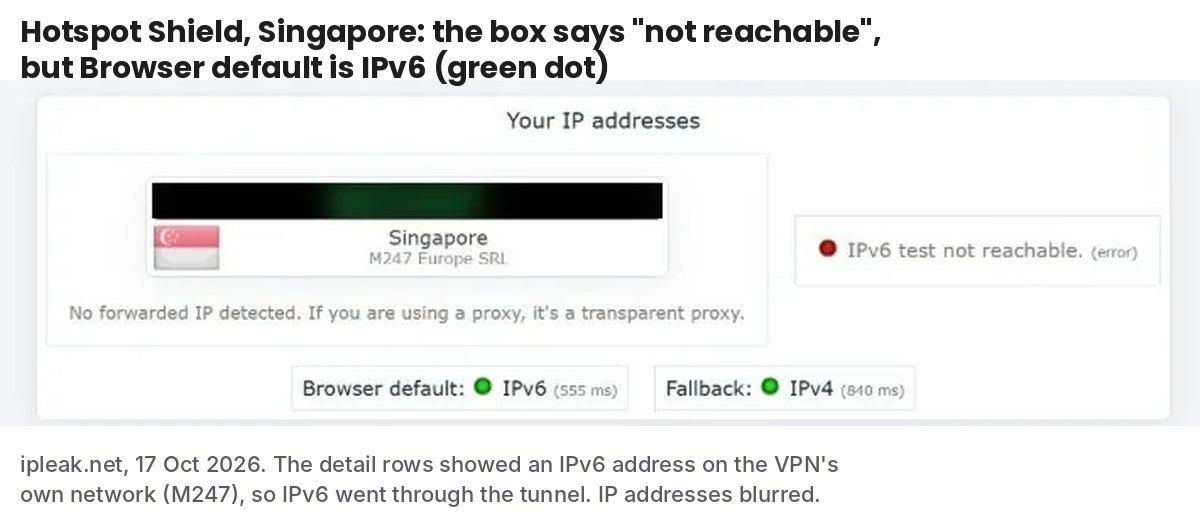
| Hotspot Shield (free plan) | Singapore | The box said “not reachable”, but “Browser default: IPv6” was green and the detail showed an IPv6 address on the VPN’s network (M247, Singapore) | IPv6 carried through the tunnel. No leak |
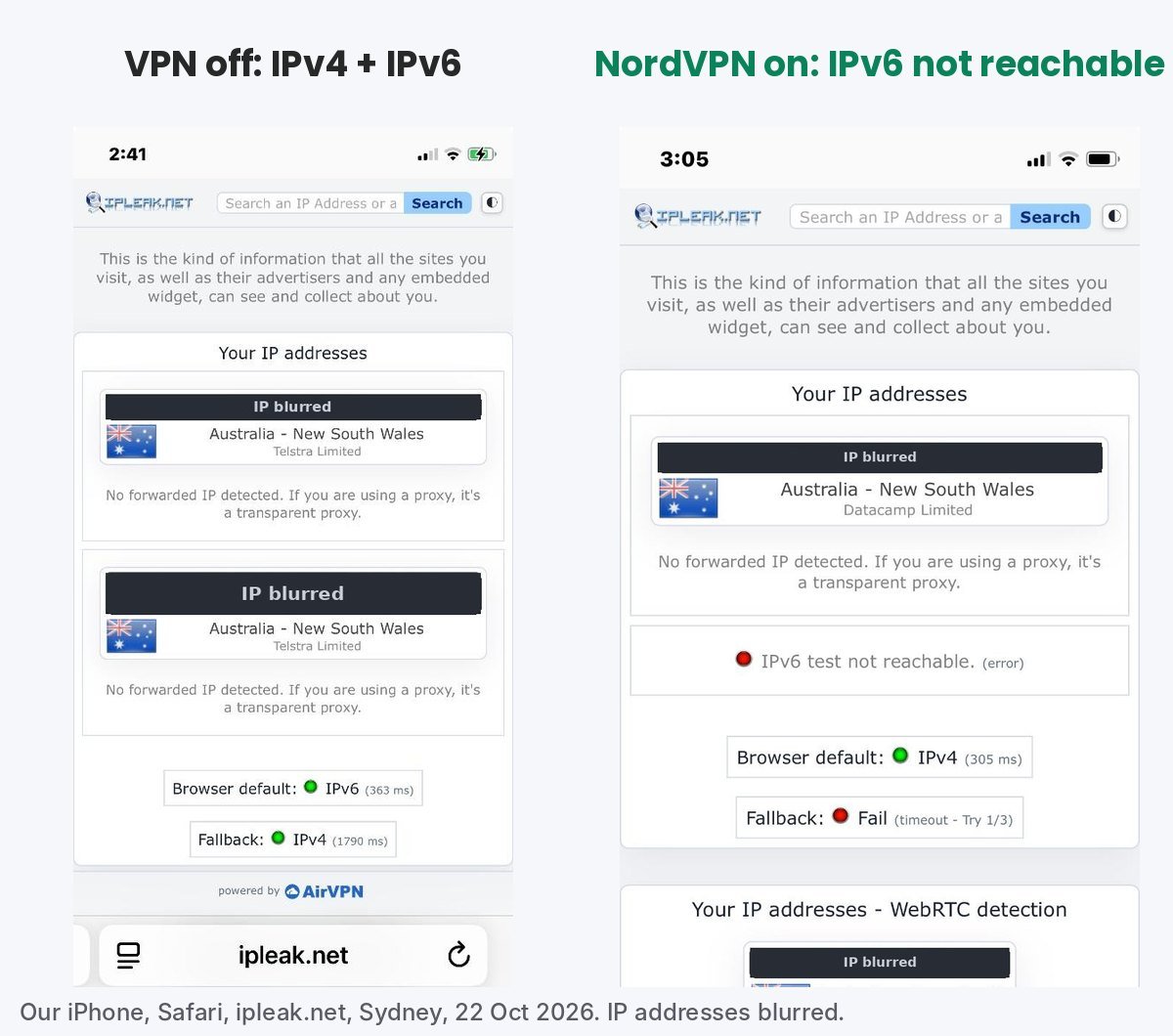
| NordVPN (iPhone app) | Sydney | “Not reachable”. With the VPN off, the same phone showed a Telstra IPv6 address | IPv6 blocked while connected. No leak |
| iCloud Private Relay (not a VPN; our comparison) | Safari only | An IPv6 address on Akamai’s network, still in New South Wales | IPv6 relayed, for Safari. The Google app on the same phone still showed our real IPv6 |
So of the five VPNs, four gave a clear answer and both answers were good: two block, two carry. The one we can’t speak for is CyberGhost, and that’s a lesson about the test rather than the product. Our laptop’s IPv6 simply wasn’t working that evening, with or without the VPN, so the test had nothing to measure. We say so on its review instead of guessing.
The Hotspot Shield row is the one worth re-reading. The headline box said IPv6 wasn’t reachable, while two lines lower the page had plainly connected over IPv6 and showed the address. Had we stopped at the box, we’d have written “blocked”. The address was the VPN’s, so there was no leak either way, but it’s a reminder that these pages need reading, not glancing.
Block it or carry it: the two honest answers
If you’re choosing a VPN and IPv6 is on your list, here’s how to think about the two approaches.
- Blocking IPv6 (Proton VPN and NordVPN did this on our devices) is simple and hard to get wrong. The trade-off is that you lose IPv6 while connected, which almost nothing you do day to day will notice, because every site still works over IPv4.
- Carrying IPv6 (hide.me and Hotspot Shield did this) keeps your connection modern and gives you a VPN-side IPv6 address. It’s the better engineering, with one more thing that has to be right: the provider’s IPv6 address must be in the location you picked, and its DNS must stay inside the tunnel too. In our two cases it was.
What to avoid is a VPN that does neither. If a leak test shows a real IPv6 address with the VPN on, the app’s “connected” label is only half true. The provider’s own setting names vary: look for “IPv6 leak protection”, “Block IPv6” or “Disable IPv6”, and check it’s on. Our kill switch guide covers the related setting that stops traffic when the tunnel drops.
Speed and gaming: does IPv6 change anything?
People ask whether IPv6 is faster. On paper it has a simpler header and no address translation in the way, and some measurements show it a touch quicker to some services. In practice the difference is small next to the things that decide your speed: your plan, the server’s distance and how busy it is. We measure VPN speed in every hands-on test, and we haven’t measured IPv4 against IPv6 separately, so we won’t put a number on it. If you want to know what a particular VPN did to our download speed, that’s on each review.
For gaming consoles the honest answer is the same. An Xbox or PlayStation on a dual-stack connection will use IPv6 where a game service supports it, and your VPN’s IPv6 policy applies the same way: blocked means the console falls back to IPv4 through the tunnel, carried means it uses the VPN’s IPv6. Neither makes your game faster by itself. If low ping is the goal, our gaming VPN guide explains which measurement to look at.
Read your own IPv6 result in two minutes
Open a leak test with the VPN off, then again with it on. ipleak.net shows both addresses; our own IP leak test does the same in the browser. The IPv6 line will say one of three things, and they mean different things.
- An address that belongs to your provider (the ISP name matches your home connection) while the VPN is on. That’s a leak. Go to the fixes below.
- An address that belongs to the VPN (the ISP name is a hosting network in the server’s city, not your provider). The VPN is carrying IPv6. Fine.
- “IPv6 test not reachable”. Three possible reasons: the VPN is blocking IPv6 (good), your connection has no working IPv6 at the moment (neutral), or the page couldn’t finish the test. To tell them apart, run the test with the VPN off. If IPv6 shows an address with the VPN off and “not reachable” with it on, the VPN is blocking it. If it’s “not reachable” both ways, your connection isn’t offering IPv6 right now, and the test can’t tell you anything about the VPN. That was our CyberGhost evening.
Scroll down the ipleak page as well. In our Hotspot Shield test the summary box and the detail lines disagreed, and the detail was right. Our guide on checking whether your VPN is working walks through the whole page, including WebRTC.
If your VPN leaks IPv6: three fixes
- Turn on the VPN’s own IPv6 protection. Most current apps have a setting for it. It’s the right fix because it follows you to every network.
- Switch IPv6 off on the device. On Windows: Settings, Network and internet, your adapter, Edit under IP assignment, or untick “Internet Protocol Version 6” in the adapter’s properties. On macOS: System Settings, Network, your connection, Details, TCP/IP, set Configure IPv6 to “Link-Local Only”. On iPhone and Android there’s no user switch for it, which is why the VPN’s own setting matters more on phones. This is a blunt fix: it turns IPv6 off for everything, not only while the VPN is on.
- Change provider. If the app has no IPv6 setting and leaks with the defaults, that tells you something about how current the app is. Our pricing comparison lists the 17 providers we track, and the six we’ve tested hands-on are marked.
IPv4 vs IPv6 questions
Is IPv6 better than IPv4?
For the internet, yes: it has enough addresses and a cleaner design. For your privacy, it’s more identifying, because your device usually gets a public address of its own and the household part of it can stay fixed. “Better” depends on which side of that you’re asking about.
Is IPv6 faster than IPv4?
Sometimes slightly, rarely noticeably. Server distance, load and your plan matter far more. We haven’t measured the two separately in our VPN tests, so we don’t quote a figure.
Is IPv6 more secure than IPv4?
IPv6 was designed with encryption support (IPsec) built in, but in everyday use your security comes from HTTPS and your VPN, not from which address family carries the packets. The practical security question is whether your VPN handles IPv6 at all.
Should I disable IPv6 when using a VPN?
Only if your VPN leaks it and has no setting to stop that. If the VPN blocks or carries IPv6 itself, as the four we could measure did, leave your device alone.
What does “IPv6 test not reachable” mean?
Either the VPN is blocking IPv6, or your connection has no working IPv6 right now, or the test failed. Run it with the VPN off to find out which. See the two-minute check above.
Does IPv6 matter for Xbox or PlayStation?
Consoles use IPv6 where the game service supports it. With a VPN, the same block-or-carry rule applies. It won’t change your ping on its own.
Can a website see both my IPv4 and IPv6 address?
It sees whichever one your device used to reach it, and leak-test pages deliberately fetch over both to show you each. With a working VPN, both should belong to the VPN or the IPv6 line should be blocked.
Sources
- HidVPN hands-on test logs: Proton VPN (9 Oct 2026), CyberGhost (10 Oct), hide.me (16 Oct), Hotspot Shield (17 Oct), NordVPN iPhone app and iCloud Private Relay (22 Oct 2026); Windows 11 laptop and iPhone, Telstra home connection, Sydney; ipleak.net and dnsleaktest.com.
- IETF RFC 8200: Internet Protocol, Version 6 (IPv6) Specification.
- IETF RFC 4941: Privacy Extensions for Stateless Address Autoconfiguration in IPv6.
- Google IPv6 adoption statistics and Internet Society Pulse: IPv6 reaches majority (Google’s measurement passed 50% for the first time in March 2026).
See NordVPN’s current plans · See FastestVPN’s current plans. Prices change often, so check the current plan before you buy.