
HidVPN earns a commission if you buy through some of the links on this page. It doesn’t change what we write. Our affiliate disclosure.
Table of Contents
- You have two locations, and a VPN moves one
- What a website sees before and after: our own results
- Six things that can still place you
- On an iPhone: Find My, Maps and the apps that use GPS
- The one tell a VPN can’t hide: distance
- Picking the server location that fits what you want
- Check what your own VPN is showing
- VPN location questions
- Sources
Key Takeaways
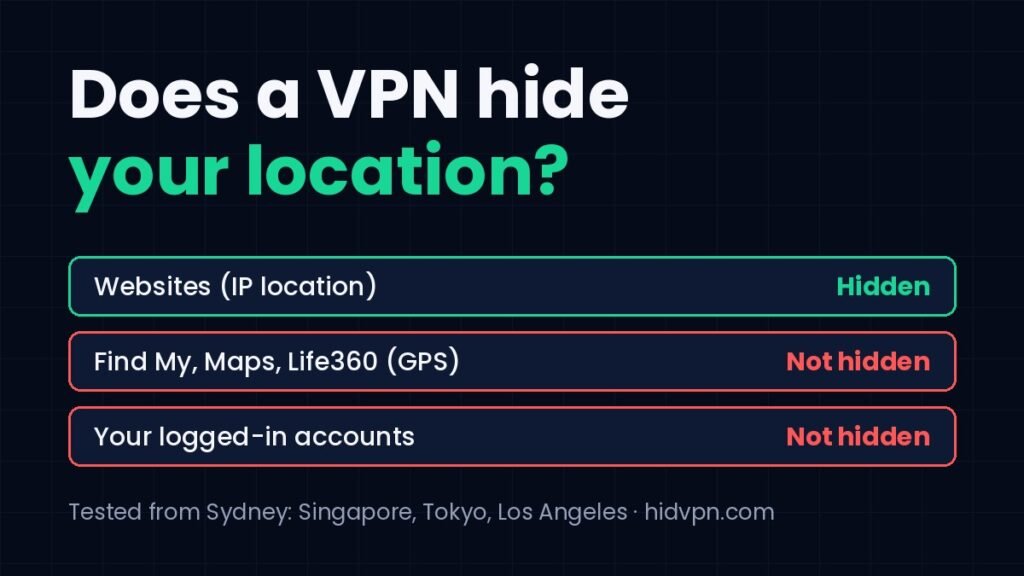
- A VPN hides your IP-address location. Websites see the city and country of the VPN server instead of your home connection. In our tests, Sydney became Singapore, Tokyo or Los Angeles depending on the server.
- It does not hide your GPS location. Find My, Life360, Google Maps and any app that asks for location permission still get your real position from the phone’s own sensors.
- Sites can still place you through other clues: an account you’re logged into, your browser’s time zone and language, saved cookies, and how long your connection takes to answer.
- Free plans may not let you choose: Proton VPN’s free tier put us in Tokyo automatically, and Hotspot Shield’s free plan offered five locations with no Australian one.
- Apple’s iCloud Private Relay is different: it hides your IP but keeps you in your own region by design.
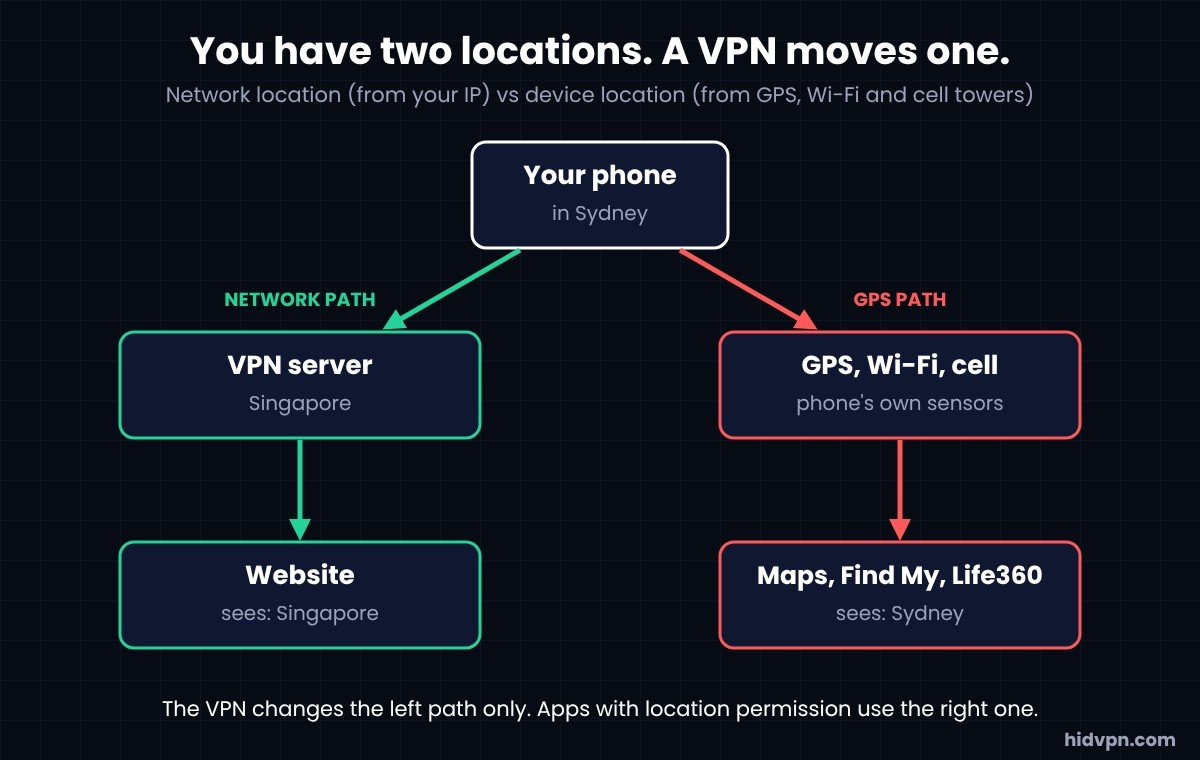
Yes, with a condition most answers skip. A VPN hides the location that websites work out from your IP address. It doesn’t touch the location your phone works out from satellites and nearby Wi-Fi. Those are two separate systems, and almost every “does a VPN hide my location” question comes down to which one you mean.
This guide splits them apart. First what a VPN actually changes, with what we saw on our own devices in Sydney. Then the six things that can still place you with a VPN on, and the iPhone cases (Find My, Life360, Maps) that people ask about most.
You have two locations, and a VPN moves one
Every connection carries an IP address, and companies keep databases that map address ranges to cities. When a site says “it looks like you’re in Sydney”, that’s a database lookup on your IP, not a measurement. It’s usually right to the city and sometimes wrong by a long way.
A VPN routes your traffic through a server somewhere else and gives you that server’s address. The database lookup now returns the server’s city. That’s the whole trick, and it works for anything that places you by IP: websites, web apps, most desktop software.
Your phone’s second location comes from GPS, nearby Wi-Fi networks and cell towers. Apps ask for it through the operating system’s location permission. A VPN never sees that data and can’t change it. Find My knows where your iPhone is whether or not NordVPN is connected, because it isn’t asking the network.
What a website sees before and after: our own results
✓ From our hands-on tests, Sydney, October 2026
How we tested
- Windows 11 laptop and an iPhone on home Wi-Fi (Telstra) in Sydney
- Tools: ipleak.net for the IP address, its mapped location and the registered owner; fast.com for the latency figures
- Dates: Proton VPN 9 Oct, CyberGhost 10 Oct, Hotspot Shield 17 Oct, NordVPN (iPhone) and iCloud Private Relay 22 Oct 2026. Our real addresses are blurred in every screenshot on the review pages
| Service and server | Location the site showed | Registered owner of the address | Latency we measured |
|---|---|---|---|
| Nothing on (baseline) | Australia, New South Wales | Telstra (our provider) | 5 to 6 ms |
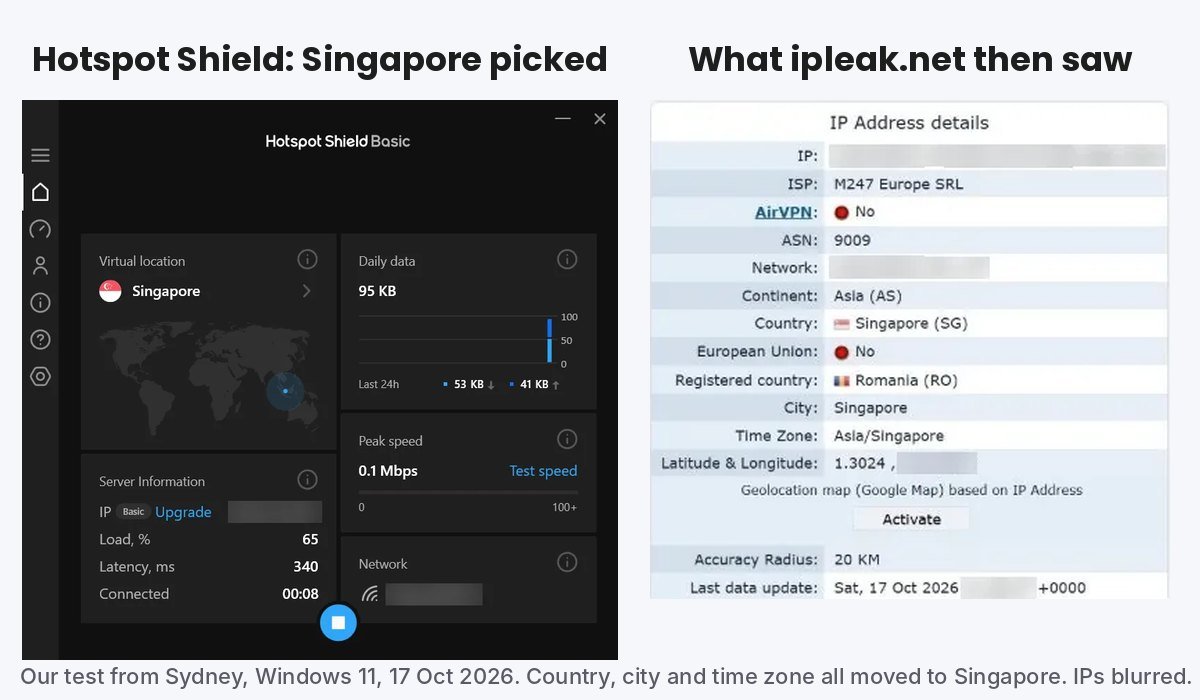
| Hotspot Shield, Singapore (free plan) | Singapore | M247, a hosting company registered in Romania | 324 ms |
| Proton VPN, Japan (free plan, picked for us) | Tokyo, Japan | Datacamp, registered in the UK | 114 ms |
| CyberGhost, Los Angeles (trial) | United States; fast.com placed us in Burleson, Texas | CyberGhost’s own range | 180 ms |
| CyberGhost, Sydney | Sydney, Australia | GSL Networks, registered in the US | Not measured separately |
| NordVPN, Sydney (iPhone) | Australia, New South Wales | Datacamp, registered in the UK | Not measured on the phone |
| iCloud Private Relay (Safari, not a VPN) | Australia, New South Wales | Akamai | Not measured |
Watch: our Sydney to Singapore location test (HidVPN Short)
Three details from that table matter more than the headline.
- The location moved every time we asked it to. Singapore, Tokyo and the United States all showed as the site’s best guess, with no trace of New South Wales. That’s the part a VPN does well.
- “Registered in” is not “located in”. Hotspot Shield’s Singapore address belongs to a company registered in Romania. Proton’s Tokyo address and NordVPN’s Sydney address both belong to a UK-registered hosting firm. Location databases use where the address is used, not where the owner is incorporated, so the city was still right. But a site that checks ownership can tell it’s looking at a hosting network rather than a home connection, which is how some sites know you’re on a VPN at all.
- Databases disagree. With CyberGhost’s Los Angeles server, ipleak said United States while fast.com placed the same address in Burleson, Texas, about 2,000 km away. Both agreed on the country. If a site tells you you’re in a city you didn’t pick, that’s usually the database, not the VPN.
Two free-plan limits showed up as well. Proton VPN’s free tier connected us to the fastest free server it had, which was Japan, and clicking a different country opened an upgrade prompt. Hotspot Shield’s free plan listed five locations (Auto, Los Angeles, New York, Singapore, United Kingdom) and no Australian one. If choosing the location is the point, check the plan offers the choice.
Six things that can still place you
With the VPN connected and the IP location moved, a website can still narrow down where you are through other channels. None of these is a VPN failure. They’re separate systems.
| Clue | What it reveals | Does a VPN change it? | What does |
|---|---|---|---|
| Your account | Address and country on file with Google, Apple, your bank, a shop | No | Nothing short of a different account. Being logged in overrides any IP guess |
| Browser time zone | Your clock’s offset, readable by any page’s script | No | Changing the device time zone, which breaks other things |
| Browser language | en-AU, de-DE and so on | No | Browser language settings |
| Cookies and saved logins | That you’re the same visitor who was in Sydney yesterday | No | A fresh browser profile or private window |
| GPS and Wi-Fi positioning | Your position to within metres, when an app has location permission | No | Revoking the permission in Settings, or turning Location Services off |
| Latency | Roughly how far you are from the server (see the next section but one) | Partly. The site sees the VPN server’s distance plus yours | Nothing. Physics |
Our guide on what a VPN does and doesn’t protect covers cookies and fingerprinting in more depth. The short version for location: a VPN moves the network clue, and you handle the others separately, or accept them.
On an iPhone: Find My, Maps and the apps that use GPS
This is the most searched version of the question, so here it is plainly.
- Find My shows your real location with a VPN on. It uses the phone’s GPS, Wi-Fi and cellular positioning and reports through your Apple Account. The VPN tunnel carries that report, encrypted, to Apple, and the report says where the phone really is.
- Life360, Google Maps, Uber, weather apps: the same. Anything you granted location permission to gets the sensor position. Google Maps will route you from your actual street with NordVPN connected to Singapore.
- Safari and websites: these see the IP location, so they’ll place you at the VPN server. Unless the site asks for location permission through the browser prompt, in which case Safari gives it the sensor position, and the VPN doesn’t matter.
- iCloud Private Relay is often mistaken for a VPN here. On our iPhone it hid our IP in Safari but kept the location in New South Wales, because Apple designed it to keep you in your region. It can’t move you. Our Private Relay vs VPN guide has the full test.
If what you want is for an app to stop knowing where you are, the control is Settings, Privacy & Security, Location Services, per app. A VPN is the wrong tool for that job, and no VPN provider’s marketing should tell you otherwise.
The one tell a VPN can’t hide: distance
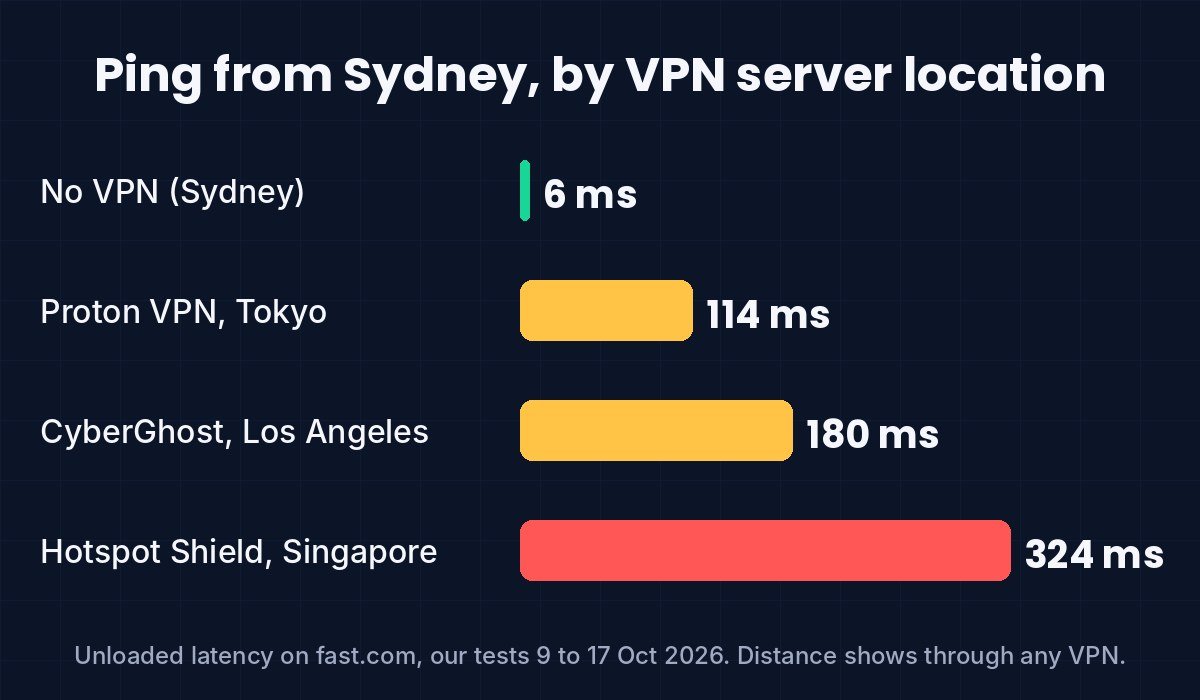
Look at the latency column in our table. Sydney to a Sydney server: 5 ms. To Singapore: 324 ms. To Tokyo: 114 ms. To Los Angeles: 180 ms. Light in fibre takes time, and a connection that answers in 300 ms is a long way from the server, whatever the IP database says.
A website can’t read your latency directly the way it reads your IP, but services that care (online games, some fraud systems) measure round-trip times and notice when a “Singapore” visitor responds like someone on the other side of an ocean. It’s one signal among many, and it doesn’t reveal your city, only roughly how far you are. We mention it because it’s the one piece of location information a VPN adds to rather than removes: the site now sees the server’s distance from you on top of its own.
The practical consequence is the one we measured in every test: the further the server, the slower the response. Our gaming VPN guide is built around that number.
Picking the server location that fits what you want
- Privacy at home, no location change wanted: pick the server nearest you. Your IP changes, your city barely does, and latency stays low. NordVPN and CyberGhost both gave us a Sydney address from Sydney.
- Appear in another country: pick a server there and check the result on a leak-test page before relying on it. Confirm the plan lets you choose; two free plans we tried didn’t, or offered a short list.
- Appear in a specific city: harder. Databases place the address, and as our Los Angeles result showed, they can land in a different city in the same country. Providers with city-level servers help, and you still check.
- Stop an app tracking you: not a VPN job. Use the location permission.
Prices and plan limits for the 17 providers we track are in our pricing comparison, and the six we’ve tested hands-on are marked. If you’re starting from zero, our guide on whether you need a VPN comes first.
Check what your own VPN is showing
- With the VPN off, open ipleak.net or our IP leak test. Note the city and the provider name. That’s your baseline.
- Connect to the server you want and reload. The city should be the server’s, and the provider name should be a hosting company, not your home provider.
- Check the WebRTC line on the same page. It should show the VPN address too. If it shows your baseline, your browser is leaking it; our is-my-VPN-working guide covers the fix.
- On a phone, open a maps app. It will still show your real position. That’s expected, not a leak.
VPN location questions
Does a VPN hide your location from websites?
From the IP-based guess, yes. Websites see the VPN server’s city and country. In our tests Sydney became Singapore, Tokyo or the United States depending on the server we picked.
Does a VPN hide your location on iPhone?
For Safari and websites, yes. For Find My, Maps, Life360 and any app with location permission, no: those use GPS and Wi-Fi positioning, which the VPN doesn’t touch.
Can a VPN change your location?
It changes your IP-address location to the server’s. It can’t change your GPS position. Whether a particular website accepts the new location depends on what else it checks, such as your account or time zone.
Does a VPN hide your location from Find My or Life360?
No. Both read the phone’s own positioning and report through your account. The VPN carries that report but doesn’t alter it.
Why does a site show a different city from the server I chose?
IP-to-location databases disagree. Our Los Angeles server was placed in Burleson, Texas by one service and simply “United States” by another. The country is usually right; the city is a guess.
Does iCloud Private Relay hide my location?
It hides your IP address from sites in Safari but keeps you in your own region on purpose. On our iPhone it still showed New South Wales. It isn’t built to move you.
Can my internet provider still see my location with a VPN?
Your provider always knows where your connection is: they installed it. A VPN stops them seeing which sites you visit, not where you live. Our guide on what your ISP can see explains the split.
Sources
- HidVPN hands-on test logs: Proton VPN (9 Oct 2026), CyberGhost (10 Oct), Hotspot Shield (17 Oct), NordVPN iPhone app and iCloud Private Relay (22 Oct 2026); Windows 11 laptop and iPhone, Telstra home connection, Sydney; ipleak.net, dnsleaktest.com, fast.com.
- Apple Support: About iCloud Private Relay (region-based address; read 22 October 2026).
- Apple Support: About privacy and Location Services (how iPhone location is determined; read 22 October 2026).
See NordVPN’s current plans · See FastestVPN’s current plans. Prices change often, so check the current plan before you buy.