
Reader-supported: if you buy through some links on this page we may earn a commission, at no extra cost to you. It doesn’t change what we write. How we make money.
Surfshark Alternative ID is a spare online identity that comes with every Surfshark plan: a made-up name, date of birth and address, plus an email alias that forwards to your real inbox. You use it to sign up for shops, newsletters, forums and one-off accounts, so your real name and email aren’t in that sign-up record if the site leaks.
It won’t make you invisible, and it isn’t a VPN feature. It’s a forwarding inbox with a fake profile attached. That’s useful for a lot of sign-ups and wrong for others, like your bank or anything tied to your legal name. Below is how it works, what it can’t do, what the add-on phone number costs, and when a free alias service does the same job.
Key takeaways
- Alternative ID is included with every Surfshark plan at no extra cost. When we started Surfshark’s 7-day trial in October 2026, the account page listed “VPN + Alternative ID”.
- Mail sent to the alias, including login, verification and two-factor emails, is forwarded to your real inbox, according to Surfshark.
- Expect up to three alias addresses at a time (reviews describe the limit slightly differently), and Security.org says you can’t send replies through the alias.
- The Alternative Number add-on is a US number only and costs extra. It can receive calls and texts and reply to texts.
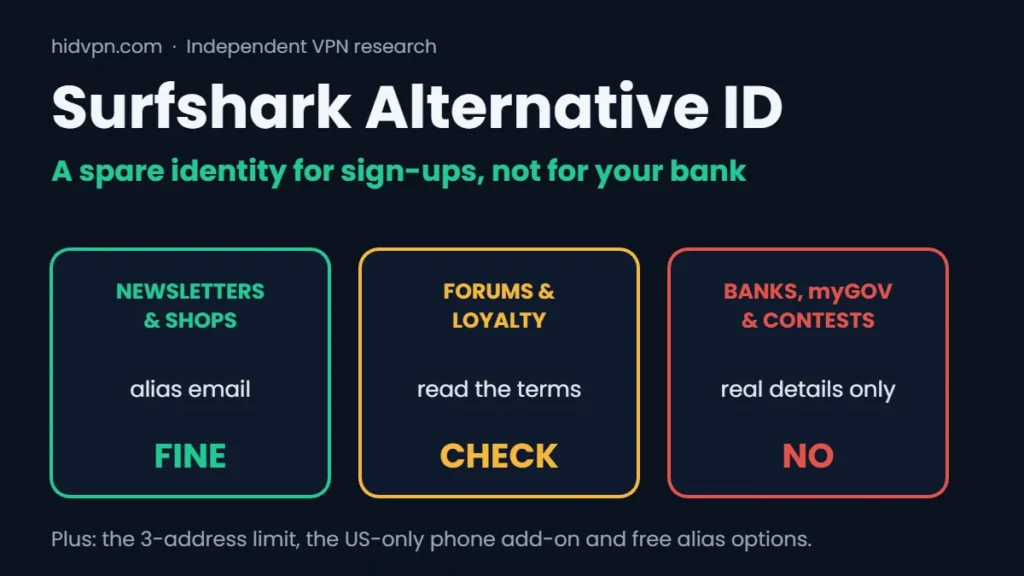
- Don’t use it for banks, government services or anywhere that checks your real identity, and check a site’s terms before you give it a made-up name.
On this page
- How Alternative ID handles your mail
- What the generated identity includes
- Alias limits, replies and what happens when you cancel
- Alternative Number: the paid phone add-on
- Where a fake identity is fine, and where it isn’t
- Setting it up and checking that forwarding works
- Other alias services, some of them free
- How it fits with the VPN itself
- FAQ
- Should you turn it on?
How Alternative ID handles your mail
When you create an Alternative ID, Surfshark gives you a new email address and links it to the address you already use. A site you sign up to sees the alias. Anything it sends there, from order confirmations to password-reset links, is passed on to your real inbox. Surfshark’s help centre says login, two-factor and verification emails are all forwarded, which is the part that matters most: you can still get back into an account you made with the alias.
The point is damage control. If that site is breached later, the leaked record holds a made-up name and an address that only exists to forward mail. Your real email, the one tied to your bank and your Apple or Google account, wasn’t given in that sign-up (though the site may still hold it from an earlier order or payment). If the alias starts getting spam, first change the email on any account you want to keep and confirm the change, then delete the alias. Sign-ups on your other aliases keep working.
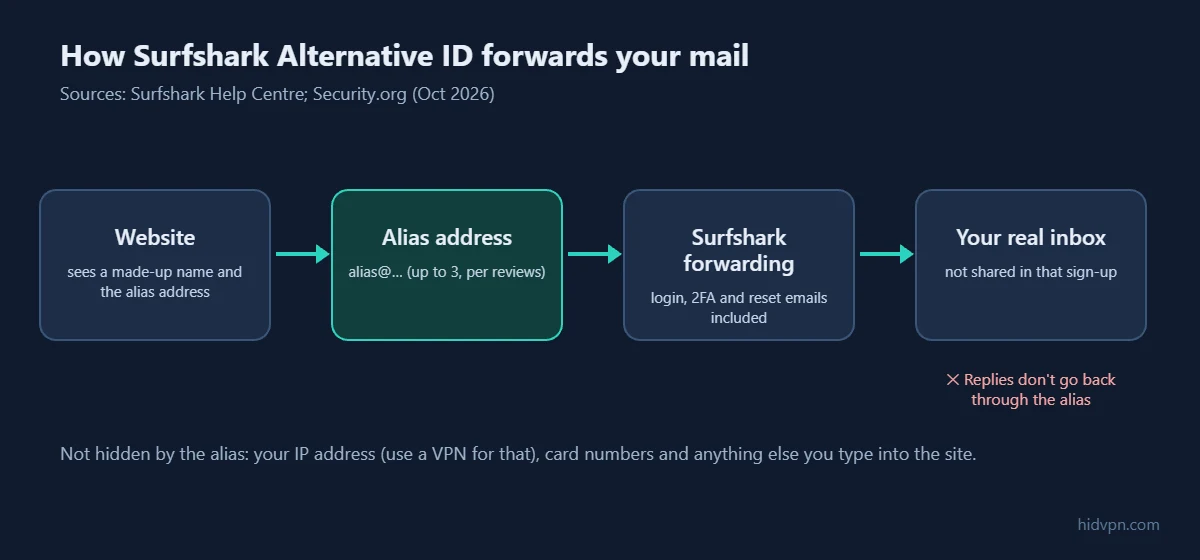
Two things stay the same. The site still sees your IP address unless you’re on a VPN, and anything you type into the site (a card number, a delivery address) is real data. The alias protects the email field and the profile fields you choose to fill with generated details. Forwarding also adds Surfshark to the path your mail takes, so you’re trusting it with those messages; it isn’t end-to-end encryption.
What the generated identity includes
Surfshark’s product page says Alternative ID can generate “a new name, age, address, email, and phone number”. You pick a few basics, including gender, age and country, and it fills in the rest. Security.org, which updated its review in October 2026, lists the persona countries as Australia, Brazil, Denmark, Germany, Portugal and the US, or random. An Australian persona gives you Australian-format details, though some sites will still reject them. Leave address fields blank where you can. A generated street address can belong to a real property, so never use it for deliveries, billing or paper mail, and never use generated details to get past a residency or eligibility check.
The phone number in that list is the separate Alternative Number add-on. The base Alternative ID gives you the name, date of birth, address and email.
To fill in sign-up forms, Surfshark offers browser extensions for Chrome, Firefox and Edge with an auto-fill option, and you manage your identities at my.surfshark.com/alternative-id.
Alias limits, replies and what happens when you cancel
Three of them are worth knowing before you rely on it.
- Three addresses, give or take. Reviews describe the cap differently. Security.org (October 2026) says you can keep up to three Alternative IDs at once, each with its own email. Hongkiat’s November 2024 guide describes one persona with up to three alias emails linked to it. Either way, plan on three addresses at most. Security.org says you can delete and replace them as often as you like. Compared with alias services that give you dozens, three means you’ll group sign-ups (one for shopping, one for newsletters, one for trials) rather than give every site its own address.
- Forwarding only, no replies. Security.org says “you cannot send replies through masked addresses”. If a shop’s support team writes to the alias and you reply from your inbox, your reply comes from your real address. For a back-and-forth conversation, use your normal email or a service that supports replies.
- It needs an active Surfshark plan. Surfshark’s own page says so. If your subscription ends, plan for those aliases to stop forwarding, and move any account you care about to another address first.
TechRadar’s reviewer, who used an Alternative ID for a week (in a piece Surfshark paid to sponsor, though TechRadar says the editorial is independent), found sign-ups for newsletters and gaming accounts went through without extra checks. The one thing he missed was a password manager. Surfshark doesn’t bundle one, so the passwords for those alias accounts need to live somewhere else.
Alternative Number: the paid phone add-on
Many sites ask for a phone number as well as an email. Alternative Number is Surfshark’s answer: a separate virtual US number you can give out instead of your own. According to Surfshark’s product page, it is sold separately on top of any plan, is available only as a US number, and can receive calls and texts. You can send a text only in reply to one you received. Tom’s Guide (December 2024) says the calls and messages arrive in the Surfshark app, not on your normal phone line, and that you can’t make outgoing calls.
On price, when we started the Surfshark trial on 22 October 2026, checkout offered Alternative Number as an optional add-on at $2.29 a month. We didn’t buy it, and our notes don’t record whether that price was in US or Australian dollars. Security.org lists it at $2.49 a month billed yearly, and Tom’s Guide quoted $5 a month at launch in December 2024 (both in US dollars). Prices change often, so check the current plan before you buy.
A US-only number has limits for Australian readers. A site that wants an Australian mobile for verification may reject it, and many services block virtual numbers for two-factor codes. Treat it as a number for sign-ups and marketing texts, and keep your real number for anything you’d need to recover.
Where a fake identity is fine, and where it isn’t
Using a made-up name on a newsletter sign-up is ordinary privacy hygiene. Using one where the law or a contract expects your real details is a different matter, and Surfshark’s own terms ban unlawful use or use that breaks another site’s rules.
| Good fit for an alias | Use your real details |
|---|---|
| Shop accounts you use once or twice | Banks, super funds, brokers |
| Newsletters and mailing lists you might drop | myGov, ATO, Service NSW and other government sites |
| App downloads and one-off sign-ups | Employers, payroll, anything tied to a tax file number |
| Forums, comment sections, Wi-Fi sign-in pages | Your Apple, Google or Microsoft account (your account recovery lives there) |
| Comment sections on sites you don’t know | Medical, insurance and travel bookings that check ID |
| Price-alert and stock-alert emails | Contests and prize draws (winners must usually prove who they are) |
Most of the right column either has a legal reason to know who you are or may ask you to prove it later. Your Apple, Google and Microsoft accounts are there for a different reason: they control recovery for everything else, so they belong on an address you’ll keep for years.
Setting it up and checking that forwarding works
- Sign in at my.surfshark.com and open Alternative ID.
- Choose the persona basics, such as gender, age and country. Change the email address to something you’ll recognise if Surfshark lets you; its page says the address can be customised.
- Install the browser extension if you want auto-fill.
- Before you use the alias anywhere, send it a test email from another account. Check that it lands in your real inbox. Tom’s Guide found forwarded mail went to the spam folder by default, with a setting to turn that off.
- Sign up to one low-stakes site and trigger a password reset. Make sure the email arrives and you can finish the reset. That proves the reset route works today.
- Write down which alias you used where, in your password manager’s notes field. With only three addresses, you’ll want to know which one to retire if spam starts.
Other alias services, some of them free
If all you want is a forwarding email address, you don’t need a VPN subscription to get one. The table uses each provider’s own pages, except the Surfshark row, which relies on the reviews cited above. Apple’s option isn’t free on its own: it comes with a paid iCloud+ plan.
| Service | Cost | Aliases | Reply from the alias | Generated name and address |
|---|---|---|---|---|
| Surfshark Alternative ID | Included with a Surfshark plan | Up to 3 at a time (per reviews) | No, per Security.org | Yes |
| Apple Hide My Email | Needs iCloud+ | Multiple (no limit stated by Apple) | Yes | No |
| Firefox Relay | Free tier; Premium paid | 5 on the free tier, unlimited on Premium | Premium only (100 replies a day) | No |
| SimpleLogin (Proton) | Free tier; Premium $36 a year (USD) | 10 on the free tier | Yes, including on the free tier | No |
Apple users who already pay for iCloud+ get the closest equivalent for no extra money, and it supports replies. iCloud+ also includes Private Relay, which we compare with a real VPN in iCloud Private Relay vs VPN. SimpleLogin is the most generous free option. What Alternative ID adds is the generated persona (name, date of birth and address) and the optional US number, all in the same account as your VPN.
Alternative ID is a handy extra if you’re buying Surfshark anyway, and a weak reason to pick Surfshark on its own. If the VPN is what you need, compare it on the VPN first in our Surfshark review, then count Alternative ID as a bonus.
How it fits with the VPN itself
The VPN and Alternative ID protect different things. The VPN hides your IP address from the sites you visit and hides which sites you visit from your internet provider or the Wi-Fi you’re on. Alternative ID hides your real name and email from the sites you sign up to. Neither one does the other’s job, which is the gap our guide on whether a VPN really protects your privacy goes into.
A site that knows your real email can link your activity across devices and networks whatever IP address you show it, which is one of the things our guide to what a VPN does and doesn’t hide covers. That’s one reason a VPN on its own won’t stop targeted emails.
Used together, a site sees a VPN server’s IP, a made-up name and a forwarding alias. That’s a reasonable setup for low-trust sign-ups on public Wi-Fi (our guide to what can go wrong on public Wi-Fi covers the network side). It still isn’t anonymity. Your payment details, your writing and your logged-in Google account can all identify you, which is why we treat any “become anonymous” claim with suspicion, as we explain in can a VPN be tracked.
If you’re comparing Surfshark with the alternatives, Surfshark vs NordVPN and ExpressVPN vs Surfshark cover the VPN side, and our Surfshark alternatives guide lists other providers that bundle extras. Prices for all 17 providers we track are in the VPN pricing comparison.
FAQ
Is Surfshark Alternative ID free?
It’s included with every Surfshark plan at no extra cost, but you need an active Surfshark subscription to use it. The Alternative Number phone add-on costs extra.
How many Alternative IDs can I have?
Up to three alias addresses at a time, based on the reviews we found. You can delete one and create a replacement.
Can I reply to emails from my Alternative ID address?
No, according to Security.org. A reply you send from your inbox comes from your real address.
Does Surfshark Alternative ID work in Australia?
The email alias works anywhere you can receive email, and Security.org lists Australia as one of the persona countries. The Alternative Number add-on only offers US numbers.
Is using a fake identity online legal?
Using a pseudonym for a newsletter or a low-stakes account is common, but check each site’s terms, because false details can breach them. Giving false details to a bank, a government agency or any service that legally checks identity can be unlawful. Surfshark’s own terms ban unlawful use. This isn’t legal advice.
Do I need the Surfshark VPN to use Alternative ID?
You need a Surfshark plan, and every plan includes the VPN. You don’t need to be connected to the VPN for the alias to forward mail.
What happens to my aliases if I cancel Surfshark?
Alternative ID needs an active subscription, so plan for the aliases to stop working. Move any account you want to keep to another address before your plan ends.
Should you turn it on?
If you already pay for Surfshark, yes: set up one identity for shopping and newsletters, run the password-reset check, and keep your real email for the accounts that matter. If you don’t, choose a VPN on its VPN merits, and get a free alias from SimpleLogin or Firefox Relay, or Hide My Email if you’re on iCloud+.
Read our Surfshark review (tested in Sydney)
Sources
- Surfshark: Alternative ID and Alternative Number product page (checked 19 Nov 2026)
- Surfshark Help Centre: What is Alternative ID?
- Security.org: Surfshark Alternative ID review (updated 7 Oct 2026)
- TechRadar: I spent a week using an alternative identity (31 Jan 2025, sponsored by Surfshark)
- Hongkiat: How to protect your online privacy with Surfshark’s Alternative ID (updated 28 Nov 2024)
- Tom’s Guide: Surfshark’s Alternative Number (21 Dec 2024)
- Apple Support: How to use Hide My Email with iCloud+
- Mozilla Support: Firefox Relay Premium FAQ
- SimpleLogin pricing
- HidVPN Surfshark test log, 22–23 October 2026 (account page and checkout add-ons seen during the 7-day trial)