
HidVPN earns a commission if you buy through some of the links on this page. It doesn’t change what we write. Our affiliate disclosure.
Table of Contents
Key Takeaways
- Your internet provider can usually tell you’re connected to a VPN, but not which sites you visit through it.
- Whether police can link activity back to you mostly depends on what the VPN company kept. In court cases, providers that kept connection records handed them over, and in the cases on record, providers that kept none had nothing useful to give.
- A VPN doesn’t stop identification through accounts you log in to, payment details, browser fingerprinting, leaks or malware.
- Using a VPN is legal in most countries, including Australia, the US and the UK. A few governments block or restrict them.
- A provider’s no-logs claim is only as good as its proof: independent audits and court records count for more than marketing.
“Can a VPN be tracked?” sounds like one question, but it’s really three. Can anyone tell you’re using a VPN? Can they see what you’re doing through it? And can they trace that activity back to you? The answers are different, and the third one mostly comes down to a single factor: what the VPN company kept.
This guide uses real court cases and published research rather than marketing claims. It covers who can see what, what happened when police asked VPN companies for records, and the everyday mistakes that identify people even when the VPN works perfectly.
Two different questions: “using a VPN” and “what you did”
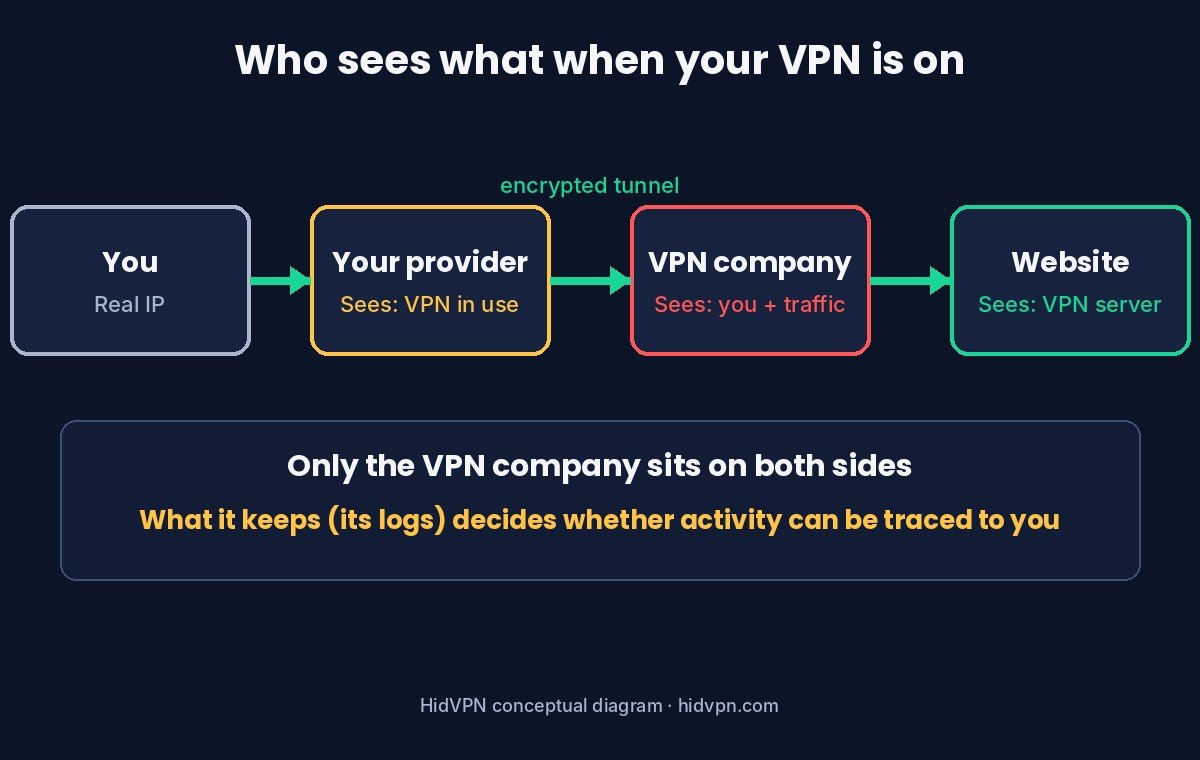
With a VPN on, your traffic travels encrypted from your device to the VPN server, then out to the internet from the server’s address. That splits the picture:
| Who | Can they tell you use a VPN? | Can they see which sites you visit? | Do they know your real IP? |
|---|---|---|---|
| Your internet provider | Usually yes | No | Yes, it’s your connection |
| Work or school network | Usually yes | No on your own device; on a device they manage, monitoring software can see it | Yes, on their network |
| Websites and apps | Sometimes, from known VPN addresses | Only their own site | No, they see the VPN server |
| The VPN company | Yes | Technically yes | Yes |
| Police with a court order | Via your provider | Only if the VPN company kept records | Only if records link the two |
The VPN company is the only party that sits on both sides: it knows your real address and the traffic going out. That’s why what it records matters so much. Our guide to how a VPN works explains the route in more detail, and our ISP guide covers what your provider sees with the VPN on and off.
Who can tell you’re using a VPN
Your provider sees your device connect to one address and send a steady stream of encrypted data to it. If that address belongs to a known VPN server, it’s easy to label. Even when it isn’t, the traffic itself can give it away. In a 2022 study presented at USENIX Security, researchers working with an internet provider serving about a million users identified over 85% of OpenVPN connections with very few false alarms, and flagged most of the “obfuscated” setups they tested too.
So hiding the fact that you use a VPN is hard. Obfuscated or “stealth” servers make it harder, which matters in countries that block VPNs. In most places it doesn’t matter at all, because using a VPN is legal. What a provider can’t see is what’s inside the tunnel: the sites, the pages, the messages.
Websites can also often tell. Many sites and apps keep lists of addresses belonging to VPN servers and data centres, which is why some show extra checks or CAPTCHAs when you connect. Our guide to why a VPN triggers CAPTCHAs covers that side.
What real cases show
Watch: what the court cases show about VPN logs (HidVPN Short)
The clearest evidence comes from cases where investigators asked VPN companies for records. The pattern is consistent: what came out depended on what the company had kept.
| Year | Provider | What happened | Kept useful records? |
|---|---|---|---|
| 2011 | HideMyAss | A member of the LulzSec hacking group was identified after HideMyAss, which logged connection times and IP addresses, complied with a court order. | Yes |
| 2016 | Private Internet Access | In an FBI case over false bomb threats, PIA could only tell investigators that the addresses were on the US East Coast. PIA says it keeps no activity logs. Investigators identified the suspect through other evidence. | No |
| 2016 (reported 2018) | IPVanish | Under its owner at the time, IPVanish gave US Homeland Security investigators a user’s real home IP address and the times they connected and disconnected, despite advertising no logs. In 2018, its then-owner StackPath said the case predated its purchase of the company. | Yes |
| 2021 | Proton (Mail, not VPN) | Under a binding Swiss order, Proton Mail logged the IP address of a specific account, which helped identify a French activist. Proton says its VPN can’t be compelled to log in the same way under Swiss law. | Mail: yes. VPN: not involved |
| 2023 | Mullvad | Swedish police searched Mullvad’s office on a German request. Mullvad says they left without taking anything and without any customer information. | No |
Two lessons. First, a “no logs” line on a website proved worthless in at least one case. Second, the providers that genuinely didn’t keep records had nothing to identify anyone with, even with police in the building. Our guide on what “no-logs” actually means explains how to tell the difference before you pay.
Why logs decide most cases
To tie a VPN session to a person, an investigator needs two halves joined together: “this VPN address did X at this time” (which a website can supply) and “this customer was using that VPN address at that time” (which only the VPN company can supply). If the company keeps connection logs, such as your real IP, the server you used and when, it can join the halves. If it doesn’t, it can’t.
What counts as a log varies. Some providers keep nothing about sessions. Others keep limited data, such as the total bandwidth or the time you last connected, which usually can’t identify activity. The useful proof is outside evidence: independent audits of the no-logs policy, and court cases or police visits where the provider had nothing to hand over. Our NordVPN, Proton VPN and Surfshark reviews each list the audits the company cites.
Remember too that the VPN company still knows who pays. With most providers, your account email and payment details link the account to you even if session records don’t exist. A few, such as Mullvad, let you sign up without an email and pay in cash.
How people get identified anyway
Most people who get identified while using a VPN aren’t caught by the VPN failing. They’re identified by something around it. The Electronic Frontier Foundation’s guidance is blunt: “A VPN is not a tool for anonymity.”
- Logging in. Sign in to Google, Facebook or a shop and they know it’s you, whatever address you connect from.
- Browser fingerprinting. Sites can recognise your browser from its settings, fonts, screen size and hardware. Changing your IP doesn’t change those. EFF’s Cover Your Tracks tool shows how unique your browser looks.
- Leaks. A leak is a request that slips around the VPN tunnel: a site lookup (DNS), a browser call feature (WebRTC) or the newer address type (IPv6). It can expose your real address or the sites you look up while the app says “Connected”. Our DNS leak guide and IP leak test cover the checks.
- Connection drops. If the VPN disconnects without a kill switch, traffic can briefly go out over your normal connection.
- Payment and sign-up details. With most providers, the account itself is linked to an email and a payment method.
- Malware or monitoring software. Anything running on your device sees what you do before it reaches the tunnel.
- Your phone’s location. Apps with location permission use GPS, not your IP. We tested this from Sydney in our VPN and location guide.
Our four quick VPN checks catch the technical ones in about five minutes.
Is it legal to use a VPN?
In most countries, yes, including Australia, the US, the UK, Canada and the EU. A VPN is a normal privacy and security tool used by businesses and individuals every day. Breaking the law while using one is still breaking the law.
A handful of governments restrict VPNs. Freedom House reported in November 2024 that Iran had made “unauthorized” VPNs a criminal offence, Russia had blocked close to 200 VPN services, and countries including Turkey, Belarus and Myanmar block them. Our country-by-country guide to VPN law has the details before you travel.
How to keep your VPN private
- Choose a provider with outside proof of no logs: recent independent audits, and ideally a record of having nothing to hand over when asked. NordVPN, which we tested in Sydney, has had six independent no-logs assessments: see NordVPN’s current plans.
- Turn on the kill switch so a drop doesn’t send traffic out unprotected. In our Sydney tests in October 2026 it was off by default on Surfshark and Hotspot Shield, and off on the Windows 11 laptop we used for NordVPN.
- Run a leak test after installing, after updates and on new networks.
- Keep personal accounts out of private sessions. Logging in to your usual accounts ties the session to you, whatever the VPN does.
- Clear or block cookies. Tracking cookies recognise you on your next visit even from a new IP address; a private window or a browser that blocks third-party cookies helps.
- Use a privacy-focused browser setup. Tracker blocking and fingerprinting protection, as in Firefox and Safari, help with the parts a VPN doesn’t touch.
- Keep the device clean. Updates and a reputable security tool matter more than any VPN setting if malware is the risk.
None of this makes you untraceable, and nothing here is meant to help anyone avoid a lawful investigation. It’s about the ordinary goal of keeping your browsing between you and the sites you choose.
Tracking questions
Can the police track a VPN?
They can usually learn that you connect to a VPN from your internet provider. To see what you did, they need records from the VPN company. Providers that kept connection logs have handed them over in past cases; in the cases on record, providers that kept none had nothing useful to give.
Can my internet provider see I’m using a VPN?
Usually yes. It sees a connection to a VPN server and a stream of encrypted data. It can’t see the sites you visit through it.
Can a VPN be traced back to me?
Usually only by joining website records to the VPN company’s records, or through something outside the VPN, such as an account login, cookies, a leak, payment details, your browser fingerprint, an app with location permission or malware on the device.
Can the government see what I do with a VPN?
Not the content of encrypted traffic in transit. It can try to get records from the VPN company, which is why a provider’s logging policy and jurisdiction matter. Where VPNs are restricted, the use of a VPN itself can be the problem.
Does a VPN hide me from Google?
It hides your real IP address from Google’s sites. If you’re signed in to your Google Account, Google still knows it’s you.
Can someone on the same Wi-Fi see what I do with a VPN?
They can see that your device is connected to a VPN, but not the sites you visit or what you send. That’s the main reason to use one on public Wi-Fi.
Sources
- Xue et al., “OpenVPN is Open to VPN Fingerprinting”, USENIX Security 2022 (read 29 October 2026).
- The Register: HideMyAss and LulzSec, September 2011.
- United States v. McWaters, S.D. Fla.: criminal complaint, 2016 (Private Internet Access response to the FBI), and PIA: Do you log?.
- CyberInsider: IPVanish provided logs to authorities (2016 case, reported 2018).
- Proton: statement on the French activist case, September 2021.
- Mullvad: Swedish police search, April 2023.
- EFF Surveillance Self-Defense: Choosing the VPN that’s right for you and EFF Cover Your Tracks (read 29 October 2026).
- Freedom House: authoritarians expand restrictions on VPNs, November 2024.