
Reader-supported: if you buy through some links on this page we may earn a commission, at no extra cost to you. It doesn’t change what we write. How we make money.
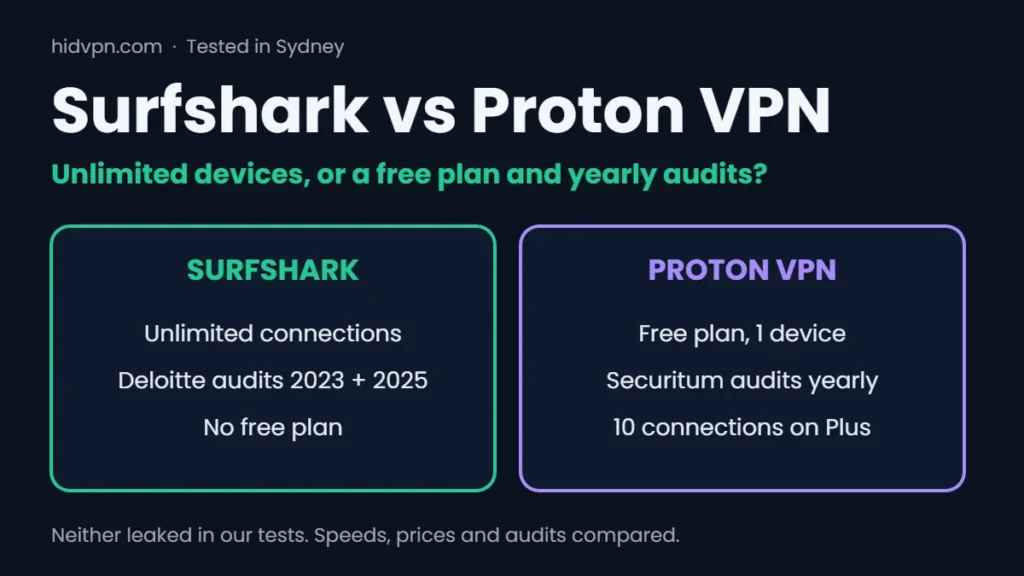
Pick Surfshark if you want one cheap plan for every device in the house: it has no device limit. Pick Proton VPN if you care most about who runs the service and where, or if you want to start on a free plan before paying anything. Neither leaked in our tests from Sydney, and both gave us fast connections on a home line.
We tested both on the same Telstra line in Sydney in October 2026: Surfshark on its paid apps for Windows and iPhone, and Proton VPN on its free plan for Windows. That difference matters for the speed numbers, so we show exactly what each test measured below, rather than turning them into a single score.
Key takeaways
- No leaks from either in our tests: the IP address and DNS checks showed only the VPN’s own servers, and WebRTC exposed nothing extra.
- Surfshark allows unlimited simultaneous connections. Proton VPN Plus allows 10 at once, and its free plan allows 1.
- Proton VPN has a free plan with no time limit. Surfshark has no free plan.
- Both have had their no-logs policies checked by outside auditors: Surfshark by Deloitte in 2023 and 2025, Proton by Securitum every year since 2022.
- Surfshark’s kill switch was off by default in the Windows app we installed. Turn it on in Settings before you rely on it.
On this page
Surfshark and Proton VPN side by side
| Surfshark | Proton VPN | |
|---|---|---|
| Company base | Amsterdam, the Netherlands (Surfshark B.V.) | Geneva, Switzerland (Proton AG) |
| Simultaneous connections | Unlimited | 10 on Plus, 1 on Free |
| Free plan | No | Yes, no time limit |
| Servers (provider’s figure, 20 Nov 2026) | 4,500+ in 100 countries | 22,000+ in 149 countries |
| No-logs audits | Deloitte, 2023 and 2025 | Securitum, yearly since 2022 |
| Kill switch | Yes (off by default in our Windows install) | Yes, including on the free plan |
| Two-server routing | MultiHop | Secure Core |
| Making VPN traffic harder to spot | Camouflage mode | Stealth protocol |
| Tested by us | Yes, Oct 2026 (paid trial, Windows + iPhone) | Yes, Oct 2026 (free plan, Windows) |
Proton lists far more servers, but providers count them differently and the totals change often. What matters for most people is whether there’s a nearby server and one in the country they need. Both have servers in Australia: Surfshark on every plan, and Proton in five Australian cities on its paid plans.
What our Sydney tests showed
Watch: our Sydney speed and leak results in 30 seconds (HidVPN Short)
We ran both tests on Windows 11, on a home Telstra connection in Sydney, on different nights. We used fast.com for speed (plus Cloudflare’s speed test for Surfshark’s Los Angeles server, where fast.com wouldn’t run), and ipleak.net and dnsleaktest.com for leaks. We measured the connection with the VPN off before each test, and again after it on the Surfshark night, because home broadband swings a lot in an evening. That night it ranged from 210 to 510 Mbps on fast.com.
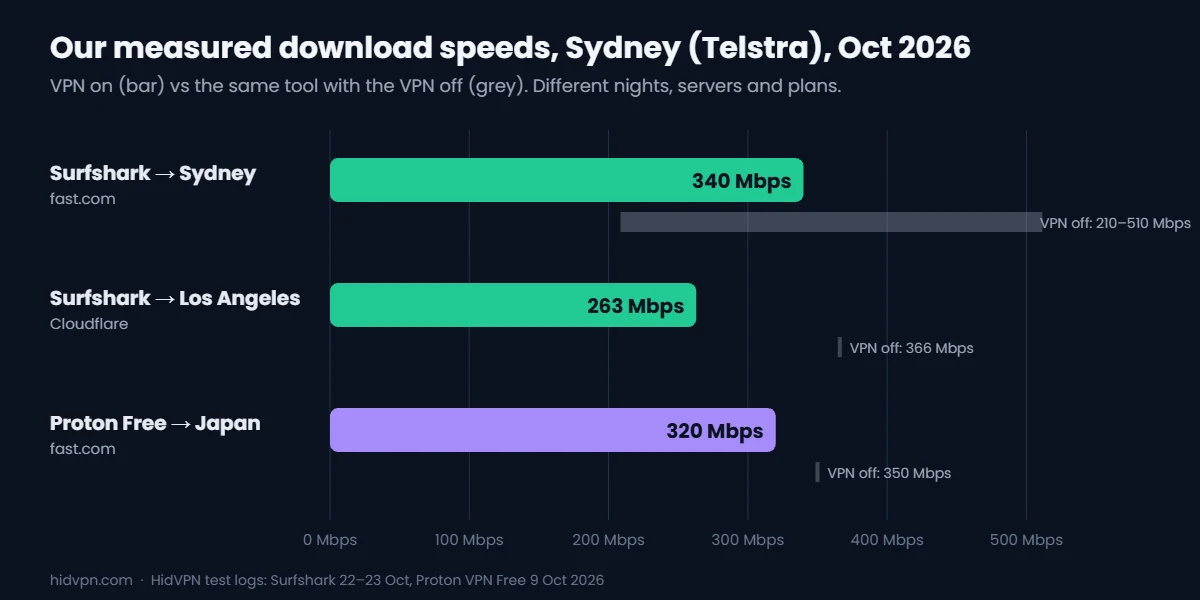
| Test | Download / upload | Compared with no VPN | Latency |
|---|---|---|---|
| Surfshark, Sydney server (WireGuard) | 340 / 48 Mbps | Inside that evening’s 210–510 Mbps range, so we couldn’t measure a loss | 8 ms |
| Surfshark, Los Angeles server (WireGuard) | 263 / 29 Mbps | About 72% of download and 53% of upload | 148 ms |
| Proton VPN Free, Japan server (auto-picked) | 320 / 40 Mbps | About 91% of download and upload | 114 ms |
Read these as “what each one did for us”, not as a race. Proton’s free plan doesn’t let you choose a country, so it put us on a Japan server, while Surfshark let us pick Sydney and Los Angeles. Sydney to Tokyo is a much shorter trip than Sydney to Los Angeles, which is the likely reason for most of the latency gap. The fair reading: both gave us fast connections, and the far-away server cost Surfshark more upload speed and added more delay.
On the iPhone we tested Surfshark only. Safari and the Google app both showed the VPN’s IP address, so the protection covered more than one browser. We didn’t test Proton VPN Plus, Proton on a phone, or either app’s kill switch during a forced disconnect. Our Surfshark review and Proton VPN review have the full logs and screenshots.
Leak checks: IP, WebRTC, DNS and IPv6
A VPN can encrypt your traffic and still leak your real IP address or DNS lookups. We checked the common leak points on both.
- IP address: ipleak.net showed only the VPN server’s address on both: a Surfshark server in Sydney, and a Proton server in Tokyo.
- WebRTC: the browser feature that can expose your real IP showed only the VPN address on Surfshark, and no address at all on Proton.
- DNS: dnsleaktest.com found only Surfshark’s own DNS server, and four Proton servers in Tokyo. Neither test showed a Telstra DNS server, so our ISP wasn’t answering our lookups. Our guide to DNS leaks explains why that matters.
- IPv6: neither leaked it. Our iPhone had working IPv6 until we connected Surfshark, which blocked it. Our laptop had working IPv6 until we connected Proton, after which it showed as “not reachable”. That’s the safe result: no IPv6 traffic slipped around the tunnel.
Surfshark’s kill switch was off when we installed the Windows app. Without it, a dropped VPN connection sends traffic over your normal connection until it reconnects. Turn it on in Settings, then VPN settings. Our kill switch guide shows how to check it works.
In the Proton Windows app we checked, the kill switch was available on the free plan too, in two strengths: Standard, which blocks traffic if the VPN drops, and Advanced, which blocks everything unless you’re connected, even after a restart.
Ownership, location and no-logs audits
Here’s who runs each service and what outside auditors checked.
Surfshark is run by Surfshark B.V. in Amsterdam, with offices in Lithuania and Poland. In 2022 it agreed a merger with Nord Security, the company behind NordVPN, but the two say they run as separate services with their own apps and infrastructure. Deloitte checked Surfshark’s no-logs claims in 2023, and again in an assurance review announced in June 2025, which looked at its VPN server configurations and found no browsing history, IP addresses or session details being stored. Surfshark says its VPN servers run from RAM only, so anything held in their memory is wiped on reboot.
Proton VPN is run by Proton AG in Switzerland, the same company behind Proton Mail. Securitum, a European security firm, has audited its no-logs policy every year since 2022. The 2025 audit included on-site inspection of production servers in Zürich and covered user activity, DNS queries and IP addresses. Proton also publishes the source code of its apps.
Both are reasonable picks on trust. Proton has the longer run of yearly audits and open-source apps. Surfshark has two Deloitte reviews and RAM-only servers. Neither audit can prove a company never logs anything; it shows what the auditors saw during the review. Our explainer on what “no logs” means covers what an audit can and can’t tell you.
Proton’s free plan vs Surfshark’s paid-only model
This is the biggest practical difference. Proton VPN Free costs nothing and has no time limit. In our test it didn’t ask for a card. Its limits are real, though:
- One device at a time.
- No choice of country. The app picks a free server for you, which for us was in Japan.
- No NetShield blocker and no split tunneling. In the Windows app, both opened an upgrade screen when we tapped them.
- Free servers can be busy. Ours showed 78–84% load during the test.
Surfshark has no free plan. When we signed up in October, the website offered a 7-day trial on the 12- and 24-month plans, and it needed a payment method before starting. If you’re not sure you need a VPN at all, Proton’s free plan is the low-risk way to find out. Our look at whether free VPNs are safe explains why Proton is one of the few free plans we’d recommend.
Extras you pay for with each
Surfshark leans towards everyday privacy tools:
- Alternative ID, included with every plan: a made-up identity and a forwarding email for sign-ups.
- CleanWeb, which blocks ads, trackers and known malware sites. It was off by default for us.
- MultiHop, which routes you through two VPN servers.
- Paid add-ons we saw at checkout: a dedicated IP and a US phone number (Alternative Number).
Proton VPN leans towards hardened routing and the wider Proton account:
- Secure Core, which sends your traffic through Proton servers in privacy-friendly countries before it leaves for the open internet.
- NetShield, its blocker for ads, trackers and malware, on paid plans.
- Stealth, a protocol designed so the connection looks less like VPN traffic.
- Proton Unlimited bundles the VPN with Proton Mail, Drive and Pass.
Both two-server features, MultiHop and Secure Core, cost speed, as our double VPN explainer shows. Most people won’t need them day to day. Our guide to obfuscated VPNs compares Surfshark’s Camouflage with Proton’s Stealth.
What each costs (checked 20 Nov 2026)
On 20 November both pricing pages showed these introductory prices, billed in US dollars:
- Surfshark Starter (the VPN plus Alternative ID): US$67.23 for the first 27 months on the 2-year plan, which works out to about US$2.49 a month. The page didn’t show the renewal price, so check it at checkout.
- Proton VPN Plus: US$35.88 for the first year (about US$2.99 a month), then US$83.88 a year at renewal.
- Proton VPN Free: no cost.
Look at the renewal price as well as the first bill, because both companies charge more after the first term. Your bank may also add a fee for paying in US dollars. Prices change often, so check the current plan before you buy. Our VPN pricing comparison tracks 17 providers side by side.
Which one to pick
Choose Surfshark if you have a lot of devices (phones, laptops, a smart TV, the kids’ tablets) and want them all on one account, or if Alternative ID’s sign-up aliases appeal to you.
Choose Proton VPN if you want to start free, if a Swiss company with yearly audits and open-source apps matters more to you than device count, or if you already use Proton Mail and want everything under one account.
If neither fits, our Surfshark alternatives guide covers the other VPNs we’ve tested, and NordVPN vs Proton VPN and Surfshark vs NordVPN compare each with NordVPN.
FAQ
Is Surfshark better than Proton VPN?
Neither is better for everyone. In our Sydney tests neither leaked and both gave us fast connections. Surfshark wins on device count, since it has no limit. Proton wins on its free plan and its longer record of yearly no-logs audits.
Which is faster, Surfshark or Proton VPN?
We can’t call a winner from our tests, because Proton’s free plan chose a Japan server for us and Surfshark let us pick Sydney and Los Angeles. Both gave us fast connections, and the more distant server added the most delay.
Is Proton VPN free better than Surfshark?
Proton VPN Free is the better pick if you don’t want to pay, only need one connection at a time, and don’t mind the app picking your server. Surfshark gives you unlimited connections and your choice of its server locations, but you have to pay.
Is Surfshark owned by NordVPN?
Not exactly. Surfshark and Nord Security agreed a merger in 2022, but they say they run as separate services with their own apps and infrastructure. Proton isn’t part of either.
Does Proton VPN work in Australia?
Yes. Proton VPN has servers in Australia on its paid plans, and its apps work on Australian internet connections. The free plan picks a server for you, and ours was in Japan.
Can I use Surfshark and Proton VPN at the same time?
Usually not on the same device. Two VPN apps running at once tend to fight over your connection, so neither works properly. Use one per device.
Read our Surfshark review Read our Proton VPN review
Sources
- HidVPN test logs: Surfshark, 22–23 October 2026 (Windows 11 app 6.20.0 and iPhone app, Telstra, Sydney); Proton VPN Free, 9 October 2026 (Windows 11, Telstra, Sydney)
- Surfshark Trust Center: audits, company address, server count, RAM-only servers (checked 20 Nov 2026)
- TechIntelPro: Surfshark’s no-logs policy re-verified by Deloitte (23 Jun 2025)
- Proton VPN: no-logs audit history (updated June 2026)
- CyberInsider: Proton VPN publishes results of latest no-logs audit (24 Sep 2025)
- Proton VPN server list: server and country count, Australian Plus servers, company address (checked 20 Nov 2026)
- Nord Security: merger agreement with Surfshark (2022) and Tech Advisor: they will remain separate VPN services
- Surfshark pricing and Proton VPN pricing (both checked 20 Nov 2026)