
HidVPN earns a commission if you buy through some of the links on this page. It doesn’t change what we write. Our affiliate disclosure.
Table of Contents
- The short answer
- What a VPN protocol does
- WireGuard
- NordLynx and Lightway: the branded versions
- OpenVPN
- IKEv2/IPsec
- PPTP and L2TP: the ones to skip
- The protocols side by side
- Which protocol to pick, by situation
- How to check which protocol you’re using
- Three things people get wrong
- FAQ
- The bottom line
Key Takeaways
- A VPN protocol is the set of rules your VPN app uses to build the encrypted tunnel: how the two ends agree on keys, how data is wrapped, and how the connection recovers when it drops.
- For most people, WireGuard (or a provider’s version of it, such as NordLynx) is the sensible default. It’s modern, small and runs over UDP.
- OpenVPN is the dependable fallback when a network blocks or slows other protocols, because it can run over TCP on the same port as normal secure web traffic.
- IKEv2 is good on phones that switch between Wi-Fi and mobile data, because it was designed to keep the tunnel up when your address changes.
- Skip PPTP entirely and avoid L2TP if you have a choice. Microsoft has started retiring both from Windows Server.
The short answer
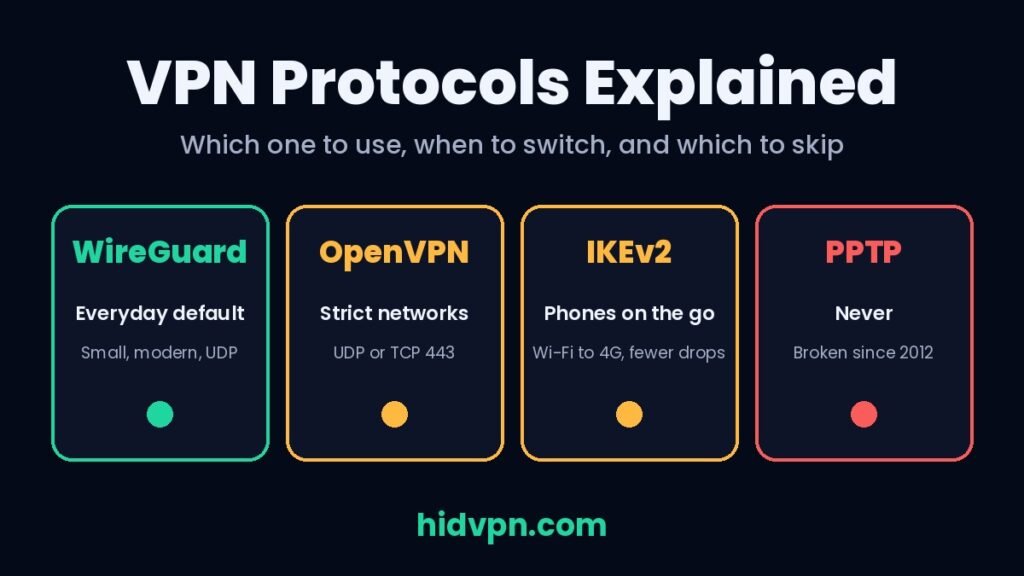
Leave your VPN app on its automatic setting unless something goes wrong. Most good providers pick WireGuard or their own WireGuard-based protocol by default, and that’s the right choice for everyday use on a laptop or phone.
Switch to OpenVPN (TCP) if you’re on a network that blocks the VPN, such as some hotel, office or campus Wi-Fi. Switch to IKEv2 if your phone keeps dropping the VPN every time you walk out of Wi-Fi range. Never pick PPTP, even if an old router or app still offers it.
What a VPN protocol does
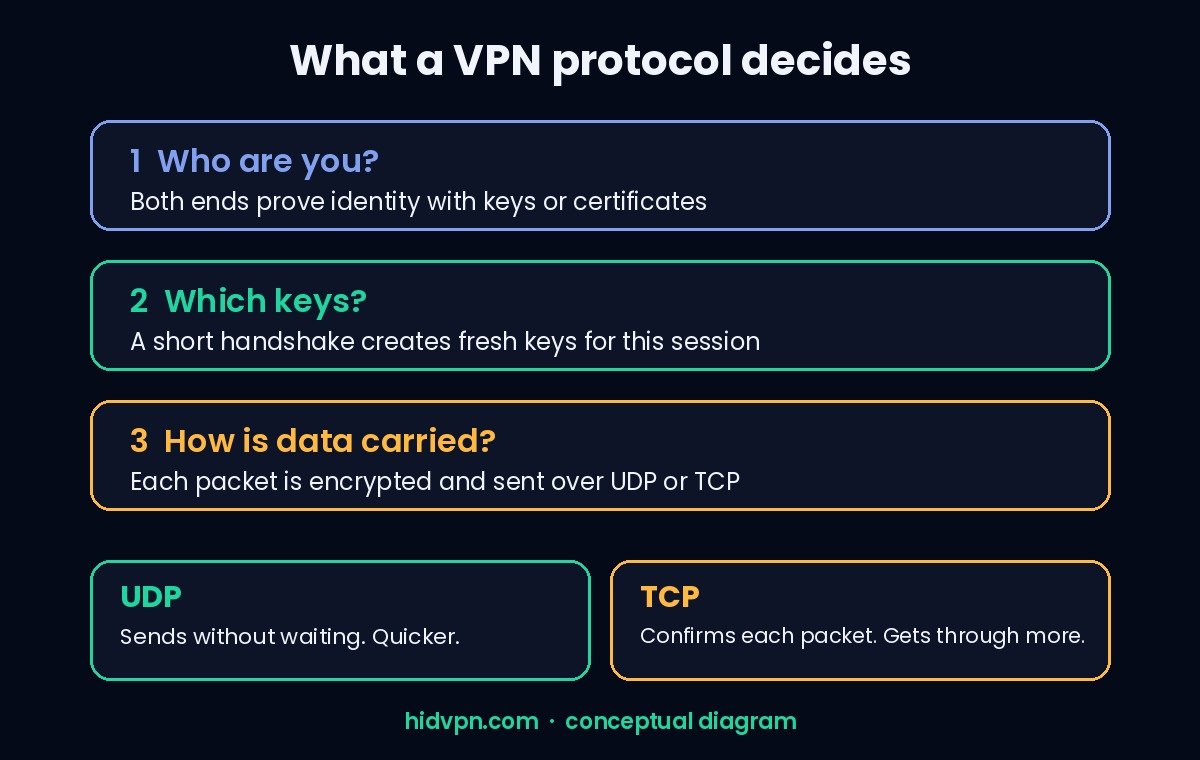
When you press connect, your VPN app and the VPN server have to agree on three things before any of your traffic moves:
- Who they are. Both sides prove their identity, usually with keys or certificates, so you don’t end up talking to an impostor server.
- Which keys to use. They run a handshake, a short exchange that produces fresh encryption keys for this session.
- How to carry the data. They wrap every packet (a small chunk of data) in encryption and send it inside the tunnel, usually over UDP or TCP.
The protocol is the rulebook for all of that. UDP and TCP are the two ways data can travel on the internet. UDP sends packets without waiting for each one to be confirmed, which keeps things quick. TCP confirms and re-sends, which is more reliable on bad networks but adds delay, and running TCP traffic inside a TCP tunnel can slow things down badly when packets get lost.
What the protocol doesn’t change: who runs the VPN server, what the provider logs, and whether your apps leak traffic outside the tunnel. Those depend on the provider and on settings like the kill switch. A strong protocol from a provider you don’t trust is still a provider you don’t trust.
WireGuard
WireGuard is the newest of the mainstream protocols. Jason Donenfeld published it in 2017, and it became part of the Linux kernel in version 5.6, released in March 2020.
Its main idea is to be small and fixed. Instead of letting the two sides negotiate from a long menu of encryption options, WireGuard uses one modern set: ChaCha20 with Poly1305 for encrypting and checking data, Curve25519 for the key exchange, and BLAKE2s for hashing. Its own documentation calls this having no “cipher agility”. If one of those ever needs replacing, the whole protocol gets a new version, so there’s no old, weak option left lying around for an attacker to force you onto.
The code is small too. Its creator’s 2017 paper describes it as a few thousand lines, and NordVPN puts the comparison at about 10,000 lines for WireGuard against roughly 400,000 for OpenVPN. Less code is easier to audit and leaves fewer places for bugs to hide.
Two limits are worth knowing:
- It runs over UDP only. Most of the time that’s an advantage. On a network that blocks or throttles UDP, WireGuard may not connect at all, and that’s when you switch to OpenVPN over TCP.
- Its default design keeps a fixed address for each user. In plain WireGuard, each user gets a fixed internal address on the server, and the server keeps the last public IP address each user connected from in memory. That’s fine for a company network. For a privacy service it’s a problem, which is why providers built their own versions on top.
NordLynx and Lightway: the branded versions
When an app offers a protocol you’ve never heard of, it’s usually one of two things: WireGuard with a privacy layer added, or a protocol the provider wrote itself.
NordLynx is NordVPN’s version of WireGuard. NordVPN says it built a “double NAT” system on top: every user on a server gets the same internal address, and a second layer gives each session its own temporary address that disappears when the session ends. The point is that the server doesn’t need to keep a lasting table linking a user to an address. NordVPN also says it added post-quantum encryption support to NordLynx in 2025, aimed at future computers that could break today’s key exchanges. NordVPN describes NordLynx as its fastest protocol; we haven’t run our own protocol speed comparison, so take that as the provider’s claim.
Lightway is ExpressVPN’s own protocol, built on the wolfSSL cryptography library. ExpressVPN rewrote it in Rust, released the code as open source, and had it audited by two outside firms, Praetorian (September 2024) and Cure53 (October 2024). Cure53 concluded that the protocol and its implementation were “already in a good state of security”.
Branded protocols aren’t automatically better or worse. What matters is the same as for any protocol: published code or published audits, and a clear explanation of what the provider changed. NordLynx sits on top of WireGuard’s published design; Lightway is open source and audited.
OpenVPN
OpenVPN has been around since 2001 and is still the most widely supported protocol on VPN servers, routers and older devices. It’s open source, and it builds its tunnel with TLS, the same family of encryption that protects secure websites.
Its biggest practical strength is flexibility. OpenVPN can run over UDP or TCP, and on any port. Its standard port is 1194, but many providers also offer it over TCP port 443, the port used by ordinary secure web traffic. On a network that blocks unusual traffic, OpenVPN over TCP 443 often gets through when nothing else does.
The trade-offs: it’s a much bigger codebase than WireGuard, connecting takes a little longer, and OpenVPN over TCP can feel slower on unreliable connections, for the TCP-inside-TCP reason above. Use UDP when it works and TCP when you need it to connect.
Router users: many home routers that support VPN clients only accept OpenVPN configuration files, and some newer ones also take WireGuard. Our router setup guide covers both.
IKEv2/IPsec
IKEv2 (Internet Key Exchange version 2, defined in RFC 7296) handles the handshake, and IPsec handles the encryption of the data itself. You’ll usually see the pair written as IKEv2/IPsec.
Its standout feature for everyday users is called MOBIKE (RFC 4555). It lets the tunnel survive a change of network address. When your phone moves from home Wi-Fi to mobile data, your address changes; with MOBIKE, the VPN updates the tunnel instead of tearing it down and starting again. If your VPN drops every time you leave the house, IKEv2 is worth trying. Our guide to VPNs that work on Wi-Fi but not mobile data covers the other causes.
IKEv2 is also built into Windows, macOS, iOS and Android (from Android 11), so it works without extra software on many devices. The downside is that IPsec uses fixed ports that some networks block, so it’s not the one to pick on restrictive Wi-Fi.
PPTP and L2TP: the ones to skip
PPTP dates from the 1990s. Researchers showed in 2012 that the login method most PPTP setups rely on could be cracked, which means recorded traffic could be decrypted later. There’s no setting that fixes it. If an app or router offers PPTP, ignore it.
L2TP/IPsec is not broken in the same way, but it’s old, slower to set up, and easy for networks to block. In October 2024 Microsoft announced that PPTP and L2TP are deprecated in future versions of Windows Server and told administrators to move to SSTP or IKEv2. Some VPN apps still list L2TP for older devices; use it only if nothing else works.
The protocols side by side
| Protocol | Runs over | Best for | Watch out for |
|---|---|---|---|
| WireGuard | UDP only | Everyday default on laptops and phones | Blocked on some networks; plain WireGuard keeps a fixed address per user |
| NordLynx (NordVPN) | UDP | NordVPN users: the app’s default | Only in NordVPN’s apps |
| Lightway (ExpressVPN) | UDP or TCP | ExpressVPN users: the app’s default | Only in ExpressVPN’s apps |
| OpenVPN | UDP or TCP, any port | Restrictive networks, routers, older devices | Slower to connect; TCP mode slows down on lossy connections |
| IKEv2/IPsec | UDP (fixed ports) | Phones that switch between Wi-Fi and mobile data | Easier for networks to block |
| L2TP/IPsec | UDP (fixed ports) | Old devices with nothing else | Being retired by Microsoft |
| PPTP | TCP + GRE | Nothing | Broken security; never use |
Which providers offer which protocols changes over time. In our provider database (checked September 2026), NordVPN lists NordLynx (WireGuard), OpenVPN and IKEv2; PureVPN and FastestVPN both list WireGuard, OpenVPN and IKEv2. Check the provider’s help pages for the current list before you buy. You can compare the rest in our side-by-side VPN table.
Which protocol to pick, by situation
Watch: which VPN protocol to pick, in 24 seconds (HidVPN Short)
Everyday use at home or on a laptop: leave it on automatic, which on most good apps means WireGuard or the provider’s version of it.
Hotel, airport, office or campus Wi-Fi that won’t connect: switch to OpenVPN over TCP. If the app has an “obfuscation” or “stealth” option, it’s built for the same job. Our guide to what can go wrong on public Wi-Fi explains why it’s worth the effort to stay connected there.
A phone that drops the VPN whenever you change networks: try IKEv2. If the drops continue, work through our VPN keeps disconnecting guide, and keep the kill switch on so nothing leaks while it reconnects.
Gaming or video calls feel laggy: stay on WireGuard or the provider’s version and pick a server close to you. Protocol matters less than distance to the server.
A home router: use WireGuard if the router supports it, otherwise OpenVPN.
Only some apps need the VPN: that’s not a protocol setting. Use split tunneling instead.
How to check which protocol you’re using
Your VPN app’s settings tell you what it’s set to. Your device tells you what it’s doing in practice. Check both, starting on the device.
1. Look at the network adapter. With the VPN connected, open Command Prompt on Windows and run ipconfig /all. Apps often name their adapter after the protocol: you may see “WireGuard”, “NordLynx” or “OpenVPN” in the adapter description. On macOS, run ifconfig and look for a utun interface that appears only while the VPN is on. On Linux, ip link shows a wg or tun interface.
2. Look at the connection itself. On Windows, run netstat -ano (or Get-NetUDPEndpoint in PowerShell) and look for the VPN app’s connection to the server. WireGuard commonly uses UDP port 51820 and OpenVPN commonly uses 1194 or 443, though providers can change ports. If you see a TCP connection on port 443 to the VPN server, you’re probably on OpenVPN over TCP.
3. Confirm the tunnel is carrying your traffic. Whatever the protocol, check that your public address is the VPN server’s, for example 203.0.113.25 rather than your home connection’s 198.51.100.40. Run curl https://ifconfig.me in a terminal, then open our IP leak test in your browser. Both should show the VPN server’s address.
The test you’ll run most often, browser versus terminal, is the same one from our VPN vs proxy guide. If they disagree, you’re not on a full-device VPN.
Three things people get wrong
“AES-256 is stronger than ChaCha20.” Both are considered strong. WireGuard uses ChaCha20 partly because it runs quickly on phones and other chips without special AES hardware. The bigger number in “256” doesn’t make one safe and the other unsafe.
“The protocol decides whether the VPN keeps logs.” It doesn’t. Logging is a provider decision. Look for an independently audited no-logs policy; our reviews list which providers have one.
“Switching protocols will fix every speed problem.” Sometimes it helps, but the server you pick, how busy it is, and your own connection usually matter more. Our note on what your internet provider can see explains what a VPN changes on your connection and what it doesn’t.
FAQ
What is the most secure VPN protocol?
WireGuard, OpenVPN and IKEv2/IPsec are all considered secure when set up properly. WireGuard’s small code and fixed set of modern encryption make it the easiest to audit. PPTP is the one protocol that isn’t secure.
What is the fastest VPN protocol?
Providers generally recommend WireGuard or their own version of it, such as NordLynx or Lightway, for speed. Actual speed depends far more on the server’s distance and load than on the protocol, so test on your own connection.
Is NordLynx the same as WireGuard?
It’s built on WireGuard. NordVPN adds a double NAT system so its servers don’t need to keep a lasting link between a user and an internal address.
Should I use UDP or TCP?
Use UDP by default, because it’s quicker. Switch to TCP when a network blocks the VPN or the connection keeps failing, because TCP on port 443 looks like normal secure web traffic and gets through more networks.
Does changing the protocol change my IP address?
No. Your public address comes from the VPN server you connect to. Changing the protocol changes how the tunnel is built, not which server you appear to come from.
Is IKEv2 good for phones?
Yes. Its MOBIKE feature keeps the tunnel up when your phone switches between Wi-Fi and mobile data, so it drops less often on the move.
The bottom line
For most people, the right protocol is the one your VPN app picks automatically, which today usually means WireGuard or a provider’s version of it. Keep OpenVPN over TCP in your back pocket for networks that block the VPN, try IKEv2 if your phone keeps dropping the connection, and ignore PPTP. Then check what your device is doing with the three steps above, because the setting in the app is only half the story.
The protocol is one part of the picture. The provider’s logging record, the kill switch and leak protection matter as much. We’ve tested NordVPN and FastestVPN hands-on (see how we test), and our PureVPN vs NordVPN comparison covers how two of the bigger names differ. Full reviews: NordVPN, FastestVPN, PureVPN.
See NordVPN’s current plans · See PureVPN’s current plans · See FastestVPN’s current plans. Prices change often, so check the current plan before you buy.