
Short answer: distance, the server you landed on, and your own connection cause most of it. The encryption itself costs far less than people think. We know because we’ve measured it. Across seven VPNs tested from a home Telstra line in Sydney in August to October 2026, nearby servers usually showed no speed loss we could measure and most distant servers kept roughly 72% to 100% of our download speed. The two really slow results came from particular servers (one local server on a bad day, one distant US server), not from the VPN simply being switched on.
Quick answer
| If your VPN feels slow because… | Try this first |
|---|---|
| You’re connected to a far-away server | Switch to the nearest server, or the nearest one in the country you need |
| The server is busy | Pick a different server in the same city; free plans are often the most crowded |
| The protocol is an older one | Switch to WireGuard (or the app’s own version of it) |
| Your own line is slow right now | Run a speed test with the VPN off first; someone else may be downloading |
| Only some apps need the VPN | Use split tunneling so everything else goes direct |
What we measured
Every test followed the same pattern: a speed test with the VPN off, then the same test connected to a nearby server, then a distant one where the plan allowed it, then the VPN off again to see how much our own line had moved. We used fast.com, and Cloudflare’s speed test where fast.com wouldn’t run through a VPN server. All tests were on a Windows 11 laptop over home Wi-Fi in Sydney.
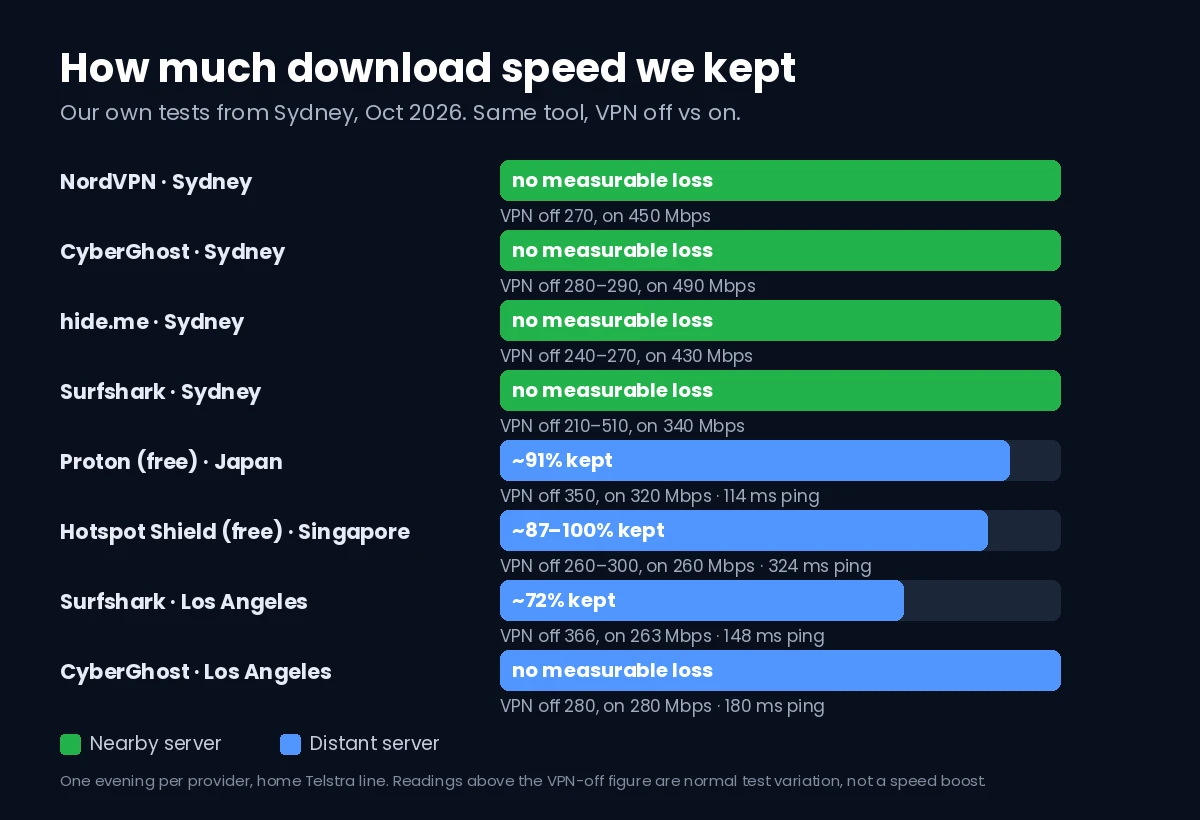
| VPN and server | VPN off | VPN on | Ping |
|---|---|---|---|
| NordVPN, Sydney | 270 Mbps | 450 Mbps | local |
| CyberGhost, Sydney | 280–290 Mbps | 490 Mbps | 7 ms |
| hide.me, Sydney | 240–270 Mbps | 430–450 Mbps | 6–7 ms |
| Surfshark, Sydney | 210–510 Mbps | 340 Mbps | 8 ms |
| FastestVPN, Sydney (October) | 440 Mbps | 460 Mbps | local |
| FastestVPN, Sydney (August) | 230 Mbps | 66 Mbps | local |
| Proton VPN free, Japan | 350 Mbps | 320 Mbps | 114 ms |
| Hotspot Shield free, Singapore | 260–300 Mbps | 260 Mbps | 324 ms |
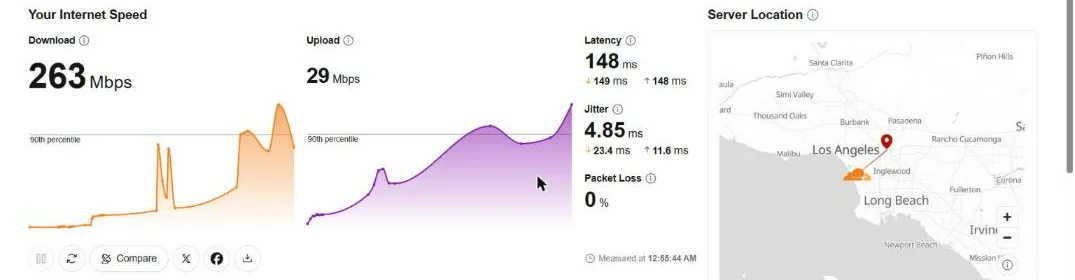
| Surfshark, Los Angeles | 366 Mbps | 263 Mbps | 148 ms |
| CyberGhost, Los Angeles | 280–290 Mbps | 280 Mbps | 180 ms |
| FastestVPN, United States | not measured that day | 20 Mbps | 203 ms |
Two things in that table are worth reading carefully. First, several “VPN on” figures are higher than “VPN off”. That isn’t a VPN making the internet faster. Home connections swing a lot from minute to minute: on one evening our own line measured anywhere from 210 to 510 Mbps with no VPN at all. Read a higher figure as “no loss we could measure”. Second, FastestVPN’s Sydney server cut our speed by about 71% in August and showed no loss at all in October. Same app, same server name, same home line. The server, not the VPN idea, was the problem that day.
The real reasons a VPN gets slow
1. Distance to the server
Every bit of data travels to the VPN server and back. From Sydney, the ping went from about 6 ms with no VPN to 114 ms through Japan, 148 to 180 ms through Los Angeles and 324 ms through Singapore on Hotspot Shield’s free plan. Download speed often held up surprisingly well over those distances, but pages feel slower to start loading when every request has to cross an ocean, and video calls and online games feel it most.
2. A busy or poor server
A VPN server is shared with other users. Proton’s free server showed 78% to 84% load during our test, and Hotspot Shield’s free Singapore server showed 65%. Free plans also tend to pick the server for you: Proton’s free app chose Japan for us and only let us choose a country after upgrading. When one server is slow, a different server in the same city often isn’t.
3. The protocol
The protocol is the method the app uses to build the encrypted tunnel. Surfshark, CyberGhost and Proton all connected over WireGuard in our tests, and Hotspot Shield uses its own protocol, Hydra. Modern protocols like these are part of why the nearby results show so little loss. If your app is set to OpenVPN, especially over TCP, switching to WireGuard is one of the simplest fixes. Our VPN protocols guide explains the differences.
4. Your own connection, not the VPN
This one catches most people out. During our Hotspot Shield test, the first VPN-off speed test came back at 64 Mbps with a very high loaded ping, because something else on the network was busy. Ten minutes later the same line measured 300 Mbps. If we’d connected the VPN during that first slow patch, we’d have blamed the VPN. Always test with the VPN off first, and again at the end.
5. Upload speed and the far side of the world
Upload often drops more than download over long distances. Through Los Angeles, CyberGhost kept our full download speed but upload fell from 44 to 19 Mbps, and Surfshark went from 54 to 29 Mbps. If uploads or video calls feel slow, a closer server usually helps more than anything else.
How to speed up a slow VPN, in order
- Check your connection without the VPN. Run a speed test with the VPN off. If it’s slow without the VPN too, the problem is your line or Wi-Fi, not the VPN.
- Connect to the nearest server. Use the app’s “fastest” or “best location” option, or pick your own city. Only use a far-away server when you actually need that country.
- Try another server in the same place. If one server is slow, the next one along may not be. This is exactly what changed between our two FastestVPN tests.
- Switch to WireGuard. If the app offers a choice and you’re on OpenVPN, change it. Change one setting at a time so you know what helped.
- Use split tunneling. If only one app needs the VPN, let everything else go direct. Our guide to split tunneling explains how it works.
- Move closer to the router or use a cable. Weak Wi-Fi hurts with or without a VPN, and a VPN makes it more noticeable.
- Restart the app and the router. Boring, but it clears stuck connections.
- If nothing helps, check the plan. Free plans limit servers and are busier. Hotspot Shield’s free app showed a “limited speed” banner; in our one test it didn’t cut download much, but it’s a sign you’re on the slower tier.
If your VPN also keeps dropping, our VPN keeps disconnecting guide covers the usual causes. And after any change, it’s worth confirming the VPN still hides your address with our IP leak test.
FAQ
Does a VPN always slow down your internet?
It always adds some work, but on a nearby server we usually couldn’t measure any loss at all. The bigger slowdowns came from distance and from busy or poor servers.
How much speed loss is normal?
In our tests, none we could measure on nearby servers, and roughly 0% to 28% lost on servers in Japan, Singapore and the US. Ping rises with distance: from about 6 ms locally to 114 to 324 ms overseas.
Why is my VPN fast one day and slow the next?
Server load and your own line both change. FastestVPN’s Sydney server cut our speed by about 71% in August and showed no loss in October.
Is a free VPN slower?
Not always on download. Proton’s free plan kept about 91% of our speed through Japan. But free plans pick the server for you and their servers are busier, so results vary more.
Bottom line
If your VPN is slow, check your own connection first, then connect to the nearest server, then try another server and WireGuard. In our tests the VPN itself was rarely the bottleneck. Distance and the particular server were.